Interstitial ads
Interstitial advertising is a full-screen ad format embedded within the app content during natural pauses, such as transitioning between game levels or completing a target action.
When an app displays an interstitial ad, the user can either click through to the advertiser's site or close the ad and return to the app.
During interstitial ad impressions, the user's attention is fully focused on the ad, which results in a higher cost for such impressions.
Appearance
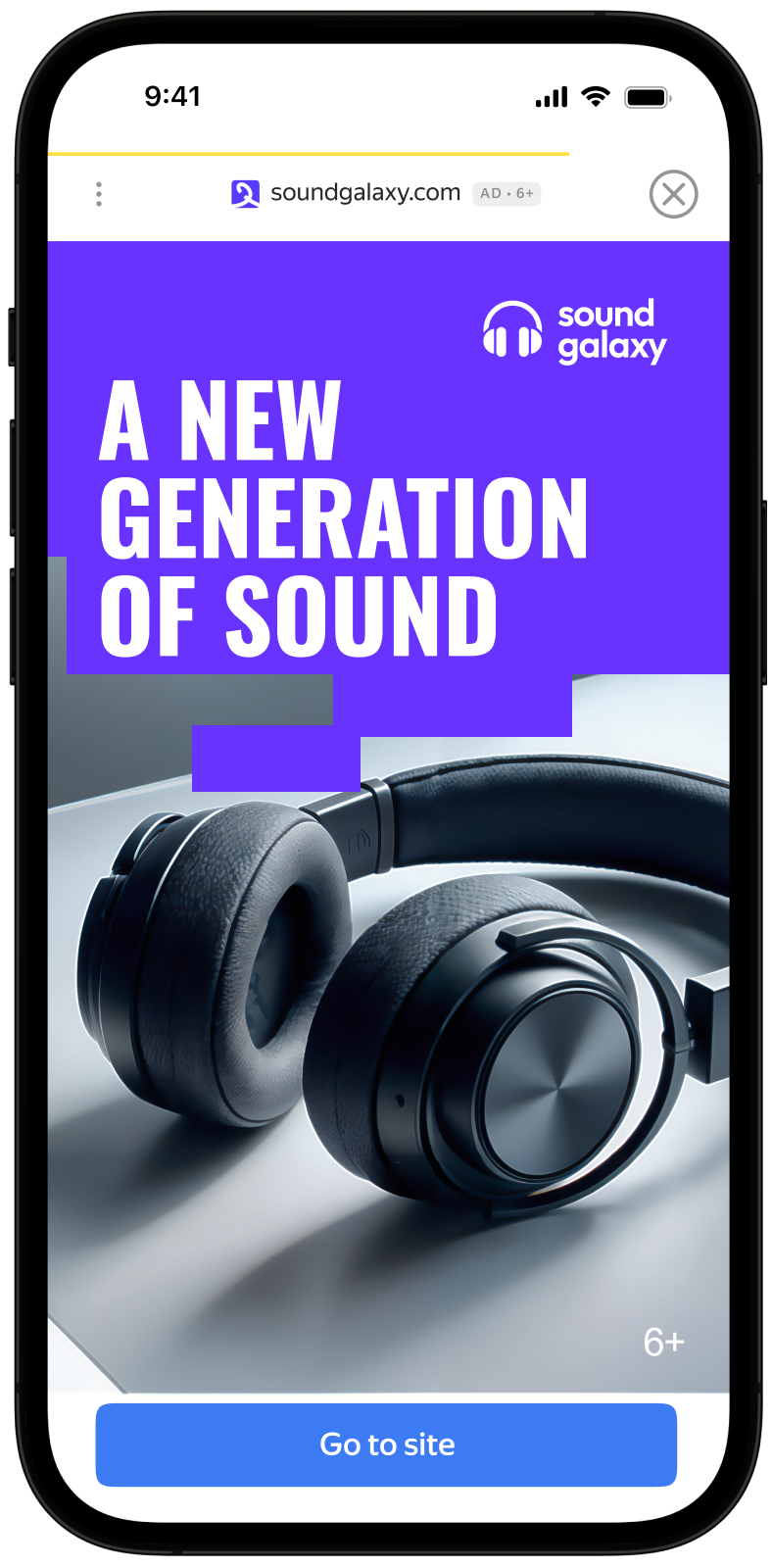
This guide covers the process of integrating interstitial ads into Android apps using the Jetpack Compose extension. Besides code samples and instructions, it contains recommendations and links to additional resources.
Prerequisite
- Follow the SDK integration steps described under Quick start.
- First, you need to initialize the advertising SDK.
- Make sure you have the latest Yandex Mobile Ads SDK version. If you're using mediation, update to the most recent single build version.
To use Jetpack Compose, add the following dependency to build.gradle.kts:
dependencies {
    implementation("com.yandex.android:mobileads:8.4.0")
    implementation("com.yandex.android:mobileads-compose:8.4.0")

    // Compose BOM (at least 2024.01.00)
    implementation(platform("androidx.compose:compose-bom:2025.03.00"))
}
Implementation
Key steps for integrating interstitial ads:
- Use
rememberInterstitialAdLoader()to create an ad loader. - Load the ad using the
loadAd()suspend function and handle theInterstitialAdLoadResultresult. - Register an
InterstitialAdEventListenerto listen for ad event callbacks. - Display the
InterstitialAdobject.
Features of interstitial ad integration
-
All calls to Yandex Mobile Ads SDK methods must be made from the main thread.
-
If an
InterstitialAdLoadResult.Failureerror occurs, don't try to load a new ad again. If you have to, limit the number of ad loading retries to avoid unsuccessful requests and connection issues. -
To prevent it from being garbage collected, maintain a strong reference to the ad throughout the lifetime of the screen where the ad interaction is taking place.
-
When the composable leaves the tree,
cancelLoading()is called automatically. You don't need to release the loader's resources explicitly.
Loading ads
To load interstitial ads, use rememberInterstitialAdLoader(). Ads are loaded via the loadAd() suspend function, which returns InterstitialAdLoadResult.
To load an ad, you need the ad placement ID obtained in the Yandex Advertising Network interface (adUnitId).
You can extend ad request parameters with the AdRequest.Builder() class to include information about the user's interests, page context, location, and other additional data in the ad request. Adding extra context to ad requests can greatly improve ad relevance. To learn more, see Ad targeting.
Example of loading an interstitial ad
@Composable
fun MyScreen(activity: Activity) {
    var interstitialAd by remember { mutableStateOf<InterstitialAd?>(null) }

    val loader = rememberInterstitialAdLoader()

    LaunchedEffect(Unit) {
        val adRequest = AdRequest.Builder("your-ad-unit-id").build()
        when (val result = loader.loadAd(adRequest)) {
            is InterstitialAdLoadResult.Success -> interstitialAd = result.ad
            is InterstitialAdLoadResult.Failure -> {
                // Ad failed to load with AdRequestError.
                // Attempting to load a new ad from here is strongly discouraged.
            }
        }
    }
}
If you serve ads through Adfox, then after the banner ad response, the campaignId, bannerId, and placeId data can be accessed from the interstitialAdLoader objects using the adAttributes property of the AdAttributes type.
Displaying ads
Interstitial ads should be displayed during natural pauses in the app's usage. This includes impressions between game levels or when a user completes a certain action. For example, after downloading a file.
Before displaying ads, set an InterstitialAdEventListener to listen for ad event callbacks.
@Composable
fun MyScreen(activity: Activity) {
    var interstitialAd by remember { mutableStateOf<InterstitialAd?>(null) }

    val loader = rememberInterstitialAdLoader()

    LaunchedEffect(Unit) {
        val adRequest = AdRequest.Builder("your-ad-unit-id").build()
        when (val result = loader.loadAd(adRequest)) {
            is InterstitialAdLoadResult.Success -> interstitialAd = result.ad
            is InterstitialAdLoadResult.Failure -> {
                // Ad failed to load with AdRequestError.
            }
        }
    }

    LaunchedEffect(interstitialAd) {
        interstitialAd?.apply {
            setAdEventListener(object : InterstitialAdEventListener {
                override fun onAdShown() {
                    // Called when ad is shown.
                }
                override fun onAdFailedToShow(adError: AdError) {
                    // Called when an InterstitialAd failed to show.
                    loadInterstitialAd()
                }
                override fun onAdDismissed() {
                    // Called when ad is dismissed.
                    // Now you can preload the next interstitial ad.
                    loadInterstitialAd()
                }
                override fun onAdClicked() {
                    // Called when a click is recorded for an ad.
                }
                override fun onAdImpression(impressionData: ImpressionData?) {
                    // Called when an impression is recorded for an ad.
                }
            })
            show(activity)
        }
    }
}
Testing interstitial ad integration
Using demo ad units for ad testing
Use test ads to check your interstitial ad integration and the app itself. To make sure that test ads are returned for each ad request, you can use a special demo ad placement ID.
Demo adUnitId: demo-interstitial-yandex.
Warning
Before publishing your app in the store, make sure to replace the demo placement ID with the real ID you obtained in the Yandex Advertising Network interface.
For the list of all available demo ad placement IDs, see Demo ad units for testing.
Testing ad integration
You can check if your interstitial ads are integrated correctly using the SDK's built-in analyzer. A detailed report with the test results will appear in the log.
To view the report, search for the keyword “YandexAds” in Logcat, a tool for debugging Android apps.
adb logcat -v brief '*:S YandexAds'
If the integration is successful, the following message is returned:
adb logcat -v brief '*:S YandexAds'
mobileads$ adb logcat -v brief '*:S YandexAds'
I/YandexAds(13719): [Integration] Ad type interstitial was integrated successfully
If there are any interstitial ad integration issues, you'll get a detailed issue report and troubleshooting recommendations.
Additional resources
- Link to GitHub.