---
metadata:
- name: generator
content: Diplodoc Platform v5.50.6
alternate:
- https://ads.yandex.com/helpcenter/en/dev/ios/app-open-ad.md
- https://ads.yandex.com/helpcenter/pt/dev/ios/app-open-ad.md
- https://ads.yandex.com/helpcenter/ru/dev/ios/app-open-ad.md
- https://ads.yandex.com/helpcenter/zh/dev/ios/app-open-ad.md
---
> **Documentation Index:** Fetch the complete configuration index at https://ads.yandex.com/helpcenter/en/llms.txt
# App open ads
App open ads are a special ad format for monetizing app load screens. These ads can be closed at any time and are designed to be served:
* When the app is launched.
* When the app is brought to the foreground.
* When returning to the app from the background.
This guide covers the process of integrating ads shown when opening an iOS app. In addition to code examples and instructions, it contains format-specific recommendations and links to additional resources.
## Layout
App open ads include a **Go to the app** button so that users know they're in your app and can close the ad. Here's an example of what an ad looks like:
## Prerequisite {#pre}
1. Follow the SDK integration steps described in [Quick start](https://ads.yandex.com/helpcenter/en/dev/ios/quick-start.md).
2. [Initialize](https://ads.yandex.com/helpcenter/en/dev/ios/quick-start.md#init) your ad SDK in advance.
3. Make sure you're running the latest [Yandex Mobile Ads SDK](https://ads.yandex.com/helpcenter/en/dev/platforms.md) version. If you're using mediation, make sure you're also running the latest version of the [unified build](https://ads.yandex.com/helpcenter/en/dev/platforms.md).
### Terms and definitions
* **Cold start** is starting an app which is not in the RAM, creating a new app session.
* **Hot start** is switching the app from background mode, when the app is paused in the RAM, to foreground mode.
## Implementation {#implement}
1. Initialize the SDK at app start.
2. Create and configure the `AppOpenAdLoader` ad loader.
3. Load the ad.
4. Use the `AppDelegate` class method `applicationDidBecomeActive(_ application: UIApplication)` to show ads when the app opens.
5. Before showing the ad, set the `AppOpenAd` callback delegate `AppOpenAdDelegate`.
6. Show the ad using the `show` method.
### Main steps
1. Initialize the SDK at app start.
```swift
// wait for sdk initialization before loading ads
YandexAds.initializeSDK(completionHandler: completionHandler)
```
2. Create and configure the `AppOpenAdLoader` ad loader.
You will need the ad unit ID from the Yandex Advertising Network interface (`AD_UNIT_ID`).
You can extend the ad request using `AdRequest` by passing user interests, page context, location, or other data. Additional contextual data in the request can significantly improve ad quality. Read more in the [Ad targeting](https://ads.yandex.com/helpcenter/en/dev/ios/target.md) section.
```swift
private lazy var appOpenAdLoader: AppOpenAdLoader = {
let loader = AppOpenAdLoader()
return loader
}()
```
3. Load the ad.
{% list tabs %}
- Swift Concurrency
```swift
func loadAd() async {
// Replace demo-appopenad-yandex with actual Ad Unit ID
let request = AdRequest(adUnitID: "demo-appopenad-yandex")
do {
let ad = try await appOpenAdLoader.loadAd(with: request)
appOpenAd = ad
appOpenAd?.delegate = self
} catch {
// Ad failed to load. Attempting to load a new ad from here is strongly discouraged.
}
}
```
- Completion handler
```swift
func loadAd() {
// Replace demo-appopenad-yandex with actual Ad Unit ID
let request = AdRequest(adUnitID: "demo-appopenad-yandex")
self.appOpenAdLoader.loadAd(with: request) { [weak self] result in
switch result {
case .success(let ad):
self?.appOpenAd = ad
self?.appOpenAd?.delegate = self
case .failure:
// Ad failed to load. Attempting to load a new ad from here is strongly discouraged.
break
}
}
}
```
{% endlist %}
4. Use the `AppDelegate` class method to display ads when the app becomes active.
```swift
func applicationDidBecomeActive(_ application: UIApplication)
```
5. Before showing the ad, set the ad callback delegate `AppOpenAdDelegate`.
```swift
extension AppOpenAdController: AppOpenAdDelegate {
func appOpenAd(_ appOpenAd: AppOpenAd, didFailToShow error: Error) {
// Called when an ad failed to show.
// Load next ad after fail to show with error
loadAd()
}
func appOpenAdDidShow(_ appOpenAd: AppOpenAd) {
// Called when ad did shown.
}
func appOpenAdDidDismiss(_ appOpenAd: AppOpenAd) {
// Called when ad is dismissed.
// Load next ad after dismiss
loadAd()
}
func appOpenAdDidClick(_ appOpenAd: AppOpenAd) {
// Called when a click is recorded for an ad.
}
func appOpenAd(_ appOpenAd: AppOpenAd, didTrackImpression impressionData: ImpressionData?) {
// Called when an impression is recorded for an ad.
}
}
```
6. Show the ad using the `show` method.
```swift
self.appOpenAd?.show(from: self)
```
{% note info %}
If the ad has already been served, calling the `show(from:)` method will return a display error in `AppOpenAdDelegate.appOpenAd(_:didFailToShowError:)`.
{% endnote %}
## Features of app open ad integration {#features}
1. All calls to Yandex Mobile Ads SDK methods must be made from the main thread.
2. Loading can take a while, so don't increase the cold start time if the ad hasn't loaded.
3. Pre-load the ad for subsequent display during hot starts.
4. We discourage you from loading app open ads and other ad formats in parallel during the app launch because the app might be downloading operational data at that time. That could overload the device and the internet connection, making the ad load longer.
5. If loading fails (a `.failure` in the completion handler, or a `catch` in Swift Concurrency), don't try to load a new ad right away. If you must, limit the number of ad reload attempts. That will help avoid constant unsuccessful requests and connection issues when limitations arise.
## Testing ad integration at launch {#test}
### Using demo ad units for ad testing {#demo-blocks}
We recommend using test ads to test your integration for app open ads and your app itself.
To guarantee that test ads are returned for every ad request, we created a special demo ad placement ID. Use it to check your ad integration.
Demo adUnitId: `demo-appopenad-yandex`.
{% note warning %}
Before publishing your app in the store, make sure to replace the demo ad placement ID with a real one obtained from the Yandex Advertising Network interface.
{% endnote %}
You can find the list of available demo ad placement IDs in the [Demo ad units for testing](https://ads.yandex.com/helpcenter/en/dev/ios/demo-blocks.md) section.
### Testing ad integration
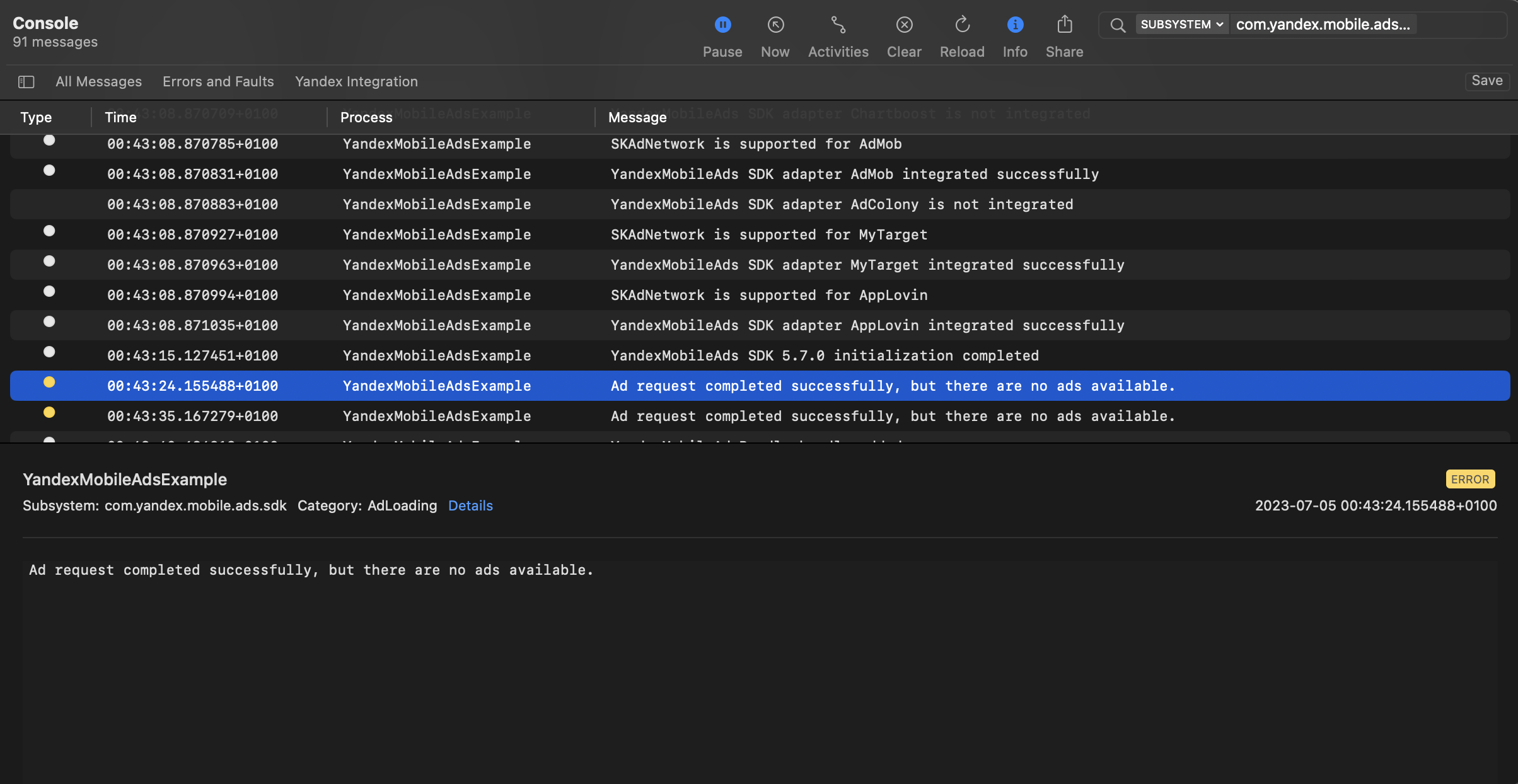
You can test your ad integration using the native Console tool.
To view detailed logs, call the `YandexAds` class's `enableLogging` method.
```swift
YandexAds.enableLogging()
```
To view SDK logs, go to the Console tool and set `Subsystem = com.mobile.ads.ads.sdk`. You can also filter logs by category and error level.
If you're having problems integrating ads, you'll get a detailed report on the issues and recommendations for how to fix them.
 ## Recommendations
1. Don't render your app open ad before the splash screen.
By displaying the splash screen, you enhance the user's app experience, making it more seamless and enjoyable. That will keep the user from being surprised or confused, making them sure they opened the right app. On the same screen, you can warn users about the upcoming ad. Use a loading indicator or simply a text message telling the user they will resume viewing app content after the ad.
2. If there's a delay between requesting and rendering the ad, the user might briefly open your app and then unexpectedly see an ad unrelated to the contents. That can negatively impact the user experience, so it is worth avoiding. One solution is to use the splash screen before displaying the main app content and start ad rendering from this screen. If the app opens some content after the splash screen, you're better off not rendering the ad.
3. Wait until new users open the app and use it a few times before rendering an app open ad. Only render the ad to users who have met certain criteria in the app (for example, passed a certain level, opened the app a certain number of times, or are not participating in rewarded offers). Don't render the ad immediately after the app is installed.
4. Regulate ad render frequency based on app user behavior. Don't render the ad at every cold/hot app start.
5. Only render the ad if your app has been in the background for a certain period of time (for example, 30 seconds, two minutes, 15 minutes).
6. Make sure you run thorough tests since each app is unique and requires a special approach to maximize revenue without reducing retention or time spent in the app. User behavior and engagement can change over time, so we recommend periodically testing the strategies you use for your app open ads.
## Additional resources {#resources}
*
Link to [GitHub](https://github.com/yandexmobile/yandex-ads-sdk-ios/blob/master/Examples/YandexMobileAdsExample/YandexMobileAdsExample/Yandex/AppOpenAd/AppOpenAdViewController.swift).
## Recommendations
1. Don't render your app open ad before the splash screen.
By displaying the splash screen, you enhance the user's app experience, making it more seamless and enjoyable. That will keep the user from being surprised or confused, making them sure they opened the right app. On the same screen, you can warn users about the upcoming ad. Use a loading indicator or simply a text message telling the user they will resume viewing app content after the ad.
2. If there's a delay between requesting and rendering the ad, the user might briefly open your app and then unexpectedly see an ad unrelated to the contents. That can negatively impact the user experience, so it is worth avoiding. One solution is to use the splash screen before displaying the main app content and start ad rendering from this screen. If the app opens some content after the splash screen, you're better off not rendering the ad.
3. Wait until new users open the app and use it a few times before rendering an app open ad. Only render the ad to users who have met certain criteria in the app (for example, passed a certain level, opened the app a certain number of times, or are not participating in rewarded offers). Don't render the ad immediately after the app is installed.
4. Regulate ad render frequency based on app user behavior. Don't render the ad at every cold/hot app start.
5. Only render the ad if your app has been in the background for a certain period of time (for example, 30 seconds, two minutes, 15 minutes).
6. Make sure you run thorough tests since each app is unique and requires a special approach to maximize revenue without reducing retention or time spent in the app. User behavior and engagement can change over time, so we recommend periodically testing the strategies you use for your app open ads.
## Additional resources {#resources}
*
Link to [GitHub](https://github.com/yandexmobile/yandex-ads-sdk-ios/blob/master/Examples/YandexMobileAdsExample/YandexMobileAdsExample/Yandex/AppOpenAd/AppOpenAdViewController.swift).