---
metadata:
- name: generator
content: Diplodoc Platform v5.50.6
alternate:
- https://ads.yandex.com/helpcenter/en/dev/ios/interstitial.md
- https://ads.yandex.com/helpcenter/pt/dev/ios/interstitial.md
- https://ads.yandex.com/helpcenter/ru/dev/ios/interstitial.md
- https://ads.yandex.com/helpcenter/zh/dev/ios/interstitial.md
---
> **Documentation Index:** Fetch the complete configuration index at https://ads.yandex.com/helpcenter/en/llms.txt
# Interstitial ads
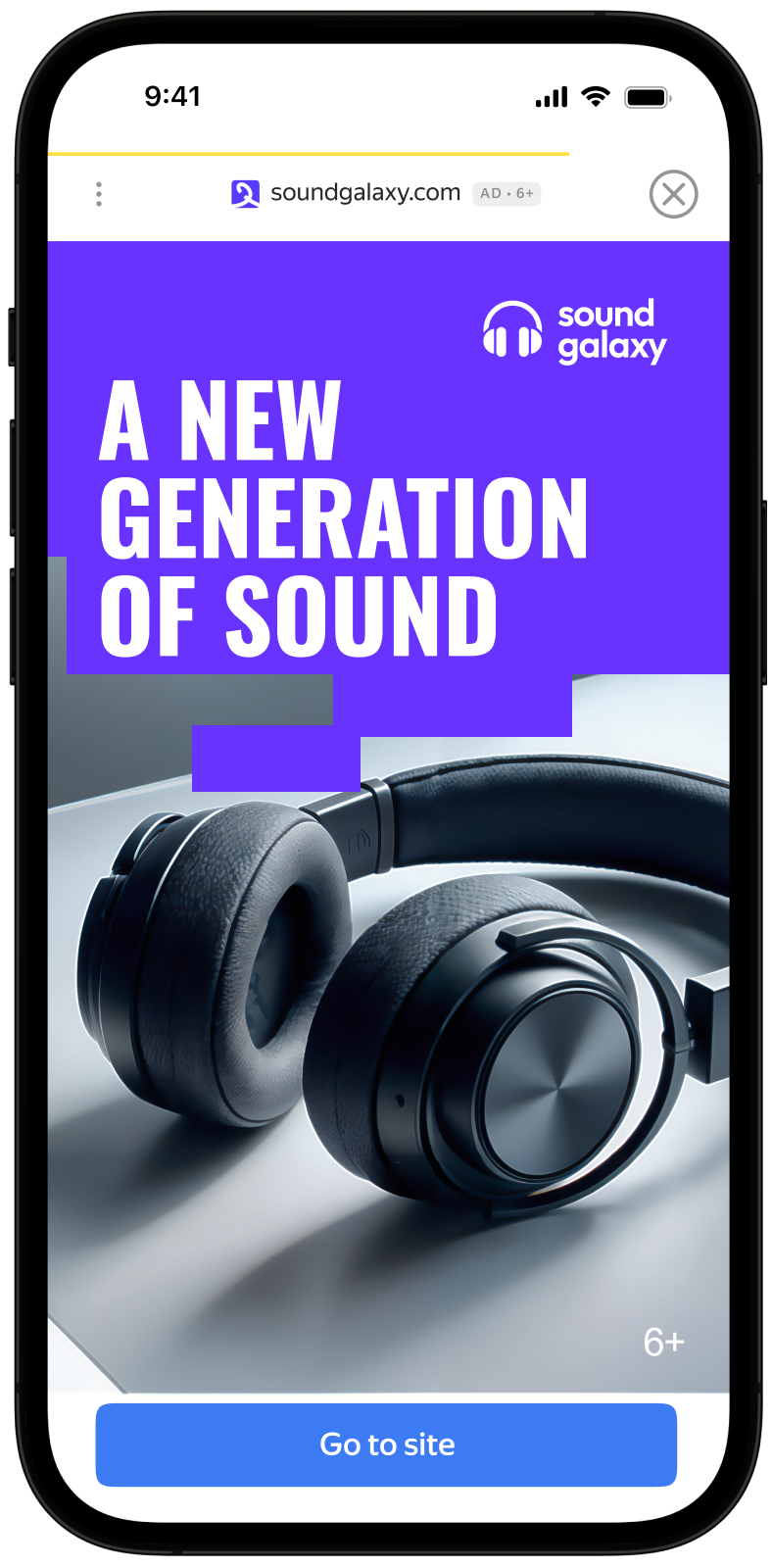
Interstitial advertising is a full-screen ad format embedded within the app content during natural pauses, such as transitioning between game levels or completing a target action.
When the app renders an interstitial ad, the user has two options: click the ad and proceed to the advertiser site or close the ad and go back to the app.
In interstitial ads, user attention is fully focused on the ads, which is why the impression cost is higher.
{% cut "Appearance" %}
 {% endcut %}
This guide will show how to integrate interstitial ads into iOS apps. In addition to code examples and instructions, it contains format-specific recommendations and links to additional resources.
## Prerequisite {#pre}
1. Follow the SDK integration steps described in [Quick start](https://ads.yandex.com/helpcenter/en/dev/ios/quick-start.md).
2. [Initialize](https://ads.yandex.com/helpcenter/en/dev/ios/quick-start.md#init) your ad SDK in advance.
3. Make sure you're running the latest [Yandex Mobile Ads SDK](https://ads.yandex.com/helpcenter/en/dev/platforms.md) version. If you're using mediation, make sure you're also running the latest version of the [unified build](https://ads.yandex.com/helpcenter/en/dev/platforms.md).
## Implementation {#implement}
Key steps for integrating interstitial ads:
- Create and configure the `InterstitialAdLoader` ad loader.
- Load the ad.
- Pass [additional settings](https://ads.yandex.com/helpcenter/en/dev/ios/target-adfox.md) if you're using Adfox.
- If needed, set a delegate for the ad object and implement the required `InterstitialAdDelegate` methods.
- Show the ad.
## Features of interstitial ad integration {#features}
1. All calls to Yandex Mobile Ads SDK methods must be made from the main thread.
2. We strongly advise against attempting to load a new ad when a load error occurs. With a completion handler, that is a `.failure` result; with Swift Concurrency, handle it in `catch`. If you need to retry from the error handler, limit ad load retries to avoid recurring failed ad requests due to network connection constraints.
3. We recommend keeping a strong reference to the ad and its loader throughout the lifecycle of the screen interacting with the ad.
## Loading ads
To load interstitial ads, create an instance of the `InterstitialAdLoader` class.
Use `loadAd(with:completion:)` with a completion handler, or the Swift Concurrency overload `loadAd(with:)`.
You can extend the ad request using `AdRequest` by passing user interests, page context, location, or other data. Additional contextual data in the request can significantly improve ad quality. Read more in the [Ad targeting](https://ads.yandex.com/helpcenter/en/dev/ios/target.md) section.
The following example shows how to load an interstitial ad from a view controller.
{% list tabs %}
- Swift Concurrency
```swift
final class InterstitialViewController: UIViewController {
private lazy var interstitialAdLoader = InterstitialAdLoader()
private var interstitialAd: InterstitialAd?
func loadAd() async {
let request = AdRequest(adUnitID: "R-M-XXXXX-YY")
do {
let ad = try await interstitialAdLoader.loadAd(with: request)
interstitialAd = ad
ad.delegate = self
} catch {
// Load error
}
}
}
```
- Completion handler
```swift
final class InterstitialViewController: UIViewController {
private lazy var interstitialAdLoader = InterstitialAdLoader()
private var interstitialAd: InterstitialAd?
func loadAd() {
let request = AdRequest(adUnitID: "R-M-XXXXX-YY")
interstitialAdLoader.loadAd(with: request) { [weak self] result in
switch result {
case .success(let ad):
self?.interstitialAd = ad
ad.delegate = self
case .failure:
// Load error
break
}
}
}
}
```
{% endlist %}
## Ad rendering
Interstitial ads should be displayed during natural pauses in the app's operation. One good option is inserting interstitial ads between game levels or after a conversion (for example, when a file has been downloaded).
After you successfully load an interstitial ad, keep a reference to it and show it:
```swift
final class InterstitialViewController: UIViewController {
private lazy var interstitialAdLoader = InterstitialAdLoader()
private var interstitialAd: InterstitialAd?
func showAd() {
interstitialAd?.show(from: self)
}
}
```
## Testing interstitial ad integration
### Using demo ad units for ad testing
We recommend using test ads to test your ad integration and your app itself.
To guarantee that test ads are returned for every ad request, we created a special demo ad placement ID. Use it to check your ad integration.
Demo adUnitId: `demo-interstitial-yandex`.
{% note warning %}
Make sure that before placing the application in the store, you replaced the demo ad placement ID with a real one, obtained in the Yandex Advertising Network interface.
{% endnote %}
You can find the list of available demo ad placement IDs in the [Demo ad units for testing](https://ads.yandex.com/helpcenter/en/dev/ios/demo-blocks.md) section.
### Testing ad integration
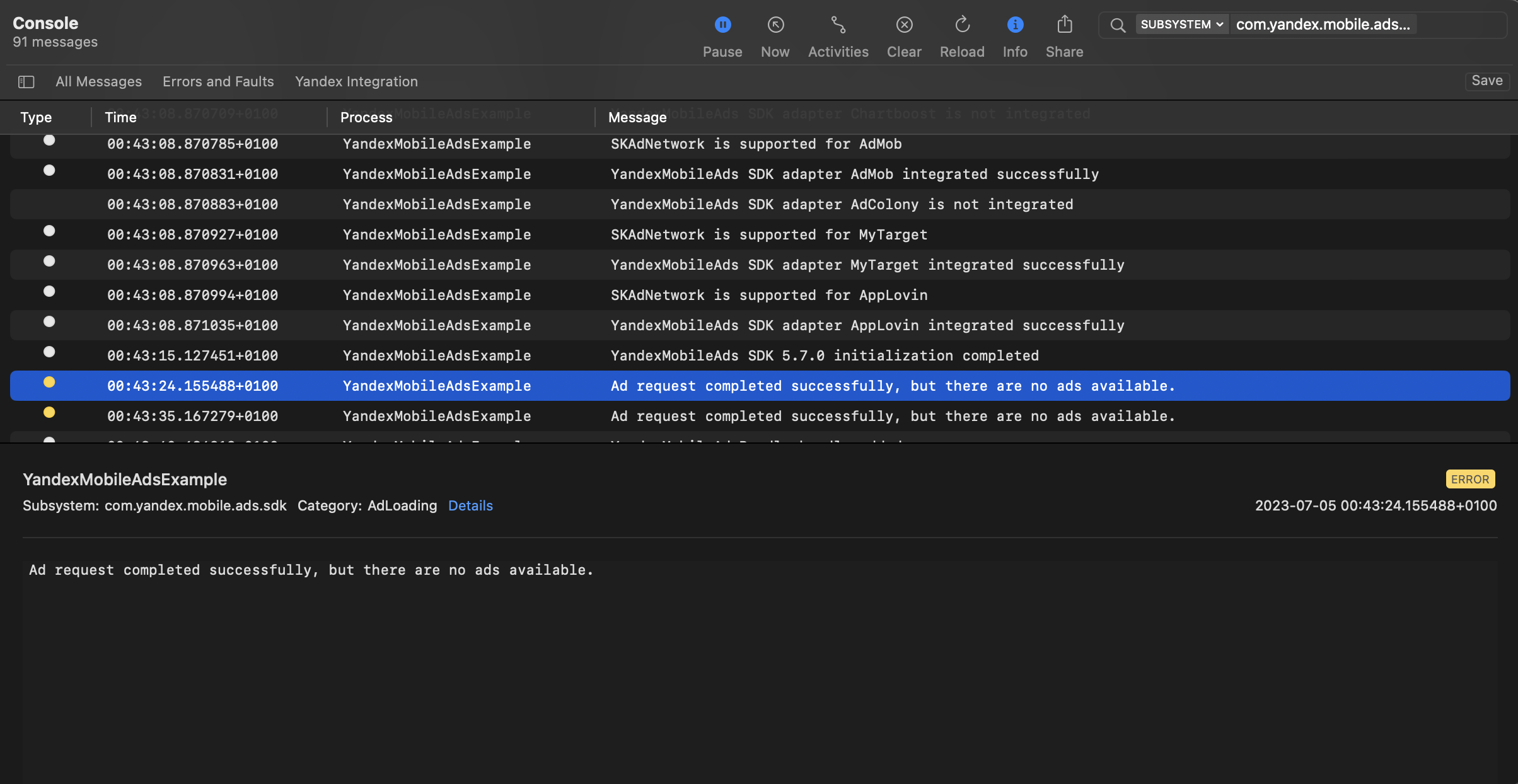
You can test your ad integration using the native Console tool.
To view detailed logs, call the `YandexAds` class's `enableLogging` method.
```swift
YandexAds.enableLogging()
```
To view SDK logs, go to the Console tool and set `Subsystem = com.mobile.ads.ads.sdk`. You can also filter logs by category and error level.
If you're having problems integrating ads, you'll get a detailed report on the issues and recommendations for how to fix them.
{% endcut %}
This guide will show how to integrate interstitial ads into iOS apps. In addition to code examples and instructions, it contains format-specific recommendations and links to additional resources.
## Prerequisite {#pre}
1. Follow the SDK integration steps described in [Quick start](https://ads.yandex.com/helpcenter/en/dev/ios/quick-start.md).
2. [Initialize](https://ads.yandex.com/helpcenter/en/dev/ios/quick-start.md#init) your ad SDK in advance.
3. Make sure you're running the latest [Yandex Mobile Ads SDK](https://ads.yandex.com/helpcenter/en/dev/platforms.md) version. If you're using mediation, make sure you're also running the latest version of the [unified build](https://ads.yandex.com/helpcenter/en/dev/platforms.md).
## Implementation {#implement}
Key steps for integrating interstitial ads:
- Create and configure the `InterstitialAdLoader` ad loader.
- Load the ad.
- Pass [additional settings](https://ads.yandex.com/helpcenter/en/dev/ios/target-adfox.md) if you're using Adfox.
- If needed, set a delegate for the ad object and implement the required `InterstitialAdDelegate` methods.
- Show the ad.
## Features of interstitial ad integration {#features}
1. All calls to Yandex Mobile Ads SDK methods must be made from the main thread.
2. We strongly advise against attempting to load a new ad when a load error occurs. With a completion handler, that is a `.failure` result; with Swift Concurrency, handle it in `catch`. If you need to retry from the error handler, limit ad load retries to avoid recurring failed ad requests due to network connection constraints.
3. We recommend keeping a strong reference to the ad and its loader throughout the lifecycle of the screen interacting with the ad.
## Loading ads
To load interstitial ads, create an instance of the `InterstitialAdLoader` class.
Use `loadAd(with:completion:)` with a completion handler, or the Swift Concurrency overload `loadAd(with:)`.
You can extend the ad request using `AdRequest` by passing user interests, page context, location, or other data. Additional contextual data in the request can significantly improve ad quality. Read more in the [Ad targeting](https://ads.yandex.com/helpcenter/en/dev/ios/target.md) section.
The following example shows how to load an interstitial ad from a view controller.
{% list tabs %}
- Swift Concurrency
```swift
final class InterstitialViewController: UIViewController {
private lazy var interstitialAdLoader = InterstitialAdLoader()
private var interstitialAd: InterstitialAd?
func loadAd() async {
let request = AdRequest(adUnitID: "R-M-XXXXX-YY")
do {
let ad = try await interstitialAdLoader.loadAd(with: request)
interstitialAd = ad
ad.delegate = self
} catch {
// Load error
}
}
}
```
- Completion handler
```swift
final class InterstitialViewController: UIViewController {
private lazy var interstitialAdLoader = InterstitialAdLoader()
private var interstitialAd: InterstitialAd?
func loadAd() {
let request = AdRequest(adUnitID: "R-M-XXXXX-YY")
interstitialAdLoader.loadAd(with: request) { [weak self] result in
switch result {
case .success(let ad):
self?.interstitialAd = ad
ad.delegate = self
case .failure:
// Load error
break
}
}
}
}
```
{% endlist %}
## Ad rendering
Interstitial ads should be displayed during natural pauses in the app's operation. One good option is inserting interstitial ads between game levels or after a conversion (for example, when a file has been downloaded).
After you successfully load an interstitial ad, keep a reference to it and show it:
```swift
final class InterstitialViewController: UIViewController {
private lazy var interstitialAdLoader = InterstitialAdLoader()
private var interstitialAd: InterstitialAd?
func showAd() {
interstitialAd?.show(from: self)
}
}
```
## Testing interstitial ad integration
### Using demo ad units for ad testing
We recommend using test ads to test your ad integration and your app itself.
To guarantee that test ads are returned for every ad request, we created a special demo ad placement ID. Use it to check your ad integration.
Demo adUnitId: `demo-interstitial-yandex`.
{% note warning %}
Make sure that before placing the application in the store, you replaced the demo ad placement ID with a real one, obtained in the Yandex Advertising Network interface.
{% endnote %}
You can find the list of available demo ad placement IDs in the [Demo ad units for testing](https://ads.yandex.com/helpcenter/en/dev/ios/demo-blocks.md) section.
### Testing ad integration
You can test your ad integration using the native Console tool.
To view detailed logs, call the `YandexAds` class's `enableLogging` method.
```swift
YandexAds.enableLogging()
```
To view SDK logs, go to the Console tool and set `Subsystem = com.mobile.ads.ads.sdk`. You can also filter logs by category and error level.
If you're having problems integrating ads, you'll get a detailed report on the issues and recommendations for how to fix them.
 ## Additional resources {#resources}
*
Link to [GitHub](https://github.com/yandexmobile/yandex-ads-sdk-ios/blob/master/Examples/YandexMobileAdsExample/YandexMobileAdsExample/Yandex/Interstitial/InterstitialAdViewController.swift).
## Additional resources {#resources}
*
Link to [GitHub](https://github.com/yandexmobile/yandex-ads-sdk-ios/blob/master/Examples/YandexMobileAdsExample/YandexMobileAdsExample/Yandex/Interstitial/InterstitialAdViewController.swift).