Rewarded ads (SwiftUI)
Rewarded ads are a popular fullscreen ad format where users receive incentives for viewing ads.
Ad impressions are opt-in: for example, users can initiate them to get game bonuses or extra lives.
Strong user motivation makes this ad format the most popular and profitable adoption in free apps.
Appearance
This guide shows you how to integrate rewarded ads into an iOS app using SwiftUI. Besides code samples and instructions, it contains recommendations and links to additional resources.
Prerequisite
- Follow the SDK integration steps described under Quick start.
- First, you need to initialize the advertising SDK.
- Make sure you're using the latest version of the Yandex Mobile Ads SDK, and if you're using mediation, the latest version of the unified build.
Implementation
Key steps to integrate rewarded ads using SwiftUI:
- Add the
.rewardedAd(isPresented:request:onEvent:)modifier. - Manage loading using
Binding<AdRequest?>and display viaBinding<Bool>. - Handle
RewardedAdEventevents in theonEventclosure. - Reward the user for watching the ad on the
.didRewardevent.
Features of rewarded ad integration
-
If the
.didFailToLoadevent returns an error, don't try to load a new ad again. If you need to retry the load from the error handler, limit the number of attempts to avoid endless failed requests and connection issues. -
Apply the modifier to a
viewthat persists throughout the display scenario.
Loading ads
To load a rewarded ad, set a non-nil AdRequest in the Binding passed to .rewardedAd.
To get notified about successful and failed loads, as well as other events, use onEvent with RewardedAdEvent.
import SwiftUI
import YandexMobileAds

struct RewardedView: View {
    @State private var adRequest: AdRequest?
    @State private var isPresented = false

    var body: some View {
        VStack {
            Button("Load and show") {
                adRequest = AdRequest(adUnitID: "R-M-XXXXX-YY")
            }
        }
        .rewardedAd(isPresented: $isPresented, request: $adRequest) { event in
            switch event {
            case .didLoad:
                isPresented = true
            case .didDismiss, .didFailToShow, .didFailToLoad:
                adRequest = nil
            default:
                break
            }
        }
    }
}
To load an ad, you need the ad placement ID obtained in the Yandex Advertising Network interface (adUnitId).
You can expand the ad request parameters using AdRequest. To do this, pass information about the user's interests, page context, location, and other additional data in the request. Context can greatly improve ad relevance. To learn more, see Ad targeting.
Displaying ads
Rewarded ads are an incentivized ad format that allows users to earn rewards by viewing ads. These rewards may include extra lives or the ability to advance to the next level in a game. The reward format is determined by the app itself.
Once the ad loads successfully, you'll receive a .didLoad event. Set isPresented = true to display the ad, or pre-set the presentation flag. Presentation will be delayed if the ad hasn't finished loading.
struct RewardedView: View {
    @State private var adRequest: AdRequest?
    @State private var isPresented = false

    var body: some View {
        ContentView()
            .rewardedAd(isPresented: $isPresented, request: $adRequest) { event in
                switch event {
                case .didLoad:
                    isPresented = true
                case .didDismiss, .didFailToShow, .didFailToLoad:
                    adRequest = nil
                default:
                    break
                }
            }
    }
}
Reward issuance
Once the ad impression is recorded, .didReward(Reward) is sent to onEvent. Use this method to reward the app user. You should grant the reward in the .didReward handler without relying solely on .didDismiss.
struct RewardedView: View {
    @State private var adRequest: AdRequest?
    @State private var isPresented = false

    var body: some View {
        ContentView()
            .rewardedAd(isPresented: $isPresented, request: $adRequest) { event in
                switch event {
                case .didReward(let reward):
                    sendReward(reward)
                case .didDismiss, .didFailToShow, .didFailToLoad:
                    adRequest = nil
                default:
                    break
                }
            }
    }

    private func sendReward(_ reward: Reward) {
        // Grant the reward
    }
}
Testing rewarded ad integration
Using demo ad units for ad testing
Use test ads to check your ad integration and the app itself. To make sure that test ads are returned for each ad request, you can use a special demo ad placement ID.
Demo adUnitId: demo-rewarded-yandex.
Warning
Before publishing your app in the store, make sure to replace the demo placement ID with the real ID you obtained in the Yandex Advertising Network interface.
For the list of all available demo ad placement IDs, see Demo ad units for testing.
Testing ad integration
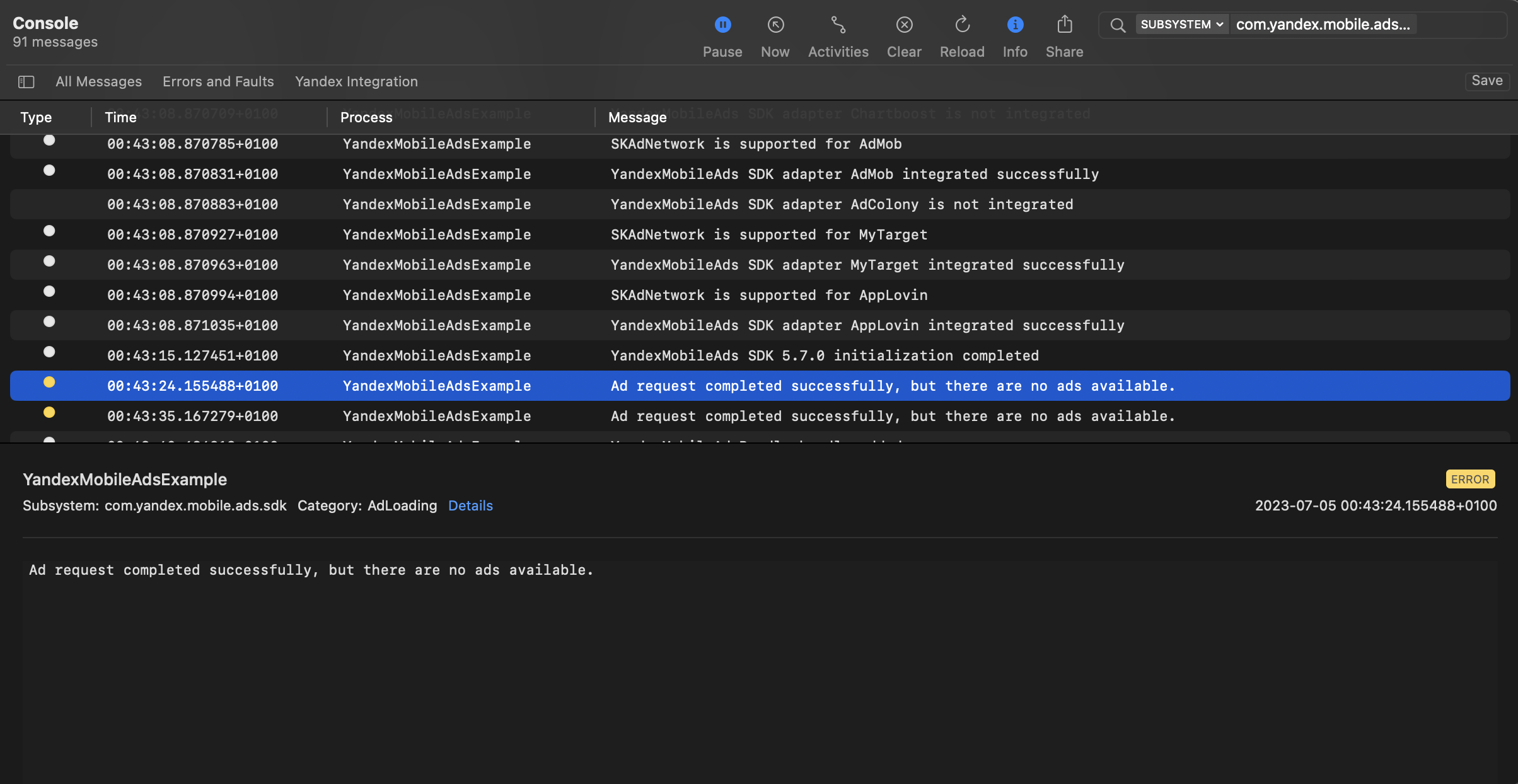
You can test your ad integration using the native Console tool.
To view detailed logs, call the YandexAds class's enableLogging method.
YandexAds.enableLogging()
To view SDK logs, go to the Console tool and set Subsystem = com.mobile.ads.ads.sdk. You can filter logs by category or error level.
If you're having problems integrating ads, you'll get a detailed report on the issues and recommendations for how to fix them.
Additional resources
- Link to GitHub.