---
metadata:
- name: generator
content: Diplodoc Platform v5.55.0
alternate:
- https://ads.yandex.com/helpcenter/en/dev/ios/swiftui/rewarded.md
- https://ads.yandex.com/helpcenter/ru/dev/ios/swiftui/rewarded.md
- https://ads.yandex.com/helpcenter/zh/dev/ios/swiftui/rewarded.md
- href: en/dev/ios/swiftui/rewarded.md
type: text/markdown
title: Markdown version
- href: ../llms.txt
type: text/markdown
title: llms.txt
---
> **Documentation Index:** Fetch the complete configuration index at https://ads.yandex.com/helpcenter/en/llms.txt
[//]: # (This page is also translated into Brazilian Portuguese — pt-BR)
# Rewarded ad (SwiftUI)
Rewarded ads are a popular fullscreen ad format where users receive incentives for viewing ads.
Ad impressions are opt-in: for example, users can initiate them to get game bonuses or extra lives.
Strong user motivation makes this ad format the most popular and profitable adoption in free apps.
{% cut "Appearance" %}
{% list tabs %}
- Text and graphic ads
- Video ads
{% endlist %}
{% endcut %}
This guide shows how to integrate rewarded ads into an iOS app using **SwiftUI**. In addition to code examples and instructions, it provides recommendations on using this ad format and links to additional resources.
## Prerequisite {#pre}
1. Follow the SDK integration steps described in [Quick start](https://ads.yandex.com/helpcenter/en/dev/ios/quick-start.md).
2. [Initialize](https://ads.yandex.com/helpcenter/en/dev/ios/quick-start.md#init) your ad SDK in advance.
3. Make sure you're running the latest [Yandex Mobile Ads SDK](https://ads.yandex.com/helpcenter/en/dev/platforms.md) version. If you're using mediation, make sure you're also running the latest version of the [unified build](https://ads.yandex.com/helpcenter/en/dev/platforms.md).
## Implementation {#implement}
Key steps for integrating rewarded ads in SwiftUI:
* Attach the `.rewardedAd(isPresented:request:onEvent:)` modifier.
* Control loading via `Binding` and display via `Binding`.
* Handle `RewardedAdEvent` events in the `onEvent` closure.
* Grant the user a reward for watching the ad on the `.didReward` event.
## Rewarded ad integration notes {#features}
1. Attempting to load a new ad upon receiving an error in the `.didFailToLoad` event is strongly discouraged. If you need to retry loading from the error handler, limit the number of reload attempts to avoid continuous failed ad requests in case of network connection restrictions.
2. Keep the modifier on a view that lives throughout the display scenario.
## Loading ads {#load}
To load a rewarded ad, set a non-nil `AdRequest` in the binding passed to `.rewardedAd`.
To receive notifications about successful or failed loading and other stages, use `onEvent` with `RewardedAdEvent`.
```swift
import SwiftUI
import YandexMobileAds
struct RewardedView: View {
@State private var adRequest: AdRequest?
@State private var isPresented = false
var body: some View {
VStack {
Button("Load and show") {
adRequest = AdRequest(adUnitID: "R-M-XXXXX-YY")
}
}
.rewardedAd(isPresented: $isPresented, request: $adRequest) { event in
switch event {
case .didLoad:
isPresented = true
case .didDismiss, .didFailToShow, .didFailToLoad:
adRequest = nil
default:
break
}
}
}
}
```
To load an ad, you will need the ad unit ID obtained from the Yandex Advertising Network interface (adUnitId).
You can extend the ad request parameters via `AdRequest` by passing user interest data, page context data, location, or other additional data. Additional contextual data in the request can significantly improve ad quality. For more information, see [Ad targeting](https://ads.yandex.com/helpcenter/en/dev/ios/target.md).
## Showing the ad {#ad-view}
Rewarded ads are an incentivized ad format that allows users to earn rewards by viewing ads. These rewards may include extra lives or the ability to advance to the next level in a game. The reward format is determined by the app itself.
After a successful load, the `.didLoad` event arrives — set `isPresented = true` to display the ad (or set the display flag in advance; if loading has not yet completed, display will be deferred).
```swift
struct RewardedView: View {
@State private var adRequest: AdRequest?
@State private var isPresented = false
var body: some View {
ContentView()
.rewardedAd(isPresented: $isPresented, request: $adRequest) { event in
switch event {
case .didLoad:
isPresented = true
case .didDismiss, .didFailToShow, .didFailToLoad:
adRequest = nil
default:
break
}
}
}
}
```
## Granting a reward {reward-send}
If the ad impression was successfully counted, `.didReward(Reward)` arrives in `onEvent`. Use it to grant a reward to the app user. The reward should be granted in the `.didReward` handler, not relying solely on `.didDismiss`.
```swift
struct RewardedView: View {
@State private var adRequest: AdRequest?
@State private var isPresented = false
var body: some View {
ContentView()
.rewardedAd(isPresented: $isPresented, request: $adRequest) { event in
switch event {
case .didReward(let reward):
sendReward(reward)
case .didDismiss, .didFailToShow, .didFailToLoad:
adRequest = nil
default:
break
}
}
}
private func sendReward(_ reward: Reward) {
// Grant the reward
}
}
```
## Testing rewarded ad integration {#test}
### Using demo blocks for ad testing
We recommend using test ads to test your ad integration and your app itself.
To guarantee that test ads are returned for every ad request, we created a special demo ad placement ID. Use it to check your ad integration.
Demo adUnitId: `demo-rewarded-yandex`.
{% note warning %}
Before publishing your app to the store, make sure you replace the demo ad unit ID with a real one obtained from the Yandex Advertising Network interface.
{% endnote %}
You can find the list of available demo ad placement IDs in the [Demo ad units for testing](https://ads.yandex.com/helpcenter/en/dev/ios/demo-blocks.md) section.
### Verifying correct ad integration
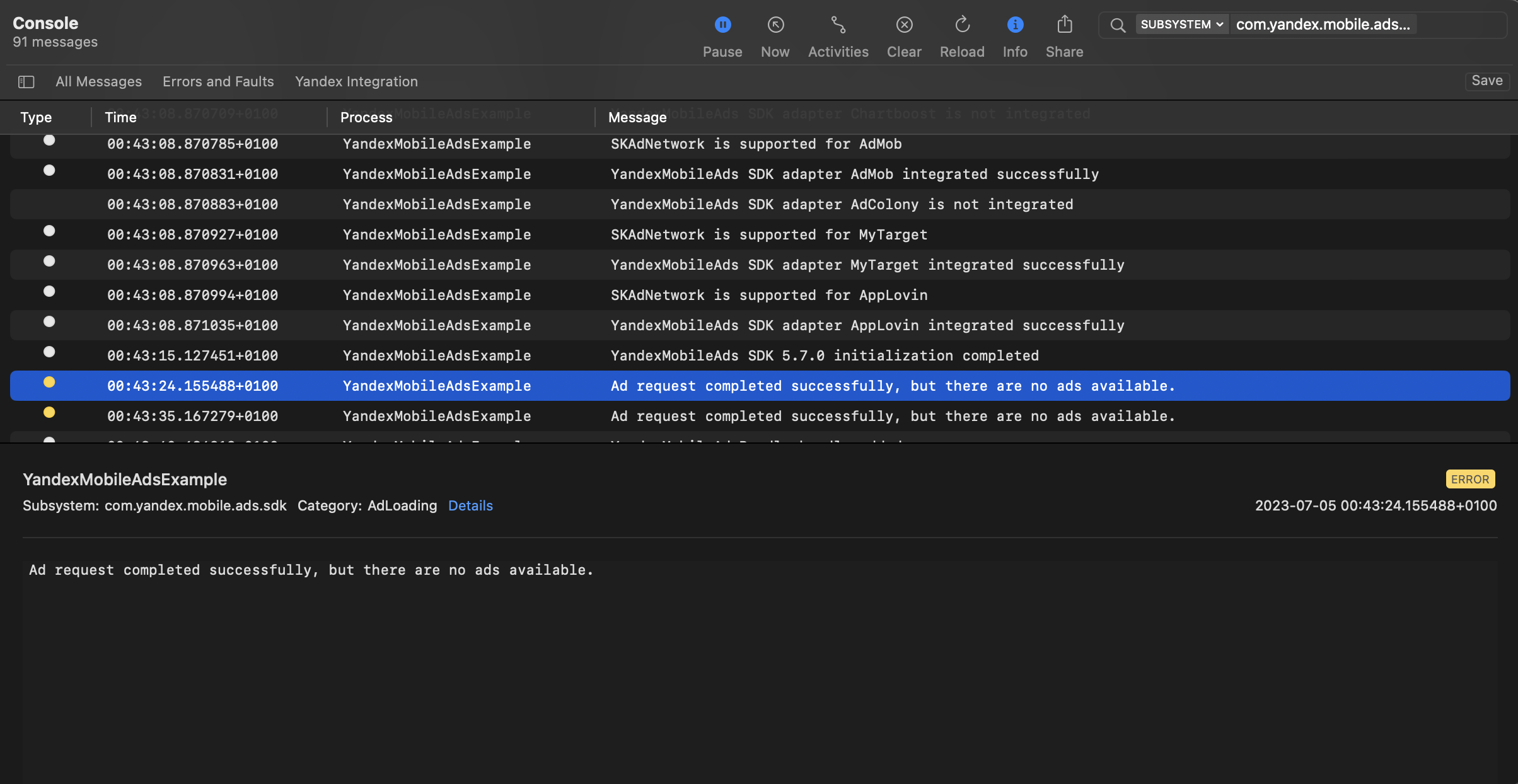
You can test your ad integration using the native Console tool.
To view detailed logs, call the `YandexAds` class's `enableLogging` method.
```swift
YandexAds.enableLogging()
```
To view SDK logs, go to the Console tool and set `Subsystem = com.mobile.ads.ads.sdk`. You can also filter logs by category and error level.
If you're having problems integrating ads, you'll get a detailed report on the issues and recommendations for how to fix them.
 ## Additional resources {#resources}
*
Link to [GitHub](https://github.com/yandexmobile/yandex-ads-sdk-ios/blob/master/Examples/YandexMobileAdsExample/YandexMobileAdsExample/Yandex/Rewarded/RewardedAdViewController.swift).
## Additional resources {#resources}
*
Link to [GitHub](https://github.com/yandexmobile/yandex-ads-sdk-ios/blob/master/Examples/YandexMobileAdsExample/YandexMobileAdsExample/Yandex/Rewarded/RewardedAdViewController.swift).