Rewarded ads
Rewarded ads are a popular fullscreen ad format where users receive incentives for viewing ads.
The display of this ad type is activated by the user, for instance, to receive a bonus or additional life in a game.
High user motivation makes this ad format the most popular and profitable in free apps.
Appearance
This guide will show how to integrate rewarded ads into iOS apps. Besides code samples and instructions, it contains format-specific recommendations and links to additional resources.
Prerequisite
- Follow the SDK integration steps described under Quick start.
- First, you need to initialize the advertising SDK.
- Make sure you're using the latest version of the Yandex Mobile Ads SDK, and if you're using mediation, update to the most recent version of the unified build.
Implementation
Key steps for integrating rewarded ads:
- Create and configure a
RewardedAdLoader. - Set a delegate and implement the required
RewardedAdLoaderDelegatemethods. - Load the ad.
- If needed, set a delegate for the ad object and implement the required
RewardedAdDelegatemethods. - Render the ad.
- Reward the user for viewing the ad.
Features of rewarded ad integration
-
All calls to Yandex Mobile Ads SDK methods must be made from the main thread.
-
We strongly advise against attempting to load a new ad when receiving an error in the
func rewardedAdLoader(_ adLoader: RewardedAdLoader, didFailToLoadWithError error: AdRequestError)method. If you need to load an ad fromfunc rewardedAdLoader(_ adLoader: RewardedAdLoader, didFailToLoadWithError error: AdRequestError), restrict ad loading retries to avoid recurring failed ad requests due to network connection constraints. -
We recommend maintaining a strong reference to the ad and its loader throughout the lifespan of the screen where the ad interaction is taking place.
Loading ads
To load rewarded ads, create an instance of the RewardedAdLoader class.
To notify when ads load or fail to load, set the delegate property for the RewardedAdLoader class and implement the RewardedAdLoaderDelegate delegate.
final class RewardedViewController: UIViewController {
    private lazy var rewardedAdLoader: RewardedAdLoader = {
        let loader = RewardedAdLoader()
        loader.delegate = self
        return loader
    }()
}

extension RewardedViewController: RewardedAdLoaderDelegate {
    func rewardedAdLoader(_ adLoader: RewardedAdLoader, didLoad rewardedAd: RewardedAd) {
        // This method will call after successfully loading
    }

    func rewardedAdLoader(_ adLoader: RewardedAdLoader, didFailToLoadWithError error: AdRequestError) {
        // This method will call after getting any error while loading the ad
    }
}
To load an ad, you need the ad placement ID obtained in the Yandex Advertising Network interface (adUnitId).
You can expand ad request parameters through AdRequest, by passing user interests, contextual page data, location, or other additional info. Adding extra context to ad requests can greatly improve ad relevance. To learn more, see Ad targeting.
The following example shows how to load a rewarded ad from the View Controller.
final class RewardedViewController: UIViewController {
    private lazy var rewardedAdLoader: RewardedAdLoader = {
        let loader = RewardedAdLoader()
        loader.delegate = self
        return loader
    }()

    func loadAd() {
        let configuration = AdRequestConfiguration(adUnitID: "R-M-XXXXX-YY")
        rewardedAdLoader.loadAd(with: configuration)
    }
}
Displaying ads
Rewarded advertising is an incentive-based ad format that allows the user to receive a reward for viewing the ad. These rewards may include extra lives or the ability to advance to the next level in a game. The reward format is determined by the app itself.
After the rewarded ad is successfully loaded, the func rewardedAdLoader(_ adLoader: RewardedAdLoader, didLoad rewardedAd: RewardedAd) method of the RewardedAdDelegate delegate will be called. Use it to display the rewarded ad.
final class RewardedViewController: UIViewController {
    private var rewardedAd: RewardedAd?

    func showAd() {
        rewardedAd?.show(from: self)
    }
}

extension RewardedViewController: RewardedAdLoaderDelegate {
    func rewardedAdLoader(_ adLoader: RewardedAdLoader, didLoad rewardedAd: RewardedAd) {
        self.rewardedAd = rewardedAd
        self.rewardedAd.delegate = self

        showAd()
    }
}
Reward issuance
Counted impressions trigger the rewardedAd(_ rewardedAd: RewardedAd, didReward reward: Reward) method of the RewardedAdDelegate delegate. Use this method to reward the app user.
final class RewardedViewController: UIViewController {
    private var rewardedAd: RewardedAd?
}

extension RewardedViewController: RewardedAdDelegate {
    func rewardedAd(_ rewardedAd: RewardedAd, didReward reward: Reward) {
        sendReward(reward)
    }
}
Testing rewarded ad integration
Using demo ad units for ad testing
We recommend using test ads to test your ad integration and your app itself.
To make sure that test ads are returned for each ad request, we created a special demo ad placement ID designed to help you test your ad integration.
Demo adUnitId: demo-rewarded-yandex.
Warning
Before publishing your app in the store, make sure to replace the demo placement ID with the real ID you obtained in the interface Yandex Advertising Network.
For the list of all available demo ad placement IDs, see Demo ad units for testing.
Testing ad integration
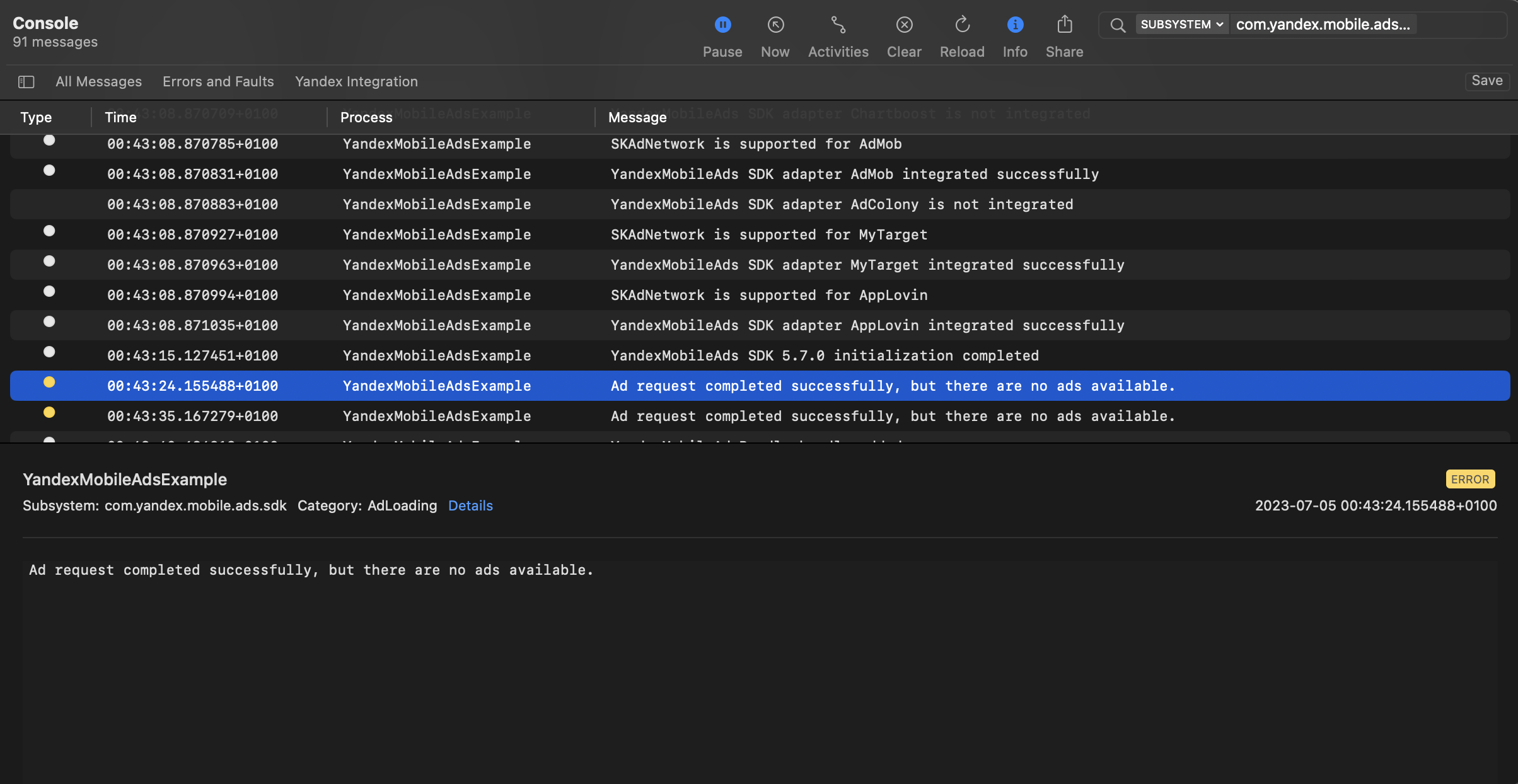
You can test your ad integration using the native Console tool.
To view detailed logs, call the MobileAds class's enableLogging method.
MobileAds.enableLogging()
To view SDK logs, go to the Console tool and set Subsystem = com.mobile.ads.ads.sdk. You can also filter logs by category and error level.
If you're having problems integrating ads, you'll get a detailed report on the issues and recommendations for how to fix them.
Additional resources
- Link to GitHub.