---
metadata:
- name: generator
content: Diplodoc Platform v5.52.0
alternate:
- https://ads.yandex.com/helpcenter/en/dev/unity/interstitial.md
- https://ads.yandex.com/helpcenter/pt/dev/unity/interstitial.md
- https://ads.yandex.com/helpcenter/ru/dev/unity/interstitial.md
- https://ads.yandex.com/helpcenter/zh/dev/unity/interstitial.md
- href: en/dev/unity/interstitial.md
type: text/markdown
title: Markdown version
- href: llms.txt
type: text/markdown
title: llms.txt
---
> **Documentation Index:** Fetch the complete configuration index at https://ads.yandex.com/helpcenter/en/llms.txt
# Interstitial advertising
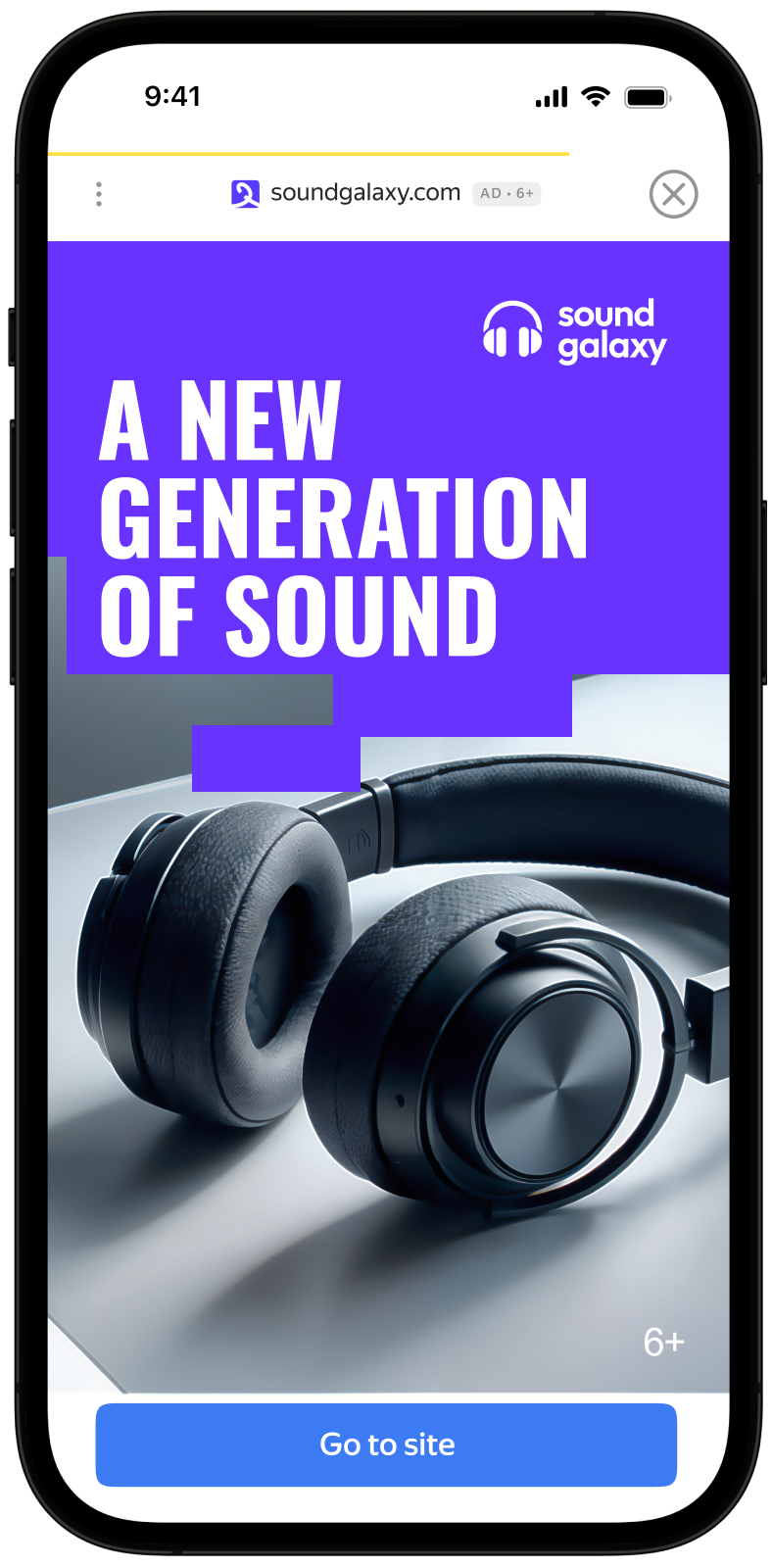
Interstitial advertising is a full-screen ad format embedded within the app content during natural pauses, such as transitioning between game levels or completing a target action.
When the app renders an interstitial ad, the user has two options: click the ad and proceed to the advertiser site or close the ad and go back to the app.
In interstitial ads, user attention is fully focused on the ads, which is why the impression cost is higher.
{% cut "Appearance" %}
{% endcut %}
This guide will show how to integrate interstitial ads into Unity apps. In addition to code examples and instructions, it contains format-specific recommendations and links to additional resources.
## Prerequisite {#pre}
1. Follow the process in [Quick start](https://ads.yandex.com/helpcenter/en/dev/unity/quick-start.md) for integrating the Yandex Mobile Ads Unity Plugin.
2. Make sure you're running the latest [Yandex Mobile Ads Unity Plugin](https://ads.yandex.com/helpcenter/en/dev/platforms.md) version. If you're using mediation, make sure you're also running the latest version of the [unified build](https://ads.yandex.com/helpcenter/en/dev/platforms.md).
## Implementation {#implement}
Key steps for integrating interstitial ads:
1. Create an `InterstitialAdLoader` ad loader.
2. Load an ad with the `InterstitialAdLoader.LoadAd(AdRequest)` method using `async/await` or callbacks.
3. Pass [additional settings](https://ads.yandex.com/helpcenter/en/dev/unity/target-adfox.md) if you're using Adfox.
4. Register listeners for events where users interact with your ad.
5. Show the ad by calling the `Interstitial.Show()` method.
6. Release the resources.
## Features of interstitial ads integration {#features}
1. If loading failed, don't try to load a new ad again. If there's no other option, limit the number of ad load retries. That will help avoid constant unsuccessful requests and connection issues when limitations arise.
2. We recommend using a single instance of `InterstitialAdLoader` for all ad loads to improve performance.
## Step-by-step guide
1. Create an `InterstitialAdLoader` object in the C# script attached to `GameObject`.
```c#
using UnityEngine;
using YandexMobileAds;
using YandexMobileAds.Base;
public class YandexMobileAdsInterstitialDemoScript : MonoBehaviour
{
private InterstitialAdLoader interstitialAdLoader;
private Interstitial interstitial;
private void SetupLoader()
{
interstitialAdLoader = new InterstitialAdLoader();
// ...
}
}
```
2. Load an ad with the `LoadAd` method.
{% list tabs %}
- async/await
```c#
private async void RequestInterstitial()
{
string adUnitId = "demo-interstitial-yandex"; // replace with "R-M-XXXXXX-Y"
try
{
interstitial = await interstitialAdLoader.LoadAd(new AdRequest(adUnitId));
}
catch (AdLoadingException e)
{
// Ad failed to load with {e.Message}
// Attempting to load a new ad from catch block is strongly discouraged.
}
}
```
- Callbacks
```c#
private void RequestInterstitial()
{
string adUnitId = "demo-interstitial-yandex"; // replace with "R-M-XXXXXX-Y"
AdRequest adRequest = new AdRequest(adUnitId);
interstitialAdLoader.LoadAd(
adRequest: adRequest,
onLoaded: interstitial => {
// The ad was loaded successfully. Now you can handle it.
this.interstitial = interstitial;
},
onFailed: args => {
// Ad failed to load with {args.Message}
// Attempting to load a new ad from the onFailed callback is strongly discouraged.
});
}
```
{% endlist %}
`adUnitId` is a unique identifier that is issued in the Yandex Advertising Network interface and looks like this: R-M-XXXXXX-Y.
{% note tip %}
For testing purposes, you can use the demo unit ID: "demo-interstitial-yandex". Before publishing your ad, make sure to replace the demo unit ID with a real ad unit ID.
You can expand the ad request parameters through the `AdTargeting` class by passing user interests, contextual app data, location details, or other data. Delivering additional contextual data in the request can significantly improve your ad quality. Read more in the [Ad Targeting](https://ads.yandex.com/helpcenter/en/dev/unity/target.md) section.
{% endnote %}
3. Register listeners for events where users interact with your ad.
```c#
using System;
// ...
interstitial.OnAdClicked += HandleAdClicked;
interstitial.OnAdShown += HandleInterstitialShown;
interstitial.OnAdFailedToShow += HandleInterstitialFailedToShow;
interstitial.OnAdImpression += HandleImpression;
interstitial.OnAdDismissed += HandleInterstitialDismissed;
// ...
public void HandleAdClicked(object sender, EventArgs args)
{
// Called when a click is recorded for an ad.
}
public void HandleInterstitialShown(object sender, EventArgs args)
{
// Called when ad is shown.
}
public void HandleInterstitialFailedToShow(object sender, AdFailureEventArgs args)
{
// Called when an InterstitialAd failed to show.
}
public void HandleInterstitialDismissed(object sender, EventArgs args)
{
// Called when ad is dismissed.
}
public void HandleImpression(object sender, ImpressionData impressionData)
{
// Called when an impression is recorded for an ad.
}
```
4. Show the ad by calling `Show()` on the `Interstitial` object.
```c#
if (interstitial != null)
{
interstitial.Show();
}
```
5. Call `Destroy()` on ads that are shown and clear links that are no longer used on the current screen.
That releases the resources and prevents memory leaks.
```c#
public void DestroyInterstitial()
{
if (interstitial != null)
{
interstitial.Destroy();
interstitial = null;
}
}
```
## Testing interstitial ad integration {#test}
{% list tabs %}
- Android
### Using demo ad units for ad testing {#demo-blocks}
Use test ads to check your interstitial ad integration and the app itself. To make sure that test ads are returned for each ad request, you can use a special demo ad placement ID.
Demo adUnitId: `demo-interstitial-yandex`.
{% note warning %}
Before publishing your app in the store, make sure to replace the demo placement ID with the real ID you obtained in the Yandex Advertising Network interface.
{% endnote %}
For the list of all available demo ad placement IDs, see [Demo ad units for testing](https://ads.yandex.com/helpcenter/en/dev/android/demo-blocks.md).
### Testing ad integration {#test-int}
You can check if your interstitial ads are integrated correctly using the SDK's built-in analyzer. A detailed report with the test results will appear in the log.
To view the report, search for the keyword “YandexAds” in [Logcat](https://developer.android.com/studio/command-line/logcat), a tool for debugging Android apps.
```bash
adb logcat -v brief '*:S YandexAds'
```
If the integration is successful, the following message is returned:
```bash
adb logcat -v brief '*:S YandexAds'
mobileads$ adb logcat -v brief '*:S YandexAds'
I/YandexAds(13719): [Integration] Ad type interstitial was integrated successfully
```
If there are any interstitial ad integration issues, you'll get a detailed issue report and troubleshooting recommendations.
- iOS
### Using demo ad units for ad testing
We recommend using test ads to test your ad integration and your app itself.
To guarantee that test ads are returned for every ad request, we created a special demo ad placement ID. Use it to check your ad integration.
Demo adUnitId: `demo-interstitial-yandex`.
{% note warning %}
Make sure that before placing the application in the store, you replaced the demo ad placement ID with a real one, obtained in the Yandex Advertising Network interface.
{% endnote %}
You can find the list of available demo ad placement IDs in the [Demo ad units for testing](https://ads.yandex.com/helpcenter/en/dev/ios/demo-blocks.md) section.
### Testing ad integration
You can test your ad integration using the native Console tool.
To view detailed logs, call the `YandexAds` class's `enableLogging` method.
```swift
YandexAds.enableLogging()
```
To view SDK logs, go to the Console tool and set `Subsystem = com.mobile.ads.ads.sdk`. You can also filter logs by category and error level.
If you're having problems integrating ads, you'll get a detailed report on the issues and recommendations for how to fix them.
{% endlist %}
## Tips
### Ad preloading
Loading an ad may take several seconds, depending on the number of ad networks connected in mobile mediation and the user's internet speed. We recommend preloading ads before displaying them.
You can call ad loading in the `Awake` method for `gameObject`. Make sure to preserve the object between scenes using the `DontDestroyOnLoad()` call. That ensures the ad that's loaded is not deleted with `gameObject` on scene change.
```c#
private void Awake()
{
SetupLoader();
RequestInterstitial();
DontDestroyOnLoad(gameObject);
}
```
Along with that, you can bind loading of the next ad to the callback functions run when ad show completes or fails. Like this:
```c#
public void HandleInterstitialFailedToShow(object sender, EventArgs args)
{
// Called when an InterstitialAd failed to show.
// Clear resources after Ad dismissed.
DestroyInterstitial();
// Now you can preload the next interstitial ad.
RequestInterstitial();
}
public void HandleInterstitialDismissed(object sender, EventArgs args)
{
// Called when ad is dismissed.
// Clear resources after Ad dismissed.
DestroyInterstitial();
// Now you can preload the next interstitial ad.
RequestInterstitial();
}
```
If you cache ads on too many screens that are unlikely to be shown, your ad effectiveness could drop. For example, if users complete 2-3 game levels per session, you shouldn't cache ads for 6-7 screens. Your ad viewability could decrease otherwise, and the advertising system might deprioritize your app.
To make sure you're finding a good balance for your app, track the "Share of impressions" or "Share of visible impressions" metric in the Yandex Advertising Network interface. If it's under 20%, you should probably revise your caching algorithm. The higher the percentage of impressions, the better.
### Full code example
{% list tabs %}
- async/await
```c#
using System;
using UnityEngine;
using UnityEngine.UI;
using YandexMobileAds;
using YandexMobileAds.Base;
public class YandexMobileAdsInterstitialDemoScript : MonoBehaviour
{
private InterstitialAdLoader interstitialAdLoader;
private Interstitial interstitial;
[SerializeField] private Button button;
private void Awake()
{
SetupLoader();
RequestInterstitial();
DontDestroyOnLoad(gameObject);
button = this.GetComponent
 {% endcut %}
This guide will show how to integrate interstitial ads into Unity apps. In addition to code examples and instructions, it contains format-specific recommendations and links to additional resources.
## Prerequisite {#pre}
1. Follow the process in [Quick start](https://ads.yandex.com/helpcenter/en/dev/unity/quick-start.md) for integrating the Yandex Mobile Ads Unity Plugin.
2. Make sure you're running the latest [Yandex Mobile Ads Unity Plugin](https://ads.yandex.com/helpcenter/en/dev/platforms.md) version. If you're using mediation, make sure you're also running the latest version of the [unified build](https://ads.yandex.com/helpcenter/en/dev/platforms.md).
## Implementation {#implement}
Key steps for integrating interstitial ads:
1. Create an `InterstitialAdLoader` ad loader.
2. Load an ad with the `InterstitialAdLoader.LoadAd(AdRequest)` method using `async/await` or callbacks.
3. Pass [additional settings](https://ads.yandex.com/helpcenter/en/dev/unity/target-adfox.md) if you're using Adfox.
4. Register listeners for events where users interact with your ad.
5. Show the ad by calling the `Interstitial.Show()` method.
6. Release the resources.
## Features of interstitial ads integration {#features}
1. If loading failed, don't try to load a new ad again. If there's no other option, limit the number of ad load retries. That will help avoid constant unsuccessful requests and connection issues when limitations arise.
2. We recommend using a single instance of `InterstitialAdLoader` for all ad loads to improve performance.
## Step-by-step guide
1. Create an `InterstitialAdLoader` object in the C# script attached to `GameObject`.
```c#
using UnityEngine;
using YandexMobileAds;
using YandexMobileAds.Base;
public class YandexMobileAdsInterstitialDemoScript : MonoBehaviour
{
private InterstitialAdLoader interstitialAdLoader;
private Interstitial interstitial;
private void SetupLoader()
{
interstitialAdLoader = new InterstitialAdLoader();
// ...
}
}
```
2. Load an ad with the `LoadAd` method.
{% list tabs %}
- async/await
```c#
private async void RequestInterstitial()
{
string adUnitId = "demo-interstitial-yandex"; // replace with "R-M-XXXXXX-Y"
try
{
interstitial = await interstitialAdLoader.LoadAd(new AdRequest(adUnitId));
}
catch (AdLoadingException e)
{
// Ad failed to load with {e.Message}
// Attempting to load a new ad from catch block is strongly discouraged.
}
}
```
- Callbacks
```c#
private void RequestInterstitial()
{
string adUnitId = "demo-interstitial-yandex"; // replace with "R-M-XXXXXX-Y"
AdRequest adRequest = new AdRequest(adUnitId);
interstitialAdLoader.LoadAd(
adRequest: adRequest,
onLoaded: interstitial => {
// The ad was loaded successfully. Now you can handle it.
this.interstitial = interstitial;
},
onFailed: args => {
// Ad failed to load with {args.Message}
// Attempting to load a new ad from the onFailed callback is strongly discouraged.
});
}
```
{% endlist %}
`adUnitId` is a unique identifier that is issued in the Yandex Advertising Network interface and looks like this: R-M-XXXXXX-Y.
{% note tip %}
For testing purposes, you can use the demo unit ID: "demo-interstitial-yandex". Before publishing your ad, make sure to replace the demo unit ID with a real ad unit ID.
You can expand the ad request parameters through the `AdTargeting` class by passing user interests, contextual app data, location details, or other data. Delivering additional contextual data in the request can significantly improve your ad quality. Read more in the [Ad Targeting](https://ads.yandex.com/helpcenter/en/dev/unity/target.md) section.
{% endnote %}
3. Register listeners for events where users interact with your ad.
```c#
using System;
// ...
interstitial.OnAdClicked += HandleAdClicked;
interstitial.OnAdShown += HandleInterstitialShown;
interstitial.OnAdFailedToShow += HandleInterstitialFailedToShow;
interstitial.OnAdImpression += HandleImpression;
interstitial.OnAdDismissed += HandleInterstitialDismissed;
// ...
public void HandleAdClicked(object sender, EventArgs args)
{
// Called when a click is recorded for an ad.
}
public void HandleInterstitialShown(object sender, EventArgs args)
{
// Called when ad is shown.
}
public void HandleInterstitialFailedToShow(object sender, AdFailureEventArgs args)
{
// Called when an InterstitialAd failed to show.
}
public void HandleInterstitialDismissed(object sender, EventArgs args)
{
// Called when ad is dismissed.
}
public void HandleImpression(object sender, ImpressionData impressionData)
{
// Called when an impression is recorded for an ad.
}
```
4. Show the ad by calling `Show()` on the `Interstitial` object.
```c#
if (interstitial != null)
{
interstitial.Show();
}
```
5. Call `Destroy()` on ads that are shown and clear links that are no longer used on the current screen.
That releases the resources and prevents memory leaks.
```c#
public void DestroyInterstitial()
{
if (interstitial != null)
{
interstitial.Destroy();
interstitial = null;
}
}
```
## Testing interstitial ad integration {#test}
{% list tabs %}
- Android
### Using demo ad units for ad testing {#demo-blocks}
Use test ads to check your interstitial ad integration and the app itself. To make sure that test ads are returned for each ad request, you can use a special demo ad placement ID.
Demo adUnitId: `demo-interstitial-yandex`.
{% note warning %}
Before publishing your app in the store, make sure to replace the demo placement ID with the real ID you obtained in the Yandex Advertising Network interface.
{% endnote %}
For the list of all available demo ad placement IDs, see [Demo ad units for testing](https://ads.yandex.com/helpcenter/en/dev/android/demo-blocks.md).
### Testing ad integration {#test-int}
You can check if your interstitial ads are integrated correctly using the SDK's built-in analyzer. A detailed report with the test results will appear in the log.
To view the report, search for the keyword “YandexAds” in [Logcat](https://developer.android.com/studio/command-line/logcat), a tool for debugging Android apps.
```bash
adb logcat -v brief '*:S YandexAds'
```
If the integration is successful, the following message is returned:
```bash
adb logcat -v brief '*:S YandexAds'
mobileads$ adb logcat -v brief '*:S YandexAds'
I/YandexAds(13719): [Integration] Ad type interstitial was integrated successfully
```
If there are any interstitial ad integration issues, you'll get a detailed issue report and troubleshooting recommendations.
- iOS
### Using demo ad units for ad testing
We recommend using test ads to test your ad integration and your app itself.
To guarantee that test ads are returned for every ad request, we created a special demo ad placement ID. Use it to check your ad integration.
Demo adUnitId: `demo-interstitial-yandex`.
{% note warning %}
Make sure that before placing the application in the store, you replaced the demo ad placement ID with a real one, obtained in the Yandex Advertising Network interface.
{% endnote %}
You can find the list of available demo ad placement IDs in the [Demo ad units for testing](https://ads.yandex.com/helpcenter/en/dev/ios/demo-blocks.md) section.
### Testing ad integration
You can test your ad integration using the native Console tool.
To view detailed logs, call the `YandexAds` class's `enableLogging` method.
```swift
YandexAds.enableLogging()
```
To view SDK logs, go to the Console tool and set `Subsystem = com.mobile.ads.ads.sdk`. You can also filter logs by category and error level.
If you're having problems integrating ads, you'll get a detailed report on the issues and recommendations for how to fix them.
{% endcut %}
This guide will show how to integrate interstitial ads into Unity apps. In addition to code examples and instructions, it contains format-specific recommendations and links to additional resources.
## Prerequisite {#pre}
1. Follow the process in [Quick start](https://ads.yandex.com/helpcenter/en/dev/unity/quick-start.md) for integrating the Yandex Mobile Ads Unity Plugin.
2. Make sure you're running the latest [Yandex Mobile Ads Unity Plugin](https://ads.yandex.com/helpcenter/en/dev/platforms.md) version. If you're using mediation, make sure you're also running the latest version of the [unified build](https://ads.yandex.com/helpcenter/en/dev/platforms.md).
## Implementation {#implement}
Key steps for integrating interstitial ads:
1. Create an `InterstitialAdLoader` ad loader.
2. Load an ad with the `InterstitialAdLoader.LoadAd(AdRequest)` method using `async/await` or callbacks.
3. Pass [additional settings](https://ads.yandex.com/helpcenter/en/dev/unity/target-adfox.md) if you're using Adfox.
4. Register listeners for events where users interact with your ad.
5. Show the ad by calling the `Interstitial.Show()` method.
6. Release the resources.
## Features of interstitial ads integration {#features}
1. If loading failed, don't try to load a new ad again. If there's no other option, limit the number of ad load retries. That will help avoid constant unsuccessful requests and connection issues when limitations arise.
2. We recommend using a single instance of `InterstitialAdLoader` for all ad loads to improve performance.
## Step-by-step guide
1. Create an `InterstitialAdLoader` object in the C# script attached to `GameObject`.
```c#
using UnityEngine;
using YandexMobileAds;
using YandexMobileAds.Base;
public class YandexMobileAdsInterstitialDemoScript : MonoBehaviour
{
private InterstitialAdLoader interstitialAdLoader;
private Interstitial interstitial;
private void SetupLoader()
{
interstitialAdLoader = new InterstitialAdLoader();
// ...
}
}
```
2. Load an ad with the `LoadAd` method.
{% list tabs %}
- async/await
```c#
private async void RequestInterstitial()
{
string adUnitId = "demo-interstitial-yandex"; // replace with "R-M-XXXXXX-Y"
try
{
interstitial = await interstitialAdLoader.LoadAd(new AdRequest(adUnitId));
}
catch (AdLoadingException e)
{
// Ad failed to load with {e.Message}
// Attempting to load a new ad from catch block is strongly discouraged.
}
}
```
- Callbacks
```c#
private void RequestInterstitial()
{
string adUnitId = "demo-interstitial-yandex"; // replace with "R-M-XXXXXX-Y"
AdRequest adRequest = new AdRequest(adUnitId);
interstitialAdLoader.LoadAd(
adRequest: adRequest,
onLoaded: interstitial => {
// The ad was loaded successfully. Now you can handle it.
this.interstitial = interstitial;
},
onFailed: args => {
// Ad failed to load with {args.Message}
// Attempting to load a new ad from the onFailed callback is strongly discouraged.
});
}
```
{% endlist %}
`adUnitId` is a unique identifier that is issued in the Yandex Advertising Network interface and looks like this: R-M-XXXXXX-Y.
{% note tip %}
For testing purposes, you can use the demo unit ID: "demo-interstitial-yandex". Before publishing your ad, make sure to replace the demo unit ID with a real ad unit ID.
You can expand the ad request parameters through the `AdTargeting` class by passing user interests, contextual app data, location details, or other data. Delivering additional contextual data in the request can significantly improve your ad quality. Read more in the [Ad Targeting](https://ads.yandex.com/helpcenter/en/dev/unity/target.md) section.
{% endnote %}
3. Register listeners for events where users interact with your ad.
```c#
using System;
// ...
interstitial.OnAdClicked += HandleAdClicked;
interstitial.OnAdShown += HandleInterstitialShown;
interstitial.OnAdFailedToShow += HandleInterstitialFailedToShow;
interstitial.OnAdImpression += HandleImpression;
interstitial.OnAdDismissed += HandleInterstitialDismissed;
// ...
public void HandleAdClicked(object sender, EventArgs args)
{
// Called when a click is recorded for an ad.
}
public void HandleInterstitialShown(object sender, EventArgs args)
{
// Called when ad is shown.
}
public void HandleInterstitialFailedToShow(object sender, AdFailureEventArgs args)
{
// Called when an InterstitialAd failed to show.
}
public void HandleInterstitialDismissed(object sender, EventArgs args)
{
// Called when ad is dismissed.
}
public void HandleImpression(object sender, ImpressionData impressionData)
{
// Called when an impression is recorded for an ad.
}
```
4. Show the ad by calling `Show()` on the `Interstitial` object.
```c#
if (interstitial != null)
{
interstitial.Show();
}
```
5. Call `Destroy()` on ads that are shown and clear links that are no longer used on the current screen.
That releases the resources and prevents memory leaks.
```c#
public void DestroyInterstitial()
{
if (interstitial != null)
{
interstitial.Destroy();
interstitial = null;
}
}
```
## Testing interstitial ad integration {#test}
{% list tabs %}
- Android
### Using demo ad units for ad testing {#demo-blocks}
Use test ads to check your interstitial ad integration and the app itself. To make sure that test ads are returned for each ad request, you can use a special demo ad placement ID.
Demo adUnitId: `demo-interstitial-yandex`.
{% note warning %}
Before publishing your app in the store, make sure to replace the demo placement ID with the real ID you obtained in the Yandex Advertising Network interface.
{% endnote %}
For the list of all available demo ad placement IDs, see [Demo ad units for testing](https://ads.yandex.com/helpcenter/en/dev/android/demo-blocks.md).
### Testing ad integration {#test-int}
You can check if your interstitial ads are integrated correctly using the SDK's built-in analyzer. A detailed report with the test results will appear in the log.
To view the report, search for the keyword “YandexAds” in [Logcat](https://developer.android.com/studio/command-line/logcat), a tool for debugging Android apps.
```bash
adb logcat -v brief '*:S YandexAds'
```
If the integration is successful, the following message is returned:
```bash
adb logcat -v brief '*:S YandexAds'
mobileads$ adb logcat -v brief '*:S YandexAds'
I/YandexAds(13719): [Integration] Ad type interstitial was integrated successfully
```
If there are any interstitial ad integration issues, you'll get a detailed issue report and troubleshooting recommendations.
- iOS
### Using demo ad units for ad testing
We recommend using test ads to test your ad integration and your app itself.
To guarantee that test ads are returned for every ad request, we created a special demo ad placement ID. Use it to check your ad integration.
Demo adUnitId: `demo-interstitial-yandex`.
{% note warning %}
Make sure that before placing the application in the store, you replaced the demo ad placement ID with a real one, obtained in the Yandex Advertising Network interface.
{% endnote %}
You can find the list of available demo ad placement IDs in the [Demo ad units for testing](https://ads.yandex.com/helpcenter/en/dev/ios/demo-blocks.md) section.
### Testing ad integration
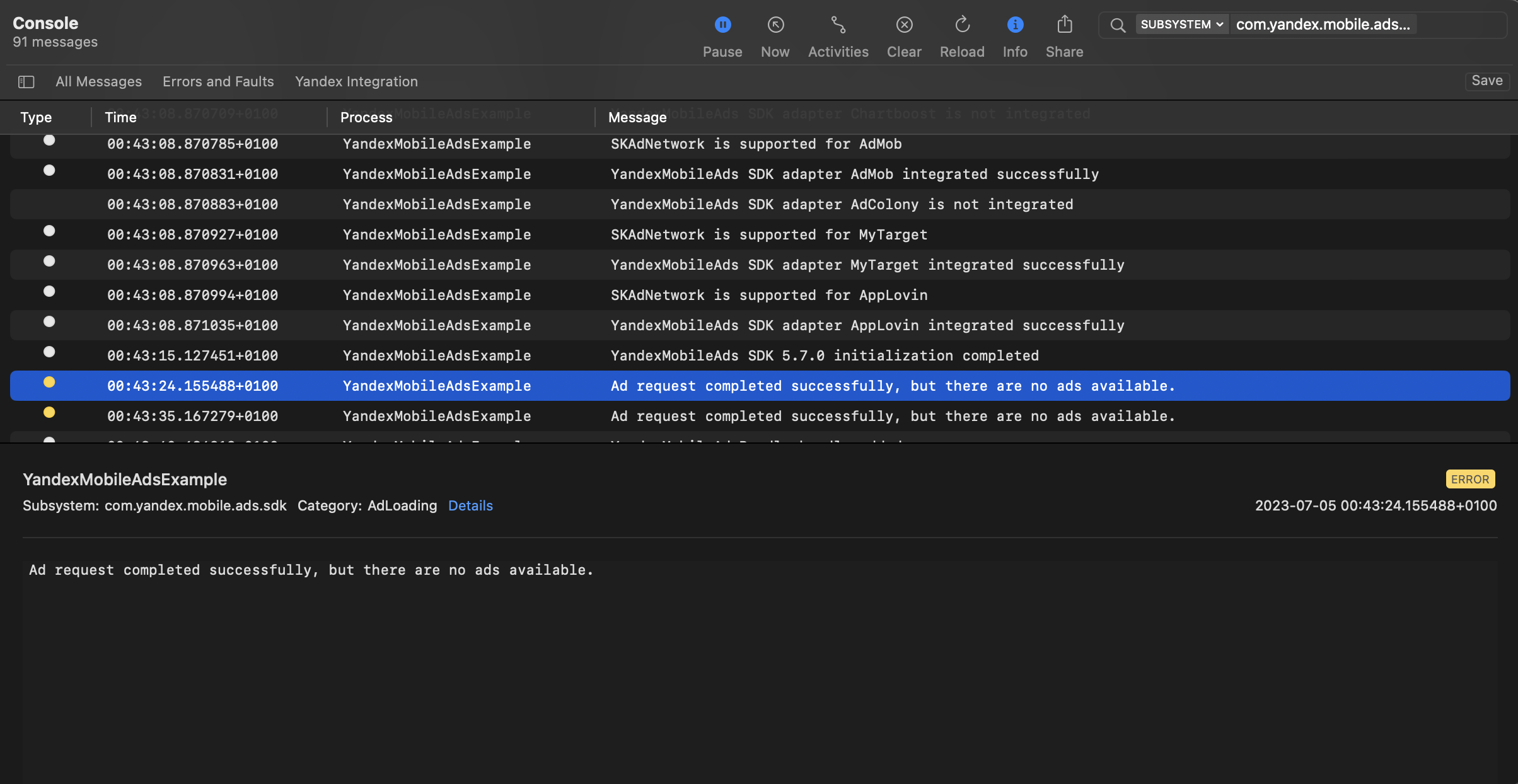
You can test your ad integration using the native Console tool.
To view detailed logs, call the `YandexAds` class's `enableLogging` method.
```swift
YandexAds.enableLogging()
```
To view SDK logs, go to the Console tool and set `Subsystem = com.mobile.ads.ads.sdk`. You can also filter logs by category and error level.
If you're having problems integrating ads, you'll get a detailed report on the issues and recommendations for how to fix them.
 {% endlist %}
## Tips
### Ad preloading
Loading an ad may take several seconds, depending on the number of ad networks connected in mobile mediation and the user's internet speed. We recommend preloading ads before displaying them.
You can call ad loading in the `Awake` method for `gameObject`. Make sure to preserve the object between scenes using the `DontDestroyOnLoad()` call. That ensures the ad that's loaded is not deleted with `gameObject` on scene change.
```c#
private void Awake()
{
SetupLoader();
RequestInterstitial();
DontDestroyOnLoad(gameObject);
}
```
Along with that, you can bind loading of the next ad to the callback functions run when ad show completes or fails. Like this:
```c#
public void HandleInterstitialFailedToShow(object sender, EventArgs args)
{
// Called when an InterstitialAd failed to show.
// Clear resources after Ad dismissed.
DestroyInterstitial();
// Now you can preload the next interstitial ad.
RequestInterstitial();
}
public void HandleInterstitialDismissed(object sender, EventArgs args)
{
// Called when ad is dismissed.
// Clear resources after Ad dismissed.
DestroyInterstitial();
// Now you can preload the next interstitial ad.
RequestInterstitial();
}
```
If you cache ads on too many screens that are unlikely to be shown, your ad effectiveness could drop. For example, if users complete 2-3 game levels per session, you shouldn't cache ads for 6-7 screens. Your ad viewability could decrease otherwise, and the advertising system might deprioritize your app.
To make sure you're finding a good balance for your app, track the "Share of impressions" or "Share of visible impressions" metric in the Yandex Advertising Network interface. If it's under 20%, you should probably revise your caching algorithm. The higher the percentage of impressions, the better.
### Full code example
{% list tabs %}
- async/await
```c#
using System;
using UnityEngine;
using UnityEngine.UI;
using YandexMobileAds;
using YandexMobileAds.Base;
public class YandexMobileAdsInterstitialDemoScript : MonoBehaviour
{
private InterstitialAdLoader interstitialAdLoader;
private Interstitial interstitial;
[SerializeField] private Button button;
private void Awake()
{
SetupLoader();
RequestInterstitial();
DontDestroyOnLoad(gameObject);
button = this.GetComponent
{% endlist %}
## Tips
### Ad preloading
Loading an ad may take several seconds, depending on the number of ad networks connected in mobile mediation and the user's internet speed. We recommend preloading ads before displaying them.
You can call ad loading in the `Awake` method for `gameObject`. Make sure to preserve the object between scenes using the `DontDestroyOnLoad()` call. That ensures the ad that's loaded is not deleted with `gameObject` on scene change.
```c#
private void Awake()
{
SetupLoader();
RequestInterstitial();
DontDestroyOnLoad(gameObject);
}
```
Along with that, you can bind loading of the next ad to the callback functions run when ad show completes or fails. Like this:
```c#
public void HandleInterstitialFailedToShow(object sender, EventArgs args)
{
// Called when an InterstitialAd failed to show.
// Clear resources after Ad dismissed.
DestroyInterstitial();
// Now you can preload the next interstitial ad.
RequestInterstitial();
}
public void HandleInterstitialDismissed(object sender, EventArgs args)
{
// Called when ad is dismissed.
// Clear resources after Ad dismissed.
DestroyInterstitial();
// Now you can preload the next interstitial ad.
RequestInterstitial();
}
```
If you cache ads on too many screens that are unlikely to be shown, your ad effectiveness could drop. For example, if users complete 2-3 game levels per session, you shouldn't cache ads for 6-7 screens. Your ad viewability could decrease otherwise, and the advertising system might deprioritize your app.
To make sure you're finding a good balance for your app, track the "Share of impressions" or "Share of visible impressions" metric in the Yandex Advertising Network interface. If it's under 20%, you should probably revise your caching algorithm. The higher the percentage of impressions, the better.
### Full code example
{% list tabs %}
- async/await
```c#
using System;
using UnityEngine;
using UnityEngine.UI;
using YandexMobileAds;
using YandexMobileAds.Base;
public class YandexMobileAdsInterstitialDemoScript : MonoBehaviour
{
private InterstitialAdLoader interstitialAdLoader;
private Interstitial interstitial;
[SerializeField] private Button button;
private void Awake()
{
SetupLoader();
RequestInterstitial();
DontDestroyOnLoad(gameObject);
button = this.GetComponent