---
metadata:
- name: generator
content: Diplodoc Platform v5.50.6
alternate:
- https://ads.yandex.com/helpcenter/en/dev/unity7/release/6-0-0-migration.md
- https://ads.yandex.com/helpcenter/ru/dev/unity7/release/6-0-0-migration.md
---
> **Documentation Index:** Fetch the complete configuration index at https://ads.yandex.com/helpcenter/en/llms.txt
# Guide for migrating to version 6
Other platforms
{% note warning %}
Make sure to update your used [Yandex Mediation](https://ads.yandex.com/helpcenter/en/dev/unity7/list-network.md) adapters and [adapters for third-party mediation networks](https://ads.yandex.com/helpcenter/en/dev/unity7/third-party-mediation.md) to the latest version. Older versions may cause adapter integration errors that can prevent your ads from being served.
{% endnote %}
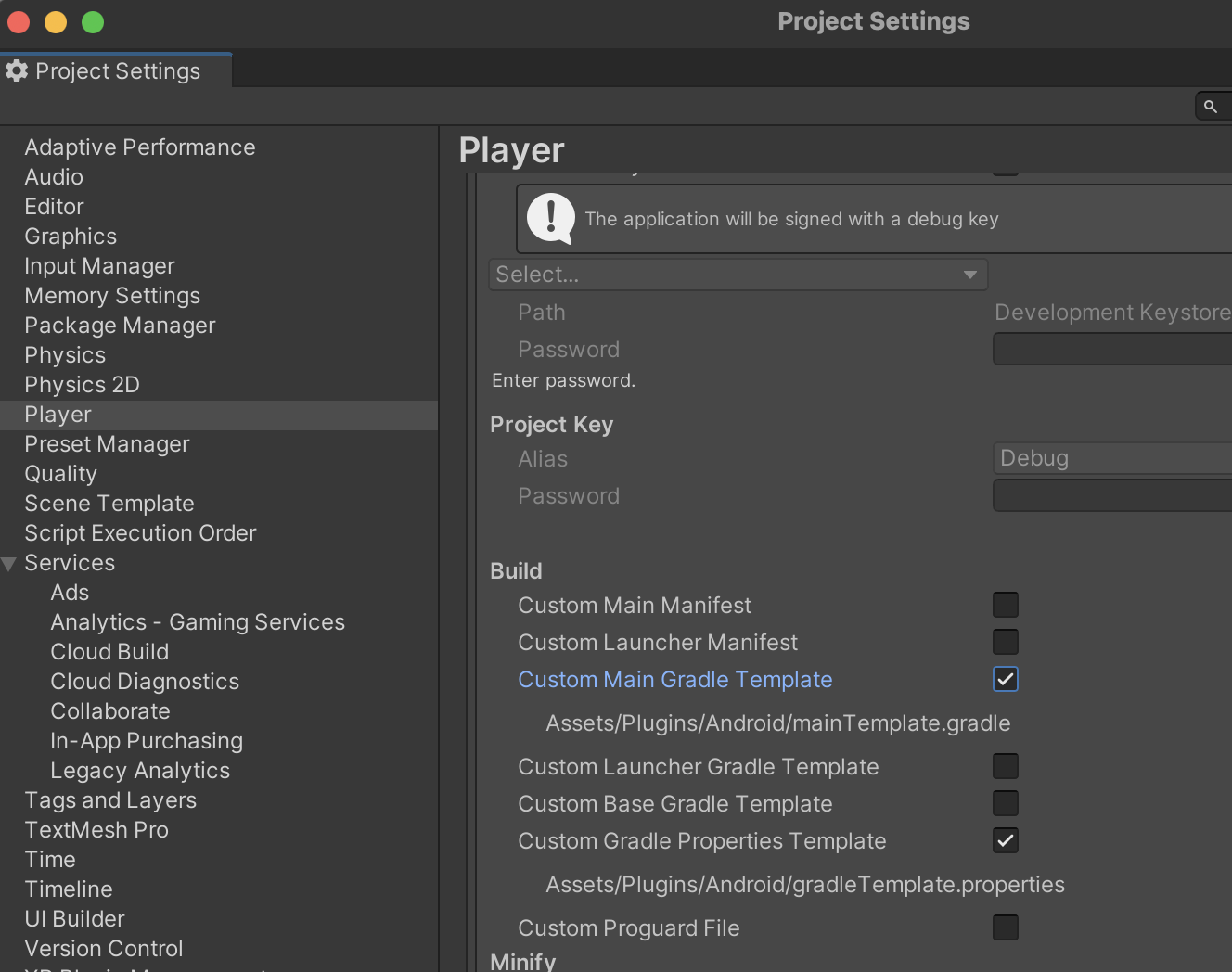
To fix this, enable custom templates for the project you're generating. Go to **Build Settings** → **Player Settings** → **Publishing Settings** → **Build** and enable **Custom Main Gradle Template**.
We recommend that you always use **Custom Main Gradle Template** and **Custom Gradle Properties Template** when building a Unity app to avoid other potential errors.
 ## Banners
Renamed the `AdSize` class to `BannerAdSize`. Removed the `FlexibleSize(int width, int height)` method.
Use methods depending on the ad type:
Use the `BannerAdSize.stickySize(int width)` method to create an adaptive sticky banner.
> That is a small, automatically updated ad placed at the top or bottom of the app screen.
>
> It does not overlap the main app content and is often used in game apps.
>
> The height of a sticky banner is determined automatically, adapting to the screen size of the device and not taking up more than 15% of the screen height.
{% note warning %}
Version 6.0.0 added autorefresh support for adaptive sticky banners.
If you have previously implemented autorefresh for sticky banners, disable it.
{% endnote %}
Use the `BannerAdSize.inlineSize(int width, int maxHeight) method` to create an adaptive inline banner.
> Adaptive inline banners are a flexible format of banner advertising, providing maximum efficiency by optimizing the ad size on each device.
>
> The height of the banner is adjusted automatically and might reach the device screen height.
>
> Typically, that format is used in feed-based apps or contexts where it's okay to focus primarily on the ad.
For backward compatibility, we preserved the `fixedSize(int width, int height)` method, though we don't recommend it. Use `inlineSize(int width, int maxHeight)` or `stickySize(int width)` instead. In SDK 6.1.0, the banner height is calculated automatically and is known before the ad request is sent. You can use this height in your screen layout.
## Rewarded ads
We changed the approach to creating and loading ads. We now provide the `RewardedAdLoader` loader object, which loads the ads, and the `RewardedAd` ad object retrieved from the `OnAdLoaded` ad load event.
To learn more about the new API, see the [SDK reference](https://doc-static.yandex.net/src/support/RSYA-RMP/mobile-ads/ru/unity-docs/namespaces.html).
#|
||
Ad loading
| **SDK 5**
A single object for ad loading and rendering:
```c#
private RewardedAd rewardedAd;
private void RequestRewardedAd()
{
string adUnitId = "demo-rewarded-yandex"; // replace with "R-M-XXXXXX-Y"
rewardedAd = new RewardedAd(adUnitId);
AdRequest request = new AdRequest.Builder().Build();
rewardedAd.LoadAd(request);
}
```
**SDK 6**
`RewardedAdLoader` for loading multiple ads:
```c#
private void SetupLoader()
{
rewardedAdLoader = new RewardedAdLoader();
rewardedAdLoader.OnAdLoaded += HandleRewardedAdLoaded;
rewardedAdLoader.OnAdFailedToLoad += HandleRewardedAdFailedToLoad;
}
private void RequestRewardedAd()
{
string adUnitId = "demo-rewarded-yandex"; // replace with "R-M-XXXXXX-Y"
AdRequestConfiguration adRequestConfiguration = new AdRequestConfiguration.Builder(adUnitId).Build();
rewardedAdLoader.LoadAd(adRequestConfiguration);
}
public void HandleAdLoaded(object sender, RewardedAdLoadedEventArgs args)
{
this.interstitial = args.RewardedAd;
}
public void HandleAdFailedToLoad(object sender, AdFailedToLoadEventArgs args)
{
Debug.Log($"HandleAdFailedToLoad event received with message: {args.Message}");
}
```
||
||
Ad rendering
| **SDK 5**
Before showing the ad, check if the ad was loaded.
```c#
private void ShowRewardedAd()
{
if (rewardedAd != null && rewardedAd.IsLoaded())
{
rewardedAd.Show();
}
}
```
**SDK 6**
You don't need to check to see if the ad is loaded.
```c#
private void ShowRewardedAd()
{
if (rewardedAd != null)
{
rewardedAd.Show();
}
}
```
||
||
Subscribing to ad lifecycle events
| **SDK 5**
All the events arrive in a single `RewardedAd` object.
```c#
rewardedAd.OnRewardedAdLoaded += HandleRewardedAdLoaded;
rewardedAd.OnRewardedAdFailedToLoad += HandleRewardedAdFailedToLoad;
rewardedAd.OnReturnedToApplication += HandleReturnedToApplication;
rewardedAd.OnLeftApplication += HandleLeftApplication;
rewardedAd.OnAdClicked += HandleAdClicked;
rewardedAd.OnRewardedAdShown += HandleRewardedAdShown;
rewardedAd.OnRewardedAdFailedToShow += HandleRewardedAdFailedToShow;
rewardedAd.OnRewardedAdDismissed += HandleRewardedAdDismissed;
rewardedAd.OnImpression += HandleImpression;
rewardedAd.OnRewarded += HandleRewarded;
```
**SDK 6**
Ad loading events arrive in the `RewardedAdLoader` object, while ad rendering events arrive in the `RewardedAd` object.
Unified the event names. Removed the `OnLeftApplication` and `OnReturnedToApplication` events.
```c#
rewardedAdLoader.OnAdLoaded += HandleRewardedAdLoaded;
rewardedAdLoader.OnAdFailedToLoad += HandleRewardedAdFailedToLoad;
// ...
rewardedAd.OnAdClicked += HandleAdClicked;
rewardedAd.OnAdShown += HandleRewardedAdShown;
rewardedAd.OnAdFailedToShow += HandleRewardedAdFailedToShow;
rewardedAd.OnAdDismissed += HandleRewardedAdDismissed;
rewardedAd.OnAdImpression += HandleImpression;
rewardedAd.OnRewarded += HandleRewarded;
```
||
|#
## Interstitial advertising
We changed the approach to creating and loading ads. We now provide the `InterstitialAdLoader` loader object, which loads the ads, and the `Interstitial` ad object retrieved from the `OnAdLoaded` ad load event.
To learn more about the new API, see the [SDK reference](https://doc-static.yandex.net/src/support/RSYA-RMP/mobile-ads/ru/unity-docs/namespaces.html).
#|
||
Ad loading
| **SDK 5**
A single object for ad loading and rendering:
```c#
private Interstitial interstitial;
private void RequestInterstitial()
{
string adUnitId = "demo-interstitial-yandex"; // replace with "R-M-XXXXXX-Y"
interstitial = new Interstitial(adUnitId);
AdRequest request = new AdRequest.Builder().Build();
interstitial.LoadAd(request);
}
```
**SDK 6**
`InterstitialAdLoader` for loading multiple ads.
```c#
private void SetupLoader()
{
interstitialAdLoader = new InterstitialAdLoader();
interstitialAdLoader.OnAdLoaded += HandleInterstitialLoaded;
interstitialAdLoader.OnAdFailedToLoad += HandleInterstitialFailedToLoad;
}
private void RequestInterstitial()
{
string adUnitId = "demo-interstitial-yandex"; // replace with "R-M-XXXXXX-Y"
AdRequestConfiguration adRequestConfiguration = new AdRequestConfiguration.Builder(adUnitId).Build();
interstitialAdLoader.LoadAd(adRequestConfiguration);
}
```
||
||
Ad rendering
| **SDK 5**
Before showing the ad, see if it loaded.
```c#
private void ShowInterstitial()
{
if (interstitial != null && interstitial.IsLoaded())
{
interstitial.Show();
}
}
```
**SDK 6**
You don't need to check to see if the ad is loaded.
```c#
private void ShowInterstitial()
{
if (interstitial != null)
{
interstitial.Show();
}
}
```
||
||
Subscribing to ad lifecycle events
| **SDK 5**
All the events arrive in a single `Interstitial` object.
```c#
interstitial.OnInterstitialLoaded += HandleInterstitialLoaded;
interstitial.OnInterstitialFailedToLoad += HandleInterstitialFailedToLoad;
interstitial.OnReturnedToApplication += HandleReturnedToApplication;
interstitial.OnLeftApplication += HandleLeftApplication;
interstitial.OnAdClicked += HandleAdClicked;
interstitial.OnInterstitialShown += HandleInterstitialShown;
interstitial.OnInterstitialFailedToShow += HandleInterstitialFailedToShow;
interstitial.OnInterstitialDismissed += HandleInterstitialDismissed;
interstitial.OnImpression += HandleImpression;
```
**SDK 6**
Ad loading events arrive in the `InterstitialAdLoader` object, while ad rendering events arrive in the `Interstitial` object.
Unified the event names. Removed the `OnLeftApplication` and `OnReturnedToApplication` events.
```c#
interstitialAdLoader.OnAdLoaded += HandleInterstitialLoaded;
interstitialAdLoader.OnAdFailedToLoad += HandleInterstitialFailedToLoad;
// ...
interstitial.OnAdClicked += HandleAdClicked;
interstitial.OnAdShown += HandleInterstitialShown;
interstitial.OnAdFailedToShow += HandleInterstitialFailedToShow;
interstitial.OnAdDismissed += HandleInterstitialDismissed;
interstitial.OnAdImpression += HandleImpression;
```
||
|#
## App open ad
Added a new ad format: app open ad. To learn more, see [App open ads](https://ads.yandex.com/helpcenter/en/dev/unity7/app-open-ad.md)
## Yandex Mediation
{% note warning %}
Make sure to update your used [Yandex Mediation](https://ads.yandex.com/helpcenter/en/dev/unity7/list-network.md) adapters and [adapters for third-party mediation networks](https://ads.yandex.com/helpcenter/en/dev/unity7/third-party-mediation.md) to the latest version. Older versions may cause adapter integration errors that can prevent your ads from being served.
{% endnote %}
We renamed the package `mobileads-admob-mediation-2.9.0.unitypackage` as `mobileads-google-mediation-6.0.0.unitypackage`.
If you use the standardized mediation build, you don't have to do anything. If you're adding adapters manually, remove the old package before adding the new one.
Here you can find the complete examples for integrations:
*
Link to [GitHub](https://github.com/yandexmobile/yandex-ads-unity-plugin).
## Banners
Renamed the `AdSize` class to `BannerAdSize`. Removed the `FlexibleSize(int width, int height)` method.
Use methods depending on the ad type:
Use the `BannerAdSize.stickySize(int width)` method to create an adaptive sticky banner.
> That is a small, automatically updated ad placed at the top or bottom of the app screen.
>
> It does not overlap the main app content and is often used in game apps.
>
> The height of a sticky banner is determined automatically, adapting to the screen size of the device and not taking up more than 15% of the screen height.
{% note warning %}
Version 6.0.0 added autorefresh support for adaptive sticky banners.
If you have previously implemented autorefresh for sticky banners, disable it.
{% endnote %}
Use the `BannerAdSize.inlineSize(int width, int maxHeight) method` to create an adaptive inline banner.
> Adaptive inline banners are a flexible format of banner advertising, providing maximum efficiency by optimizing the ad size on each device.
>
> The height of the banner is adjusted automatically and might reach the device screen height.
>
> Typically, that format is used in feed-based apps or contexts where it's okay to focus primarily on the ad.
For backward compatibility, we preserved the `fixedSize(int width, int height)` method, though we don't recommend it. Use `inlineSize(int width, int maxHeight)` or `stickySize(int width)` instead. In SDK 6.1.0, the banner height is calculated automatically and is known before the ad request is sent. You can use this height in your screen layout.
## Rewarded ads
We changed the approach to creating and loading ads. We now provide the `RewardedAdLoader` loader object, which loads the ads, and the `RewardedAd` ad object retrieved from the `OnAdLoaded` ad load event.
To learn more about the new API, see the [SDK reference](https://doc-static.yandex.net/src/support/RSYA-RMP/mobile-ads/ru/unity-docs/namespaces.html).
#|
||
Ad loading
| **SDK 5**
A single object for ad loading and rendering:
```c#
private RewardedAd rewardedAd;
private void RequestRewardedAd()
{
string adUnitId = "demo-rewarded-yandex"; // replace with "R-M-XXXXXX-Y"
rewardedAd = new RewardedAd(adUnitId);
AdRequest request = new AdRequest.Builder().Build();
rewardedAd.LoadAd(request);
}
```
**SDK 6**
`RewardedAdLoader` for loading multiple ads:
```c#
private void SetupLoader()
{
rewardedAdLoader = new RewardedAdLoader();
rewardedAdLoader.OnAdLoaded += HandleRewardedAdLoaded;
rewardedAdLoader.OnAdFailedToLoad += HandleRewardedAdFailedToLoad;
}
private void RequestRewardedAd()
{
string adUnitId = "demo-rewarded-yandex"; // replace with "R-M-XXXXXX-Y"
AdRequestConfiguration adRequestConfiguration = new AdRequestConfiguration.Builder(adUnitId).Build();
rewardedAdLoader.LoadAd(adRequestConfiguration);
}
public void HandleAdLoaded(object sender, RewardedAdLoadedEventArgs args)
{
this.interstitial = args.RewardedAd;
}
public void HandleAdFailedToLoad(object sender, AdFailedToLoadEventArgs args)
{
Debug.Log($"HandleAdFailedToLoad event received with message: {args.Message}");
}
```
||
||
Ad rendering
| **SDK 5**
Before showing the ad, check if the ad was loaded.
```c#
private void ShowRewardedAd()
{
if (rewardedAd != null && rewardedAd.IsLoaded())
{
rewardedAd.Show();
}
}
```
**SDK 6**
You don't need to check to see if the ad is loaded.
```c#
private void ShowRewardedAd()
{
if (rewardedAd != null)
{
rewardedAd.Show();
}
}
```
||
||
Subscribing to ad lifecycle events
| **SDK 5**
All the events arrive in a single `RewardedAd` object.
```c#
rewardedAd.OnRewardedAdLoaded += HandleRewardedAdLoaded;
rewardedAd.OnRewardedAdFailedToLoad += HandleRewardedAdFailedToLoad;
rewardedAd.OnReturnedToApplication += HandleReturnedToApplication;
rewardedAd.OnLeftApplication += HandleLeftApplication;
rewardedAd.OnAdClicked += HandleAdClicked;
rewardedAd.OnRewardedAdShown += HandleRewardedAdShown;
rewardedAd.OnRewardedAdFailedToShow += HandleRewardedAdFailedToShow;
rewardedAd.OnRewardedAdDismissed += HandleRewardedAdDismissed;
rewardedAd.OnImpression += HandleImpression;
rewardedAd.OnRewarded += HandleRewarded;
```
**SDK 6**
Ad loading events arrive in the `RewardedAdLoader` object, while ad rendering events arrive in the `RewardedAd` object.
Unified the event names. Removed the `OnLeftApplication` and `OnReturnedToApplication` events.
```c#
rewardedAdLoader.OnAdLoaded += HandleRewardedAdLoaded;
rewardedAdLoader.OnAdFailedToLoad += HandleRewardedAdFailedToLoad;
// ...
rewardedAd.OnAdClicked += HandleAdClicked;
rewardedAd.OnAdShown += HandleRewardedAdShown;
rewardedAd.OnAdFailedToShow += HandleRewardedAdFailedToShow;
rewardedAd.OnAdDismissed += HandleRewardedAdDismissed;
rewardedAd.OnAdImpression += HandleImpression;
rewardedAd.OnRewarded += HandleRewarded;
```
||
|#
## Interstitial advertising
We changed the approach to creating and loading ads. We now provide the `InterstitialAdLoader` loader object, which loads the ads, and the `Interstitial` ad object retrieved from the `OnAdLoaded` ad load event.
To learn more about the new API, see the [SDK reference](https://doc-static.yandex.net/src/support/RSYA-RMP/mobile-ads/ru/unity-docs/namespaces.html).
#|
||
Ad loading
| **SDK 5**
A single object for ad loading and rendering:
```c#
private Interstitial interstitial;
private void RequestInterstitial()
{
string adUnitId = "demo-interstitial-yandex"; // replace with "R-M-XXXXXX-Y"
interstitial = new Interstitial(adUnitId);
AdRequest request = new AdRequest.Builder().Build();
interstitial.LoadAd(request);
}
```
**SDK 6**
`InterstitialAdLoader` for loading multiple ads.
```c#
private void SetupLoader()
{
interstitialAdLoader = new InterstitialAdLoader();
interstitialAdLoader.OnAdLoaded += HandleInterstitialLoaded;
interstitialAdLoader.OnAdFailedToLoad += HandleInterstitialFailedToLoad;
}
private void RequestInterstitial()
{
string adUnitId = "demo-interstitial-yandex"; // replace with "R-M-XXXXXX-Y"
AdRequestConfiguration adRequestConfiguration = new AdRequestConfiguration.Builder(adUnitId).Build();
interstitialAdLoader.LoadAd(adRequestConfiguration);
}
```
||
||
Ad rendering
| **SDK 5**
Before showing the ad, see if it loaded.
```c#
private void ShowInterstitial()
{
if (interstitial != null && interstitial.IsLoaded())
{
interstitial.Show();
}
}
```
**SDK 6**
You don't need to check to see if the ad is loaded.
```c#
private void ShowInterstitial()
{
if (interstitial != null)
{
interstitial.Show();
}
}
```
||
||
Subscribing to ad lifecycle events
| **SDK 5**
All the events arrive in a single `Interstitial` object.
```c#
interstitial.OnInterstitialLoaded += HandleInterstitialLoaded;
interstitial.OnInterstitialFailedToLoad += HandleInterstitialFailedToLoad;
interstitial.OnReturnedToApplication += HandleReturnedToApplication;
interstitial.OnLeftApplication += HandleLeftApplication;
interstitial.OnAdClicked += HandleAdClicked;
interstitial.OnInterstitialShown += HandleInterstitialShown;
interstitial.OnInterstitialFailedToShow += HandleInterstitialFailedToShow;
interstitial.OnInterstitialDismissed += HandleInterstitialDismissed;
interstitial.OnImpression += HandleImpression;
```
**SDK 6**
Ad loading events arrive in the `InterstitialAdLoader` object, while ad rendering events arrive in the `Interstitial` object.
Unified the event names. Removed the `OnLeftApplication` and `OnReturnedToApplication` events.
```c#
interstitialAdLoader.OnAdLoaded += HandleInterstitialLoaded;
interstitialAdLoader.OnAdFailedToLoad += HandleInterstitialFailedToLoad;
// ...
interstitial.OnAdClicked += HandleAdClicked;
interstitial.OnAdShown += HandleInterstitialShown;
interstitial.OnAdFailedToShow += HandleInterstitialFailedToShow;
interstitial.OnAdDismissed += HandleInterstitialDismissed;
interstitial.OnAdImpression += HandleImpression;
```
||
|#
## App open ad
Added a new ad format: app open ad. To learn more, see [App open ads](https://ads.yandex.com/helpcenter/en/dev/unity7/app-open-ad.md)
## Yandex Mediation
{% note warning %}
Make sure to update your used [Yandex Mediation](https://ads.yandex.com/helpcenter/en/dev/unity7/list-network.md) adapters and [adapters for third-party mediation networks](https://ads.yandex.com/helpcenter/en/dev/unity7/third-party-mediation.md) to the latest version. Older versions may cause adapter integration errors that can prevent your ads from being served.
{% endnote %}
We renamed the package `mobileads-admob-mediation-2.9.0.unitypackage` as `mobileads-google-mediation-6.0.0.unitypackage`.
If you use the standardized mediation build, you don't have to do anything. If you're adding adapters manually, remove the old package before adding the new one.
Here you can find the complete examples for integrations:
*
Link to [GitHub](https://github.com/yandexmobile/yandex-ads-unity-plugin).