Improving resource quality
The quality of your resource directly affects its ad revenue, with impressions on high-quality platforms yielding higher returns. To enhance your platform, focus on optimizing the ad-to-content ratio, refining ad unit placement, minimizing misclicks, and monitoring traffic sources.
Warning
When following these recommendations, please consider the Rules of participation in the Yandex Advertising Network and the technical requirements for placing ad units and serving ads.
What affects quality
1. Content, user experience, and ad balance
Create useful, relevant content and design your app's structure and navigation so users can quickly find what they need and effortlessly engage with your resource.
Maintain a good balance between content and advertising. Ad units shouldn't be intrusive or visually dominate over the app's main content — remember that users come for the content first. If your resource has excessive advertising, it may be rejected during moderation until the issues are fixed.
However, ads shouldn't be too subtle either. They should blend naturally into the screen structure, remain noticeable to users, and stay effective.
2. Ad unit placement
Your ads shouldn't interfere with the main content or hinder user experience. Make sure that:
- Ad units appear on the screen correctly and don't overlap UI elements.
- Ads don't camouflage as the app's main content.
- Ad units aren't positioned in a way that could cause misclicks.
- Ad loading doesn't slow down your resource.
- Ads don't shift content when loading. If an ad appears with a delay, a user might accidentally click instead of the intended element. Use ad preloading and allocate a fixed-size space for the ad unit.
Choose formats that best fit your screen layout and how users interact with your app. For recommendations on how to set up ad units for each ad format, see Ad units.
3. Misclicks
A misclick is an unintentional click on an ad. Misclicks typically happen due to poor ad unit placement or an unusual app layout.
For example, a user might try to tap a button or open another screen, but end up tapping an ad instead. In this case, they land on the advertiser's site with no interest in the promotional offer and may immediately close the page or go back without completing a conversion.
The following ad unit placement mistakes can cause misclicks:
-
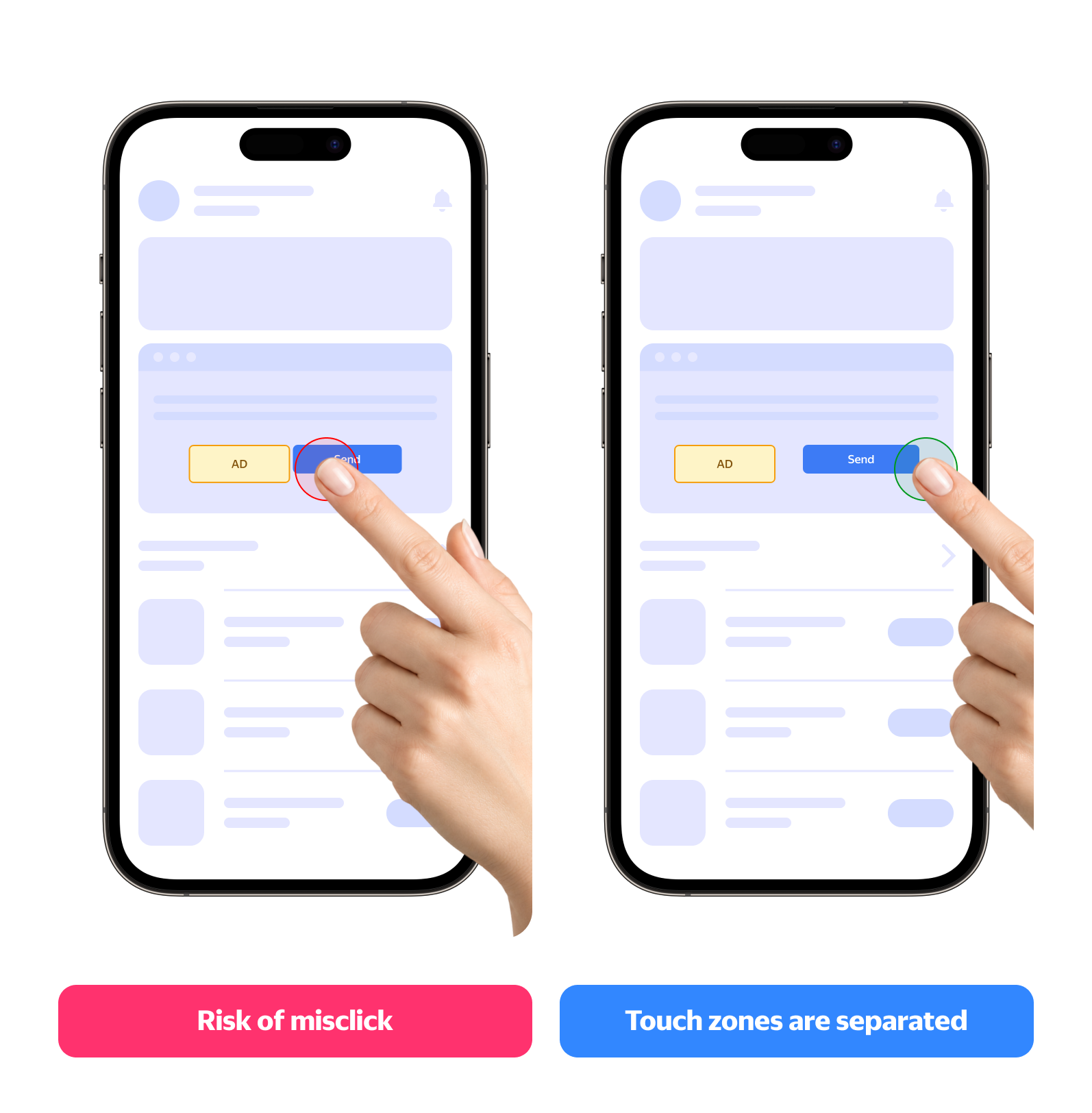
Ad unit is too close to buttons, input fields, or navigation elements, with their interactive areas overlapping:
-
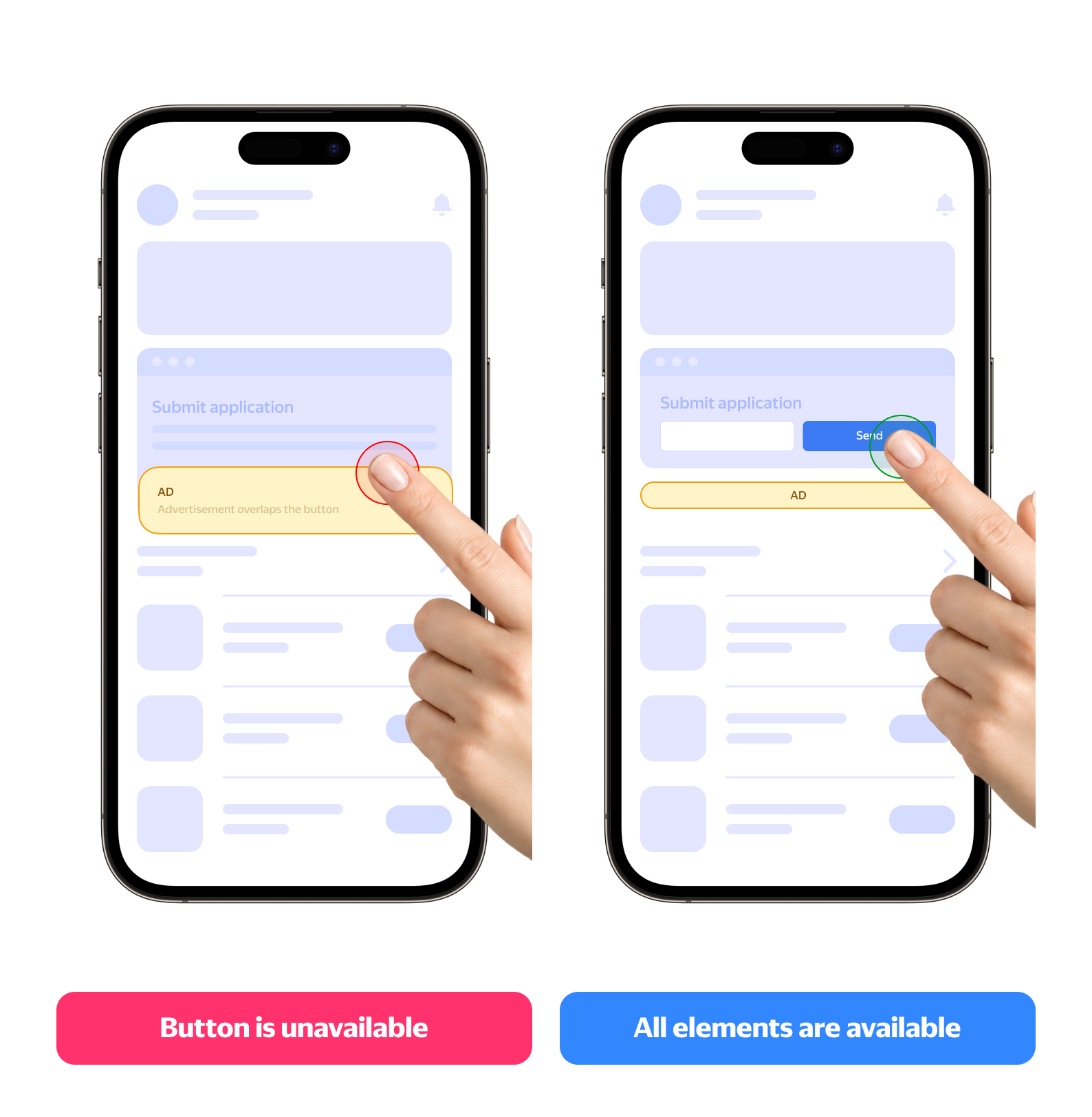
Ads cover buttons, forms, modal windows, or other UI elements:
-
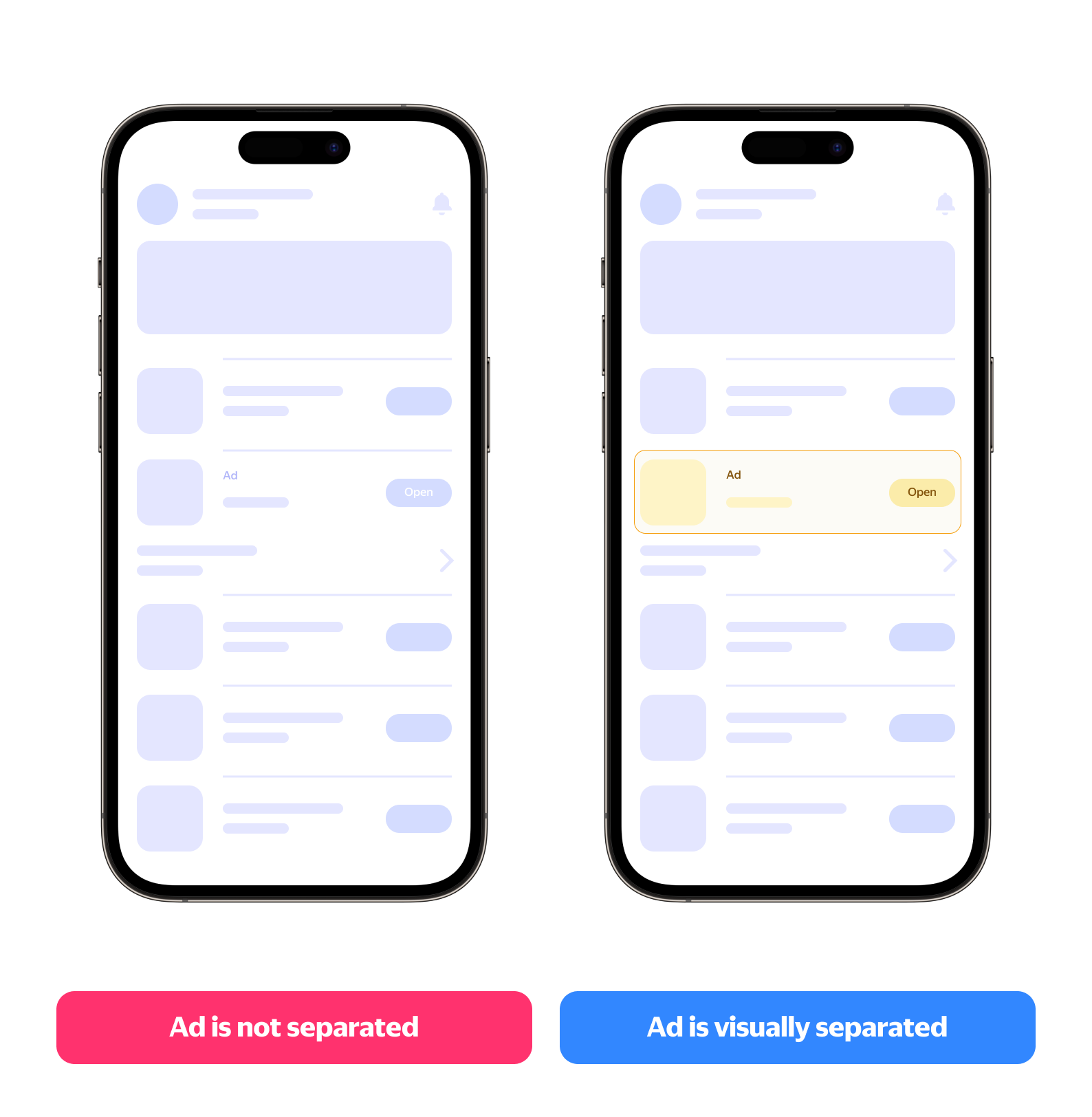
Ads visually resemble buttons, links, or other UI elements:
A high volume of misclicks can lead to:
- Decreased resource quality. Misclicks don't reflect genuine user interest in ads and can result in low post-click engagement and conversion rates.
- Reduced advertiser interest. Misclicks can negatively impact traffic quality and raise concerns among advertisers. As a result, advertisers might blacklist your platform and exclude it from their campaigns.
- Lower cost per 1000 impressions (CPM) and revenue. Low click effectiveness can reduce the cost of ad impressions and lower your platform's overall revenue.
A high CTR doesn't necessarily indicate good ad unit placement: some clicks may be accidental.
How to check if your placement contributes to misclicks
Check every screen where you display ads:
- See if the ad units' interactive areas overlap with any interface elements such as buttons, input fields, or navigation.
- Make sure ads don't pop up when the user is about to convert.
- Test how your ad units look across different screen sizes and in both orientations
- Look for ad units with a significantly higher click share than the rest: an abnormally high CTR may indicate misclicks.
To analyze user behavior, A/B test different ad densities and choose the optimal option.
After adjusting your placements, compare the CTR, CPM, and revenue over comparable periods before and after the changes, accounting for the traffic volume and composition. A decrease in CTR after eliminating the cause of misclicks doesn't mean your ad placement has gotten worse.
4. Traffic sources and quality
A resource's quality depends on how well the traffic you attract aligns with the app's content and user interests. Track where users come from and how they interact with your resource. Analyze install sources, including ad campaigns, app stores, and partner networks.
Be sure to regularly check:
- Traffic volume by source. Investigate the reasons for sharp spikes in installs and session count and note any new sources.
- User behavior. Compare the session duration and retention rate across acquisition channels. Consider the purpose of each screen and the user's goals.
- Robot activity and incentivized traffic. Note any suspicious changes in user activity and compare statistics across different acquisition sources.
For your analysis, use the AppMetrica reports on traffic sources and user acquisition.
If the quality of your resource keeps declining, it may be blocked. In this case, improve traffic quality, user metrics, and ad unit integration before resubmitting for moderation.
To learn more about the reasons for resource blocking and the remoderation terms, see Why might the Yandex Advertising Network reject my application?.
How traffic quality affects ad unit performance
Yandex considers the share of ad unit clicks that result in bounces on advertiser sites. You can't track this metric yourself, so it's important to monitor the quality of traffic sources, assess your ad unit placements, and take measures to prevent misclicks.
Fraud risks
Be cautious of promises of guaranteed revenue or artificial growth in impressions, clicks, and CTR. Such offers often rely on prohibited methods that violate the Rules of participation and may get your domain and account permanently blocked in the Yandex Advertising Network with no right to appeal for recovery.
Before partnering with anyone, check whether the company is a certified seller Yandex Advertising Network and what changes it proposes to increase revenue.
Common fraud scenario:
- A little-known company suggests embedding third-party ad unit code in your resource.
- After installation, it starts generating non-genuine traffic and fraudulent ad clicks.
- The Yandex Advertising Network blocks your resource for violating its rules.
Don't integrate any tools unless you know how they work and what purpose they serve, and don't grant access to your ad settings to unverified parties. Any risks and financial losses incurred due to using fraudulent schemes are the resource owner's liability.
If you receive a suspicious offer, please let our support service know. This helps us detect and prevent fraudulent schemes.