Yandex Mediation
Yandex Mediation is a free platform that allows you to display ads from multiple ad networks (demand platforms) in your mobile app. Each advertising network offers ads for display, and Yandex Mediation automatically selects the highest-paying ad for the publisher.
Advantages Yandex Mediation
- The more advertising networks, the higher the chances that a suitable ad will be found for the placement.
- The best offer is selected out of all the available offers.
- Connecting to international advertising networks allows you to show relevant ads to users from different countries.
Yandex Mediation is available to iOS and Android app owners. By default, the Yandex Advertising Network is enabled as one of your available advertising networks. You can also configure impressions from other advertising networks:
- AppLovin
- BIGO Ads
- Chartboost
- Digital Turbine (ex. AdColony)
- Google AdMob
- InMobi
- IronSource
- Liftoff (ex. Vungle)
- Mintegral
- Pangle
- Start.io
- Tapjoy
- Unity Ads
- VK Ads (ex. myTarget)
- AppLovin
- BIGO Ads
- Chartboost
- Digital Turbine (ex. AdColony)
- Google AdMob
- InMobi
- IronSource
- Liftoff (ex. Vungle)
- Mintegral
- Start.io
- Unity Ads
- VK Ads (ex. myTarget)
How it works
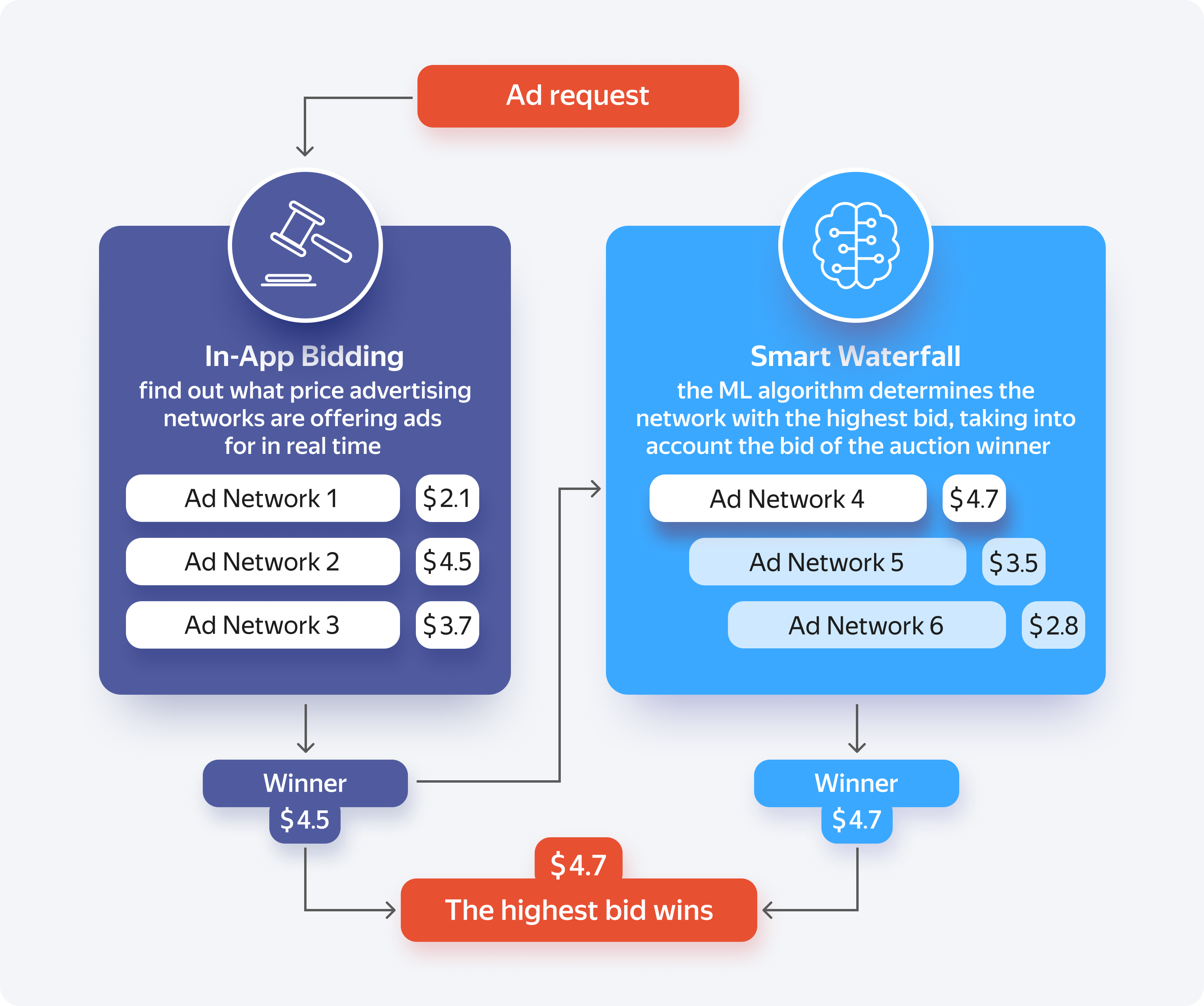
When a user navigates to an ad screen, the app sends a request to Yandex Mediation. The platform then determines which ad from which ad network will bring the most revenue when displayed.
For networks that use In-App Bidding, Yandex Mediation requests bids directly from all networks in parallel.
Advertising networks connected via a Smart Waterfall also compete for impressions. After the bidding networks respond, the ML algorithm predicts whether other networks can offer higher bids:
- If the algorithm determines that it's possible, Yandex Mediation sends an ad request to the network.
- Otherwise, it immediately serves the most profitable ad from the bidding network.
For a list of ad networks that support In-App Bidding or Smart Waterfall, see the Advertising sources section.
Payments
Yandex Mediation doesn't consolidate payouts from other ad networks. This means that you receive advertising revenue from other ad networks directly from them.
Partners receive earnings from Yandex Advertising Network when their revenue reaches a certain threshold. The threshold depends on the form of partnership and your country of residence. For more information about payouts, see Terms of participation, documents, and payouts.
If you want to receive revenue from all ad networks as a single payment, we suggest you try Easy Monetization.
Yandex Mediation vs. Easy Monetization
Yandex Mediation gives app owners more control over monetization but requires more effort and expertise. With Easy Monetization, our team of experts handles your in-app ads for you.
When managing ads on their own, the app owner:
- Determines which ad networks to connect to the app.
- Registers with all ad networks.
- Configures ad units for all ad networks.
- Defines and configures thresholds for the mediation system.
- Monitors ad effectiveness and updates the settings.
- Waits until the minimum payout threshold is reached for each ad network.
Here's what Easy Monetization can do for you:
- Take full care of the monetization setup.
- Create a single account to manage all ad networks.
- Pay the revenue in a single payment.
- Recommend new ad placements in the app.
Statistics
To build a Yandex Mediation report:
- Go to Statistics.
- Change the statistics level: instead of YAN, select Mobile Mediation in the drop-down list to the left.
- Build a report based on a template or create a new report following the instructions.
By default, Yandex Mediation reports show estimated revenue in a given currency and in rubles, broken down by day, demand platform, ad placement, and ad type. Revenue is calculated using impression data and the CPM floors set for the ad units of connected ad networks.
For some ad networks, you can set up the collection of statistics directly from your external ad network account, enabling the reports Yandex Advertising Network to display accurate impression and revenue data for the selected network. For more information about Yandex Mediation reports, see Yandex Mediation statistics.
