적응형 스티키 배너
앱 화면 상단이나 하단에 배치되는 작고 자동으로 갱신되는 광고입니다. 주요 앱 콘텐츠를 가리지 않으며 게임 앱에서 자주 사용됩니다.
적응형 스티키 배너는 기기마다 광고 크기를 최적화해 최대 효율을 냅니다. 이 광고 유형을 사용하면 개발자가 광고의 최대 허용 너비를 설정할 수 있으며, 최적 광고 크기는 여전히 자동으로 결정됩니다. 적응형 스티키 배너의 높이는 화면 높이의 15%를 넘지 않아야 합니다.
표시 예
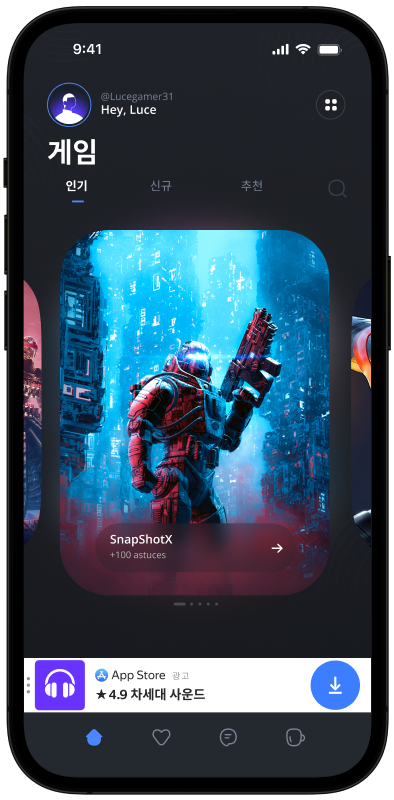
이 가이드는 Android 앱에 적응형 스티키 배너를 연동하는 과정을 다룹니다. 코드 예시와 설명 외에도 형식별 권장 사항과 추가 자료 링크를 포함합니다.
사전 요구 사항
- 빠른 시작에 설명된 SDK 통합 단계를 따릅니다.
- 미리 광고 SDK를 초기화합니다.
- Yandex Mobile Ads SDK의 최신 버전을 사용 중인지 확인합니다. 미디에이션을 사용하는 경우 통합 빌드도 최신 버전인지 확인합니다.
구현
적응형 스티키 배너 연동의 주요 단계:
- 배너 광고를 표시할 뷰를 만들고 설정합니다.
- 콜백 리스너를 등록합니다.
- 광고를 로드합니다.
- Adfox를 사용하는 경우 추가 설정을 전달합니다.
적응형 스티키 배너 연동의 특징
-
Yandex Mobile Ads SDK 메서드 호출은 모두 메인 스레드에서 수행해야 합니다.
-
onAdFailedToLoad()콜백에서 오류가 나면 바로 새 광고를 다시 로드하지 마세요. 부득이하면 광고 로드 재시도 횟수를 제한하세요. 제한이 있을 때 반복적인 실패 요청과 연결 문제를 줄이는 데 도움이 됩니다. -
적응형 스티키 배너는 사용 가능한 전체 너비를 쓸 때 가장 잘 동작합니다. 대부분 기기 화면의 전체 너비입니다. 앱에 설정된 패딩과 디스플레이 안전 영역을 반드시 고려하세요.
-
광고 크기는
BannerAdSize.stickySize(context, adWidth)메서드로 구합니다. 인자로 컨텍스트와 광고 컨테이너의 사용 가능한 너비를 넘깁니다. -
미디에이션을 사용하는 경우 초기화가 완료된 뒤 스티키 배너 크기를 계산할 것을 강력히 권장합니다. 초기화가 끝나기 전에는 예비 크기만 제공되며, 정확한 설정을 받은 후 변경될 수 있습니다.
-
BannerAdSize.stickySize(context, adWidth)로 계산한BannerAdSize객체에 들어 있는 광고 너비·높이 값은 동일 기기에서는 일관됩니다. 특정 기기에서 앱 레이아웃을 테스트할 때 해당 기기의 광고 크기는 변하지 않는다고 보면 됩니다. -
적응형 스티키 배너의 높이는 화면 높이의 15%를 넘지 않으며, 50 dp 미만이 될 수 없습니다.
앱 레이아웃에 광고 뷰 추가
배너 광고를 표시하려면 앱 레이아웃에 BannerAdView를 추가합니다. 프로그래밍 방식이나 XML로 추가할 수 있습니다.
앱 화면 레이아웃에 BannerAdView를 추가하는 예:
# activity.xml
...
<com.yandex.mobile.ads.banner.BannerAdView
        android:id="@+id/ad_container_view"
        android:layout_width="match_parent"
        android:layout_height="wrap_content"
        app:layout_constraintBottom_toBottomOf="parent" />
...
프로그래밍 방식으로 BannerAdView 인스턴스를 만들 수도 있습니다.
val bannerAd = BannerAdView(this)
final BannerAdView bannerAd = new BannerAdView(this);
광고 로드 및 렌더링
BannerAdView를 만들어 앱 화면에 추가한 뒤에는 광고를 로드해야 합니다. 적응형 스티키 배너를 로드하기 전에 기기마다 광고 크기를 계산합니다.
이 작업은 SDK API 메서드 BannerAdSize.stickySize(context, adWidth)로 자동 수행됩니다.
인자로 컨텍스트와 광고 컨테이너에 허용되는 최대 너비를 넘깁니다. 기기 화면 전체 너비나 부모 컨테이너 너비를 쓰는 것을 권장합니다. 앱에 설정된 패딩과 디스플레이 안전 영역을 반드시 고려하세요.
private val adSize: BannerAdSize
    get() {
        // Calculate the width of the ad, taking into account the padding in the ad container.
        var adWidthPixels = binding.adContainerView.width
        if (adWidthPixels == 0) {
            // If the ad hasn't been laid out, default to the full screen width
            adWidthPixels = resources.displayMetrics.widthPixels
        }
        val adWidth = (adWidthPixels / resources.displayMetrics.density).roundToInt()

        return BannerAdSize.stickySize(this, adWidth)
    }
@NonNull
private BannerAdSize getAdSize() {
    final DisplayMetrics displayMetrics = getResources().getDisplayMetrics();
    // Calculate the width of the ad, taking into account the padding in the ad container.
    int adWidthPixels = mBinding.adContainerView.getWidth();
    if (adWidthPixels == 0) {
        // If the ad hasn't been laid out, default to the full screen width
        adWidthPixels = displayMetrics.widthPixels;
    }
    final int adWidth = Math.round(adWidthPixels / displayMetrics.density);

    return BannerAdSize.stickySize(this, adWidth);
}
광고를 로드하려면 Activity 컨텍스트와 Yandex Advertising Network 인터페이스에서 받은 광고 단위 ID(adUnitId)가 필요합니다.
로드 성공·실패 알림과 적응형 스티키 배너의 수명 주기 이벤트를 추적하려면 BannerAdView 인스턴스에 BannerAdEventListener 콜백 리스너를 설정합니다.
AdRequest.Builder() 클래스로 사용자 관심사, 페이지 컨텍스트, 위치 등 추가 정보를 광고 요청에 포함해 매개변수를 확장할 수 있습니다. 요청에 컨텍스트를 더하면 광고 품질이 크게 좋아질 수 있습니다. 자세한 내용은 광고 타기팅을 참고하세요.
아래 예시는 적응형 스티키 배너를 로드하는 방법을 보여 줍니다. 로드가 끝나면 배너가 자동으로 표시됩니다.
class StickyBannerAdActivity : AppCompatActivity(R.layout.activity_sticky_banner_ad) {
    private var bannerAd: BannerAdView? = null
    private lateinit var binding: ActivityStickyBannerAdBinding

    private val adSize: BannerAdSize
        get() {
            // Calculate the width of the ad, taking into account the padding in the ad container.
            var adWidthPixels = binding.adContainerView.width
            if (adWidthPixels == 0) {
                // If the ad hasn't been laid out, default to the full screen width
                adWidthPixels = resources.displayMetrics.widthPixels
            }
            val adWidth = (adWidthPixels / resources.displayMetrics.density).roundToInt()

            return BannerAdSize.stickySize(this, adWidth)
        }

    override fun onCreate(savedInstanceState: Bundle?) {
        super.onCreate(savedInstanceState)
        binding = ActivityStickyBannerAdBinding.inflate(layoutInflater)
        setContentView(binding.root)

        // Since we're loading the banner based on the adContainerView size,
        // we need to wait until this view is laid out before we can get the width
        binding.adContainerView.viewTreeObserver.addOnGlobalLayoutListener(object :
            ViewTreeObserver.OnGlobalLayoutListener {
            override fun onGlobalLayout() {
                binding.adContainerView.viewTreeObserver.removeOnGlobalLayoutListener(this);
                bannerAd = loadBannerAd(adSize)
            }
        })
    }

    private fun loadBannerAd(adSize: BannerAdSize): BannerAdView {
        return binding.banner.apply {
            setAdSize(adSize)
            setAdUnitId("your-ad-unit-id")
            setBannerAdEventListener(object : BannerAdEventListener {
                override fun onAdLoaded() {
                    // If this callback occurs after the activity is destroyed, you
                    // must call destroy and return or you may get a memory leak.
                    // Note `isDestroyed` is a method on Activity.
                    if (isDestroyed) {
                        bannerAd?.destroy()
                        return
                    }
                }

                override fun onAdFailedToLoad(adRequestError: AdRequestError) {
                    // Ad failed to load with AdRequestError.
                    // Attempting to load a new ad from the onAdFailedToLoad() method is strongly discouraged.
                }

                override fun onAdClicked() {
                    // Called when a click is recorded for an ad.
                }

                override fun onLeftApplication() {
                    // Called when the user is about to leave the application (e.g., to go to the browser), as a result of clicking on the ad.
                }

                override fun onReturnedToApplication() {
                    // Called when the user returns to the application after a click.
                }

                override fun onImpression(impressionData: ImpressionData?) {
                    // Called when an impression is recorded for an ad.
                }
            })
            loadAd(
                AdRequest.Builder()
                    // Methods in the AdRequest.Builder class can be used here to specify individual options settings.
                    .build()
            )
        }
    }
}
public class StickyBannerAdActivity extends AppCompatActivity {
    @Nullable
    private BannerAdView mBannerAd = null;
    private ActivityStickyBannerAdBinding mBinding;

    public StickyBannerAdActivity() {
        super(R.layout.activity_sticky_banner_ad);
    }

    @Override
    protected void onCreate(@Nullable Bundle savedInstanceState) {
        super.onCreate(savedInstanceState);
        mBinding = ActivityStickyBannerAdBinding.inflate(getLayoutInflater());
        setContentView(mBinding.getRoot());

        // Since we're loading the banner based on the adContainerView size,
        // we need to wait until this view is laid out before we can get the width
        mBinding.adContainerView.getViewTreeObserver().addOnGlobalLayoutListener(
                new ViewTreeObserver.OnGlobalLayoutListener() {
                    @Override
                    public void onGlobalLayout() {
                        mBinding.adContainerView.getViewTreeObserver().removeOnGlobalLayoutListener(this);
                        mBannerAd = loadBannerAd(getAdSize());
                    }
                }
        );
    }

    @NonNull
    private BannerAdSize getAdSize() {
        final DisplayMetrics displayMetrics = getResources().getDisplayMetrics();
        // Calculate the width of the ad, taking into account the padding in the ad container.
        int adWidthPixels = mBinding.adContainerView.getWidth();
        if (adWidthPixels == 0) {
            // If the ad hasn't been laid out, default to the full screen width
            adWidthPixels = displayMetrics.widthPixels;
        }
       final int adWidth = Math.round(adWidthPixels / displayMetrics.density);

        return BannerAdSize.stickySize(this, adWidth);
    }

    @NonNull
    private BannerAdView loadBannerAd(@NonNull final BannerAdSize adSize) {
        final BannerAdView bannerAd = mBinding.banner;
        bannerAd.setAdSize(adSize);
        bannerAd.setAdUnitId("your-ad-unit-id");
        bannerAd.setBannerAdEventListener(new BannerAdEventListener() {
            @Override
            public void onAdLoaded() {
                // If this callback occurs after the activity is destroyed, you
                // must call destroy and return or you may get a memory leak.
                // Note `isDestroyed` is a method on Activity.
                if (isDestroyed() && mBannerAd != null) {
                    mBannerAd.destroy();
                }
            }

            @Override
            public void onAdFailedToLoad(@NonNull final AdRequestError adRequestError) {
                // Ad failed to load with AdRequestError.
                // Attempting to load a new ad from the onAdFailedToLoad() method is strongly discouraged.
            }

            @Override
            public void onAdClicked() {
                // Called when a click is recorded for an ad.
            }

            @Override
            public void onLeftApplication() {
                // Called when the user is about to leave the application (e.g., to go to the browser), as a result of clicking on the ad.
            }

            @Override
            public void onReturnedToApplication() {
                // Called when the user returns to the application after a click.
            }

            @Override
            public void onImpression(@Nullable ImpressionData impressionData) {
                // Called when an impression is recorded for an ad.
            }
        });
        final AdRequest adRequest = new AdRequest.Builder()
                // Methods in the AdRequest.Builder class can be used here to specify individual options settings.
                .build();
        bannerAd.loadAd(adRequest);
        return bannerAd;
    }
}
Adfox를 통해 광고를 게재하는 경우 배너 광고 응답 후 BannerAdView 객체에서 AdAttributes 유형의 adAttributes 속성을 사용해 campaignId, bannerId, placeId 데이터에 접근할 수 있습니다.
리소스 해제
Activity가 종료된 뒤에 콜백이 호출되면, 사용 중인 광고 객체에 대해 destroy()를 호출해 리소스를 해제하세요.
private fun loadBannerAd(adSize: BannerAdSize): BannerAdView {
    return binding.banner.apply {
        setBannerAdEventListener(object : BannerAdEventListener {
            override fun onAdLoaded() {
                // If this callback occurs after the activity is destroyed, you
                // must call destroy and return or you may get a memory leak.
                // Note `isDestroyed` is a method on Activity.
                if (isDestroyed) {
                    bannerAd?.destroy()
                    return
                }
            }
            ...
        })
        ...
    }
}
@NonNull
private BannerAdView loadBannerAd(@NonNull final BannerAdSize adSize) {
    final BannerAdView bannerAd = mBinding.banner;
    bannerAd.setBannerAdEventListener(new BannerAdEventListener() {
        @Override
        public void onAdLoaded() {
            // If this callback occurs after the activity is destroyed, you
            // must call destroy and return or you may get a memory leak.
            // Note `isDestroyed` is a method on Activity.
            if (isDestroyed() && mBannerAd != null) {
                mBannerAd.destroy();
            }
        }
        ...
    });
    ...
    return bannerAd;
}
적응형 스티키 배너 연동 테스트
광고 테스트를 위한 데모 광고 유닛 사용
적응형 스티키 배너 통합과 앱 자체를 테스트하려면 테스트 광고 사용을 권장합니다.
모든 광고 요청에 테스트 광고가 반환되도록 특별한 데모 광고 게재 ID를 만들었습니다. 광고 통합 확인에 사용하세요.
데모 adUnitId: demo-banner-yandex.
Важно
스토어에 앱을 게시하기 전에 데모 광고 게재 ID를 Yandex Advertising Network 인터페이스에서 받은 실제 ID로 반드시 바꾸세요.
사용 가능한 데모 광고 게재 ID 목록은 테스트용 데모 광고 유닛 섹션에서 확인할 수 있습니다.
광고 통합 테스트
SDK에 내장된 분석기로 적응형 스티키 배너 통합을 확인할 수 있습니다.
이 도구는 광고가 올바르게 통합되었는지 검사하고 로그에 자세한 보고서를 출력합니다.
보고서를 보려면 Android 앱 디버깅용 Logcat 도구에서 키워드 YandexAds로 검색하세요.
adb logcat -v brief '*:S YandexAds'
통합이 성공하면 다음 메시지가 표시됩니다.
adb logcat -v brief '*:S YandexAds'
mobileads$ adb logcat -v brief '*:S YandexAds'
I/YandexAds(13719): [Integration] Ad type banner was integrated successfully
배너 광고 통합에 문제가 있으면 문제점과 수정 권장 사항이 담긴 자세한 보고서를 받을 수 있습니다.
추가 자료
-
GitHub 링크