---
metadata:
- name: generator
content: Diplodoc Platform v5.52.0
alternate:
- https://ads.yandex.com/helpcenter/en/dev/android/adaptive-inline-banner.md
- https://ads.yandex.com/helpcenter/pt/dev/android/adaptive-inline-banner.md
- https://ads.yandex.com/helpcenter/ru/dev/android/adaptive-inline-banner.md
- https://ads.yandex.com/helpcenter/zh/dev/android/adaptive-inline-banner.md
- href: pt/dev/android/adaptive-inline-banner.md
type: text/markdown
title: Markdown version
- href: llms.txt
type: text/markdown
title: llms.txt
---
> **Documentation Index:** Fetch the complete configuration index at https://ads.yandex.com/helpcenter/pt/llms.txt
# Banner adaptativo inline
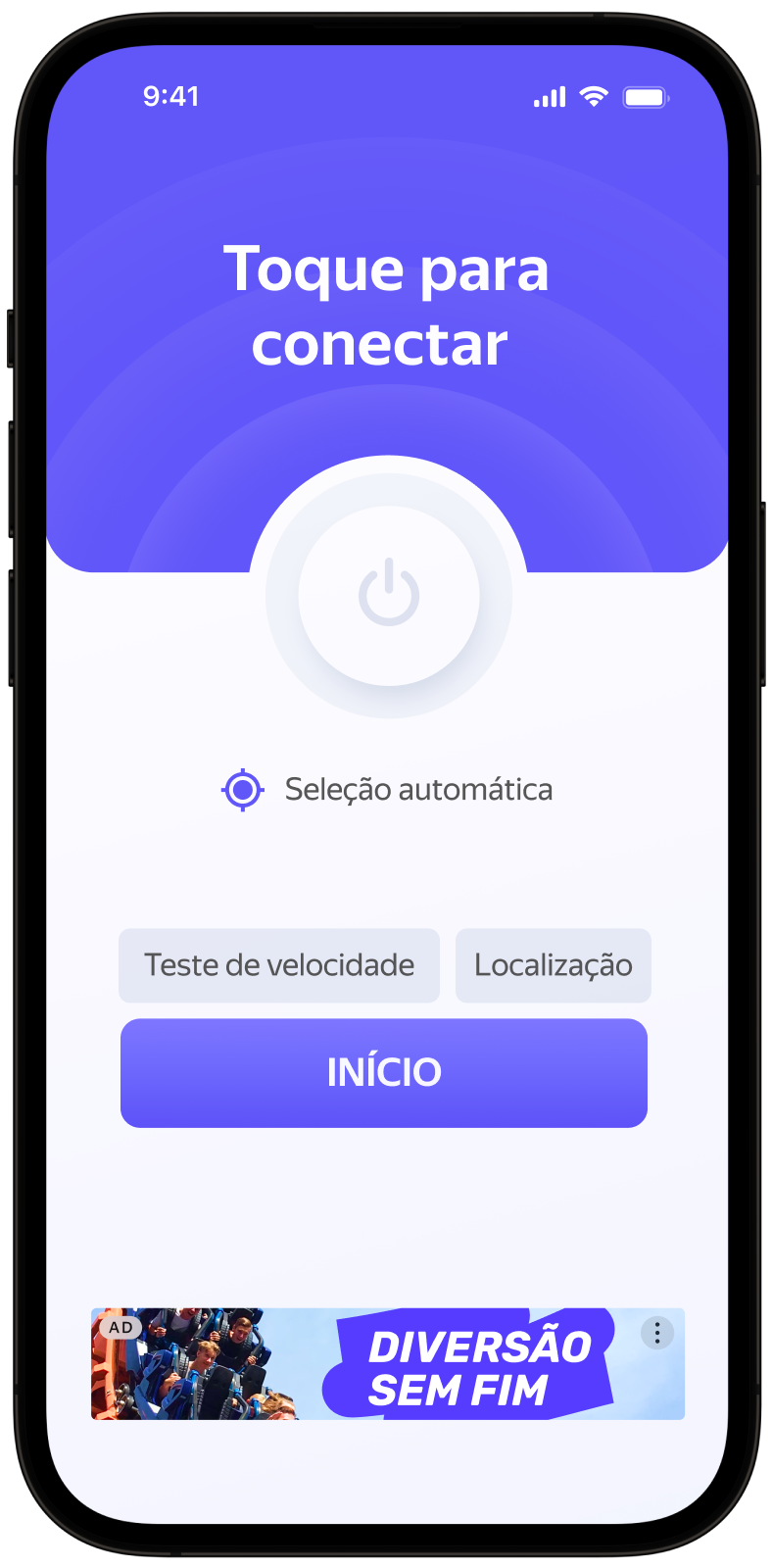
Banners adaptativos inline são um formato flexível de publicidade em banner, proporcionando máxima eficiência ao otimizar o tamanho do anúncio em cada dispositivo.
Esse tipo de anúncio permite que os desenvolvedores definam uma largura e altura máximas permitidas para o anúncio, embora o tamanho ideal do anúncio ainda seja determinado automaticamente. Para selecionar o melhor tamanho de anúncio, os banners adaptativos integrados usam a altura máxima em vez da altura fixa. Dessa forma, há espaço para melhorar o desempenho.
Normalmente, esse formato é usado em aplicativos baseados em feed ou contextos em que é aceitável focar principalmente no anúncio.
{% cut "Aparência" %}
 {% endcut %}
Este guia mostra como integrar banners adaptativos inline em aplicativos Android.
Além de exemplos de código e instruções, contém recomendações específicas aos formatos e links para recursos adicionais.
## Pré-requisito {#pre}
1. Siga os passos de integração do SDK descritos em [Início rápido](../../../en/dev/android/quick-start.md).
2. [Inicialize](../../../en/dev/android/quick-start.md#init) seu SDK de anúncios com antecedência.
3. Confirme se você está utilizando a última versão do [Yandex Mobile Ads SDK](../../../en/dev/android/changelog-android.md). Se você estiver usando mediação, confirme se também está utilizando a última versão da [compilação unificada](../../../en/dev/android/changelog-android.md).
## Implementação {#implement}
Principais passos para integrar banners adaptativos inline:
* Criar e configurar uma visualização para exibir anúncios em banner.
* Registrar um listener de método de callback.
* Carregar o anúncio.
* Passar [configurações adicionais](../../../en/dev/android/target-adfox.md) se você estiver usando Adfox.
## Características da integração de banners adaptativos inline {#features}
1. Todas as chamadas para métodos do Yandex Mobile Ads SDK devem ser feitas a partir do thread principal.
2. Para exibir corretamente anúncios em vídeo na tela do seu aplicativo, você precisa ativar a [aceleração de hardware](https://developer.android.com/guide/topics/graphics/hardware-accel). A aceleração de hardware é ativada por padrão, mas alguns aplicativos a desativam. Se isso se aplicar ao seu aplicativo, recomendamos ativar a aceleração de hardware para as classes de atividade que usam anúncios.
3. Se houve um erro no callback `onAdFailedToLoad()`, não tente carregar um novo anúncio novamente. Se não houver outra opção, limite o número de tentativas de carregamento de anúncios. Isso ajudará a evitar solicitações constantes malsucedidas e problemas de conexão quando surgirem limitações.
4. Para garantir que os banners adaptativos inline funcionem corretamente, [torne seus layouts de aplicativo adaptativos](https://developer.android.com/guide/topics/large-screens/support-different-screen-sizes). Caso contrário, seus anúncios podem ser renderizados incorretamente.
5. Os banners adaptativos inline funcionam melhor quando usam toda a largura disponível. Na maioria dos casos, essa é a largura total da tela do dispositivo. Você deve incluir todas as margens e áreas seguras de exibição aplicáveis ao aplicativo.
6. Os banners adaptativos inline foram projetados para uso em conteúdo rolável. Ele pode ter a mesma altura que a tela do dispositivo ou ser limitado à altura máxima, dependendo da API.
7. Para obter o tamanho do anúncio, use o método `BannerAdSize.inlineSize(context, adWidth, maxAdHeight)`, que recebe o contexto do anúncio, a largura disponível do contêiner do anúncio e a altura máxima aceitável do anúncio como argumentos.
8. O objeto `BannerAdSize`, calculado usando o método `BannerAdSize.inlineSize(context, adWidth, maxAdHeight)`, contém dados técnicos para selecionar os tamanhos de anúncio mais eficazes no backend. A altura do anúncio pode mudar toda vez que é carregado. A largura e altura reais do anúncio ficam disponíveis após o recebimento de uma mensagem de carregamento de anúncio bem-sucedido.
## Adição de uma visualização de anúncio ao layout do aplicativo {#add-view}
Para exibir anúncios em banner, você precisa adicionar `BannerAdView` ao layout do aplicativo. Você pode fazer isso programaticamente ou usando um arquivo XML.
Exemplo de adição de `BannerAdView` ao layout da tela do aplicativo:
```xml
# activity.xml
...
...
```
Você também pode criar um objeto `BannerAdView` programaticamente:
{% list tabs %}
- Kotlin
```kotlin
val bannerAd = BannerAdView(this)
```
- Java
```java
final BannerAdView bannerAd = new BannerAdView(this);
```
{% endlist %}
## Carregamento e renderização de anúncios {#load}
Após criar `BannerAdView` e adicioná-lo à tela do aplicativo, o anúncio precisa ser carregado. O tamanho do anúncio também deve ser calculado para cada dispositivo antes de carregar banners adaptativos inline.
Essa operação é realizada automaticamente através da API do SDK: `BannerAdSize.inlineSize(context, adWidth, maxAdHeight)`. Passe o contexto, a largura disponível do contêiner do anúncio e a altura máxima aceitável do anúncio como argumentos. Os banners adaptativos inline funcionam melhor quando utilizam toda a largura disponível da tela. Na maioria dos casos, será a largura total da tela do dispositivo. Você precisa considerar os parâmetros de margem definidos no seu aplicativo e a área segura de exibição:
{% list tabs %}
- Kotlin
```kotlin
private val adSize: BannerAdSize
get() {
val screenHeight = resources.displayMetrics.run { heightPixels / density }.roundToInt()
// Calculate the width of the ad, taking into account the padding in the ad container.
var adWidthPixels = binding.adContainerView.width
if (adWidthPixels == 0) {
// If the ad hasn't been laid out, default to the full screen width
adWidthPixels = resources.displayMetrics.widthPixels
}
val adWidth = (adWidthPixels / resources.displayMetrics.density).roundToInt()
val maxAdHeight = screenHeight / 2
return BannerAdSize.inlineSize(context, adWidth, maxAdHeight)
}
```
- Java
```java
@NonNull
private BannerAdSize getAdSize() {
final DisplayMetrics displayMetrics = getResources().getDisplayMetrics();
final int screenHeight = Math.round(displayMetrics.heightPixels / displayMetrics.density);
// Calculate the width of the ad, taking into account the padding in the ad container.
int adWidthPixels = mBinding.adContainerView.getWidth();
if (adWidthPixels == 0) {
// If the ad hasn't been laid out, default to the full screen width
adWidthPixels = displayMetrics.widthPixels;
}
final int adWidth = Math.round(adWidthPixels / displayMetrics.density);
// Determine the maximum allowable ad height. The current value is given as an example.
final int maxAdHeight = screenHeight / 2;
return BannerAdSize.inlineSize(this, adWidth, maxAdHeight);
}
```
{% endlist %}
Para carregar um anúncio, você também precisa do contexto de Atividade e da ID da unidade de anúncio (adUnitId) da interface do Yandex Advertising Network.
Para notificar quando os anúncios são carregados ou falham ao carregar e para acompanhar o ciclo de vida dos banners adaptativos inline, defina o listener do método de callback `BannerAdEventListener` para o objeto da classe `BannerAdView`.
Você pode expandir os parâmetros de solicitação de anúncio através de `AdRequest.Builder()` passando interesses do usuário, dados contextuais do aplicativo, detalhes de localização ou outros dados na solicitação. Fornecer dados contextuais adicionais na solicitação pode melhorar consideravelmente a qualidade do anúncio. Saiba mais na seção [Segmentação de anúncios](../../../en/dev/android/target.md).
O exemplo a seguir mostra como carregar um banner adaptativo inline. Após o carregamento bem-sucedido, o banner será exibido automaticamente:
{% list tabs %}
- Kotlin
```kotlin
class AdaptiveInlineBannerAdActivity : AppCompatActivity(R.layout.activity_inline_banner_ad) {
private var bannerAd: BannerAdView? = null
private lateinit var binding: ActivityInlineBannerAdBinding
private val adSize: BannerAdSize
get() {
val screenHeight = resources.displayMetrics.run { heightPixels / density }.roundToInt()
// Calculate the width of the ad, taking into account the padding in the ad container.
var adWidthPixels = binding.adContainerView.width
if (adWidthPixels == 0) {
// If the ad hasn't been laid out, default to the full screen width
adWidthPixels = resources.displayMetrics.widthPixels
}
val adWidth = (adWidthPixels / resources.displayMetrics.density).roundToInt()
// Determine the maximum allowable ad height. The current value is given as an example.
val maxAdHeight = screenHeight / 2
return BannerAdSize.inlineSize(context, adWidth, maxAdHeight)
}
override fun onCreate(savedInstanceState: Bundle?) {
super.onCreate(savedInstanceState)
binding = ActivityInlineBannerAdBinding.inflate(layoutInflater)
setContentView(binding.root)
// Since we're loading the banner based on the adContainerView size,
// we need to wait until this view is laid out before we can get the width
binding.adContainerView.viewTreeObserver.addOnGlobalLayoutListener(object :
ViewTreeObserver.OnGlobalLayoutListener {
override fun onGlobalLayout() {
binding.adContainerView.viewTreeObserver.removeOnGlobalLayoutListener(this);
bannerAd = loadBannerAd(adSize)
}
})
}
private fun loadBannerAd(adSize: BannerAdSize): BannerAdView {
return binding.banner.apply {
setAdSize(adSize)
setAdUnitId("your-ad-unit-id")
setBannerAdEventListener(object : BannerAdEventListener {
override fun onAdLoaded() {
// If this callback occurs after the activity is destroyed, you
// must call destroy and return or you may get a memory leak.
// Note `isDestroyed` is a method on Activity.
if (isDestroyed) {
bannerAd?.destroy()
return
}
}
override fun onAdFailedToLoad(adRequestError: AdRequestError) {
// Ad failed to load with AdRequestError.
// Attempting to load a new ad from the onAdFailedToLoad() method is strongly discouraged.
}
override fun onAdClicked() {
// Called when a click is recorded for an ad.
}
override fun onLeftApplication() {
// Called when user is about to leave application (e.g., to go to the browser), as a result of clicking on the ad.
}
override fun onReturnedToApplication() {
// Called when user returned to application after click.
}
override fun onImpression(impressionData: ImpressionData?) {
// Called when an impression is recorded for an ad.
}
})
loadAd(
AdRequest.Builder()
// Methods in the AdRequest.Builder class can be used here to specify individual options settings.
.build()
)
}
}
}
```
- Java
```java
public class AdaptiveInlineBannerAdActivity extends AppCompatActivity {
@Nullable
private BannerAdView mBannerAd = null;
private ActivityInlineBannerAdBinding mBinding;
public AdaptiveInlineBannerAdActivity() {
super(R.layout.activity_inline_banner_ad);
}
@Override
protected void onCreate(@Nullable Bundle savedInstanceState) {
super.onCreate(savedInstanceState);
mBinding = ActivityInlineBannerAdBinding.inflate(getLayoutInflater());
setContentView(mBinding.getRoot());
// Since we're loading the banner based on the adContainerView size,
// we need to wait until this view is laid out before we can get the width
mBinding.adContainerView.getViewTreeObserver().addOnGlobalLayoutListener(
new ViewTreeObserver.OnGlobalLayoutListener() {
@Override
public void onGlobalLayout() {
mBinding.adContainerView.getViewTreeObserver().removeOnGlobalLayoutListener(this);
mBannerAd = loadBannerAd(getAdSize());
}
}
);
}
@NonNull
private BannerAdSize getAdSize() {
final DisplayMetrics displayMetrics = getResources().getDisplayMetrics();
final int screenHeight = Math.round(displayMetrics.heightPixels / displayMetrics.density);
// Calculate the width of the ad, taking into account the padding in the ad container.
int adWidthPixels = mBinding.adContainerView.getWidth();
if (adWidthPixels == 0) {
// If the ad hasn't been laid out, default to the full screen width
adWidthPixels = displayMetrics.widthPixels;
}
final int adWidth = Math.round(adWidthPixels / displayMetrics.density);
// Determine the maximum allowable ad height. The current value is given as an example.
final int maxAdHeight = screenHeight / 2;
return BannerAdSize.inlineSize(this, adWidth, maxAdHeight);
}
@NonNull
private BannerAdView loadBannerAd(@NonNull final BannerAdSize adSize) {
final BannerAdView bannerAd = mBinding.banner;
bannerAd.setAdSize(adSize);
bannerAd.setAdUnitId("your-ad-unit-id");
bannerAd.setBannerAdEventListener(new BannerAdEventListener() {
@Override
public void onAdLoaded() {
// If this callback occurs after the activity is destroyed, you
// must call destroy and return or you may get a memory leak.
// Note `isDestroyed` is a method on Activity.
if (isDestroyed() && mBannerAd != null) {
mBannerAd.destroy();
}
}
@Override
public void onAdFailedToLoad(@NonNull final AdRequestError adRequestError) {
// Ad failed to load with AdRequestError.
// Attempting to load a new ad from the onAdFailedToLoad() method is strongly discouraged.
}
@Override
public void onAdClicked() {
// Called when a click is recorded for an ad.
}
@Override
public void onLeftApplication() {
// Called when user is about to leave application (e.g., to go to the browser), as a result of clicking on the ad.
}
@Override
public void onReturnedToApplication() {
// Called when user returned to application after click.
}
@Override
public void onImpression(@Nullable ImpressionData impressionData) {
// Called when an impression is recorded for an ad.
}
});
final AdRequest adRequest = new AdRequest.Builder()
// Methods in the AdRequest.Builder class can be used here to specify individual options settings.
.build();
bannerAd.loadAd(adRequest);
return bannerAd;
}
}
```
{% endlist %}
Se você veicula anúncios pelo Adfox, será possível, após a resposta do banner publicitário, acessar os dados de `campaignId`, `bannerId` e `placeId` a partir dos objetos `BannerAdView` usando a propriedade `adAttributes` do tipo `AdAttributes`.
## Liberação de recursos {#destroy}
Se o método de callback foi chamado após o término do ciclo de vida de Activity, libere os recursos chamando a função `destroy()` para o objeto do anúncio:
{% list tabs %}
- Kotlin
```kotlin
private fun loadBannerAd(adSize: BannerAdSize): BannerAdView {
return binding.banner.apply {
setBannerAdEventListener(object : BannerAdEventListener {
override fun onAdLoaded() {
// If this callback occurs after the activity is destroyed, you
// must call destroy and return or you may get a memory leak.
// Note `isDestroyed` is a method on Activity.
if (isDestroyed) {
bannerAd?.destroy()
return
}
}
...
})
...
}
}
```
- Java
```java
@NonNull
private BannerAdView loadBannerAd(@NonNull final BannerAdSize adSize) {
final BannerAdView bannerAd = mBinding.banner;
bannerAd.setBannerAdEventListener(new BannerAdEventListener() {
@Override
public void onAdLoaded() {
// If this callback occurs after the activity is destroyed, you
// must call destroy and return or you may get a memory leak.
// Note `isDestroyed` is a method on Activity.
if (isDestroyed() && mBannerAd != null) {
mBannerAd.destroy();
}
}
...
});
...
return bannerAd;
}
```
{% endlist %}
## Teste da integração do banner adaptativo inline {#test}
### Uso de blocos de anúncios de demonstração para teste de anúncios {#demo-blocks}
Recomendamos usar anúncios de teste para testar sua integração de banner adaptativo inline e seu próprio aplicativo.
Para garantir que anúncios de teste sejam retornados para cada solicitação de anúncio, criamos um ID especial de posicionamento de anúncios de demonstração. Use-o para verificar sua integração de anúncios.
adUnitId de demonstração: `demo-banner-yandex`.
{% note warning %}
Antes de publicar seu app na loja, lembre-se de substituir a ID de inserção demonstrativa por uma ID real obtida na interface do Yandex Advertising Network.
{% endnote %}
Confira a lista de IDs de posicionamento de anúncios de demonstração disponíveis na seção [Blocos de anúncio de demonstração para teste](../../../en/dev/android/demo-blocks.md).
### Teste da integração de anúncios {#test-int}
Você pode testar sua integração de banner adaptativo inline usando o analisador integrado do SDK.
A ferramenta garante que seus anúncios estejam integrados corretamente e gera um relatório detalhado no log.
Para ver o relatório, procure a palavra-chave "YandexAds" na ferramenta [Logcat](https://developer.android.com/studio/command-line/logcat) usada para depuração de aplicativos Android.
```bash
adb logcat -v brief '*:S YandexAds'
```
Se a integração for bem-sucedida, você verá esta mensagem:
```bash
adb logcat -v brief '*:S YandexAds'
mobileads$ adb logcat -v brief '*:S YandexAds'
I/YandexAds(13719): [Integration] Ad type banner was integrated successfully
```
Se você estiver tendo problemas para integrar anúncios em banner, receberá um relatório detalhado sobre os problemas e recomendações de como corrigi-los.
## Recursos adicionais {#resources}
*
Link para [GitHub](https://github.com/yandexmobile/yandex-ads-sdk-android).
{% endcut %}
Este guia mostra como integrar banners adaptativos inline em aplicativos Android.
Além de exemplos de código e instruções, contém recomendações específicas aos formatos e links para recursos adicionais.
## Pré-requisito {#pre}
1. Siga os passos de integração do SDK descritos em [Início rápido](../../../en/dev/android/quick-start.md).
2. [Inicialize](../../../en/dev/android/quick-start.md#init) seu SDK de anúncios com antecedência.
3. Confirme se você está utilizando a última versão do [Yandex Mobile Ads SDK](../../../en/dev/android/changelog-android.md). Se você estiver usando mediação, confirme se também está utilizando a última versão da [compilação unificada](../../../en/dev/android/changelog-android.md).
## Implementação {#implement}
Principais passos para integrar banners adaptativos inline:
* Criar e configurar uma visualização para exibir anúncios em banner.
* Registrar um listener de método de callback.
* Carregar o anúncio.
* Passar [configurações adicionais](../../../en/dev/android/target-adfox.md) se você estiver usando Adfox.
## Características da integração de banners adaptativos inline {#features}
1. Todas as chamadas para métodos do Yandex Mobile Ads SDK devem ser feitas a partir do thread principal.
2. Para exibir corretamente anúncios em vídeo na tela do seu aplicativo, você precisa ativar a [aceleração de hardware](https://developer.android.com/guide/topics/graphics/hardware-accel). A aceleração de hardware é ativada por padrão, mas alguns aplicativos a desativam. Se isso se aplicar ao seu aplicativo, recomendamos ativar a aceleração de hardware para as classes de atividade que usam anúncios.
3. Se houve um erro no callback `onAdFailedToLoad()`, não tente carregar um novo anúncio novamente. Se não houver outra opção, limite o número de tentativas de carregamento de anúncios. Isso ajudará a evitar solicitações constantes malsucedidas e problemas de conexão quando surgirem limitações.
4. Para garantir que os banners adaptativos inline funcionem corretamente, [torne seus layouts de aplicativo adaptativos](https://developer.android.com/guide/topics/large-screens/support-different-screen-sizes). Caso contrário, seus anúncios podem ser renderizados incorretamente.
5. Os banners adaptativos inline funcionam melhor quando usam toda a largura disponível. Na maioria dos casos, essa é a largura total da tela do dispositivo. Você deve incluir todas as margens e áreas seguras de exibição aplicáveis ao aplicativo.
6. Os banners adaptativos inline foram projetados para uso em conteúdo rolável. Ele pode ter a mesma altura que a tela do dispositivo ou ser limitado à altura máxima, dependendo da API.
7. Para obter o tamanho do anúncio, use o método `BannerAdSize.inlineSize(context, adWidth, maxAdHeight)`, que recebe o contexto do anúncio, a largura disponível do contêiner do anúncio e a altura máxima aceitável do anúncio como argumentos.
8. O objeto `BannerAdSize`, calculado usando o método `BannerAdSize.inlineSize(context, adWidth, maxAdHeight)`, contém dados técnicos para selecionar os tamanhos de anúncio mais eficazes no backend. A altura do anúncio pode mudar toda vez que é carregado. A largura e altura reais do anúncio ficam disponíveis após o recebimento de uma mensagem de carregamento de anúncio bem-sucedido.
## Adição de uma visualização de anúncio ao layout do aplicativo {#add-view}
Para exibir anúncios em banner, você precisa adicionar `BannerAdView` ao layout do aplicativo. Você pode fazer isso programaticamente ou usando um arquivo XML.
Exemplo de adição de `BannerAdView` ao layout da tela do aplicativo:
```xml
# activity.xml
...
...
```
Você também pode criar um objeto `BannerAdView` programaticamente:
{% list tabs %}
- Kotlin
```kotlin
val bannerAd = BannerAdView(this)
```
- Java
```java
final BannerAdView bannerAd = new BannerAdView(this);
```
{% endlist %}
## Carregamento e renderização de anúncios {#load}
Após criar `BannerAdView` e adicioná-lo à tela do aplicativo, o anúncio precisa ser carregado. O tamanho do anúncio também deve ser calculado para cada dispositivo antes de carregar banners adaptativos inline.
Essa operação é realizada automaticamente através da API do SDK: `BannerAdSize.inlineSize(context, adWidth, maxAdHeight)`. Passe o contexto, a largura disponível do contêiner do anúncio e a altura máxima aceitável do anúncio como argumentos. Os banners adaptativos inline funcionam melhor quando utilizam toda a largura disponível da tela. Na maioria dos casos, será a largura total da tela do dispositivo. Você precisa considerar os parâmetros de margem definidos no seu aplicativo e a área segura de exibição:
{% list tabs %}
- Kotlin
```kotlin
private val adSize: BannerAdSize
get() {
val screenHeight = resources.displayMetrics.run { heightPixels / density }.roundToInt()
// Calculate the width of the ad, taking into account the padding in the ad container.
var adWidthPixels = binding.adContainerView.width
if (adWidthPixels == 0) {
// If the ad hasn't been laid out, default to the full screen width
adWidthPixels = resources.displayMetrics.widthPixels
}
val adWidth = (adWidthPixels / resources.displayMetrics.density).roundToInt()
val maxAdHeight = screenHeight / 2
return BannerAdSize.inlineSize(context, adWidth, maxAdHeight)
}
```
- Java
```java
@NonNull
private BannerAdSize getAdSize() {
final DisplayMetrics displayMetrics = getResources().getDisplayMetrics();
final int screenHeight = Math.round(displayMetrics.heightPixels / displayMetrics.density);
// Calculate the width of the ad, taking into account the padding in the ad container.
int adWidthPixels = mBinding.adContainerView.getWidth();
if (adWidthPixels == 0) {
// If the ad hasn't been laid out, default to the full screen width
adWidthPixels = displayMetrics.widthPixels;
}
final int adWidth = Math.round(adWidthPixels / displayMetrics.density);
// Determine the maximum allowable ad height. The current value is given as an example.
final int maxAdHeight = screenHeight / 2;
return BannerAdSize.inlineSize(this, adWidth, maxAdHeight);
}
```
{% endlist %}
Para carregar um anúncio, você também precisa do contexto de Atividade e da ID da unidade de anúncio (adUnitId) da interface do Yandex Advertising Network.
Para notificar quando os anúncios são carregados ou falham ao carregar e para acompanhar o ciclo de vida dos banners adaptativos inline, defina o listener do método de callback `BannerAdEventListener` para o objeto da classe `BannerAdView`.
Você pode expandir os parâmetros de solicitação de anúncio através de `AdRequest.Builder()` passando interesses do usuário, dados contextuais do aplicativo, detalhes de localização ou outros dados na solicitação. Fornecer dados contextuais adicionais na solicitação pode melhorar consideravelmente a qualidade do anúncio. Saiba mais na seção [Segmentação de anúncios](../../../en/dev/android/target.md).
O exemplo a seguir mostra como carregar um banner adaptativo inline. Após o carregamento bem-sucedido, o banner será exibido automaticamente:
{% list tabs %}
- Kotlin
```kotlin
class AdaptiveInlineBannerAdActivity : AppCompatActivity(R.layout.activity_inline_banner_ad) {
private var bannerAd: BannerAdView? = null
private lateinit var binding: ActivityInlineBannerAdBinding
private val adSize: BannerAdSize
get() {
val screenHeight = resources.displayMetrics.run { heightPixels / density }.roundToInt()
// Calculate the width of the ad, taking into account the padding in the ad container.
var adWidthPixels = binding.adContainerView.width
if (adWidthPixels == 0) {
// If the ad hasn't been laid out, default to the full screen width
adWidthPixels = resources.displayMetrics.widthPixels
}
val adWidth = (adWidthPixels / resources.displayMetrics.density).roundToInt()
// Determine the maximum allowable ad height. The current value is given as an example.
val maxAdHeight = screenHeight / 2
return BannerAdSize.inlineSize(context, adWidth, maxAdHeight)
}
override fun onCreate(savedInstanceState: Bundle?) {
super.onCreate(savedInstanceState)
binding = ActivityInlineBannerAdBinding.inflate(layoutInflater)
setContentView(binding.root)
// Since we're loading the banner based on the adContainerView size,
// we need to wait until this view is laid out before we can get the width
binding.adContainerView.viewTreeObserver.addOnGlobalLayoutListener(object :
ViewTreeObserver.OnGlobalLayoutListener {
override fun onGlobalLayout() {
binding.adContainerView.viewTreeObserver.removeOnGlobalLayoutListener(this);
bannerAd = loadBannerAd(adSize)
}
})
}
private fun loadBannerAd(adSize: BannerAdSize): BannerAdView {
return binding.banner.apply {
setAdSize(adSize)
setAdUnitId("your-ad-unit-id")
setBannerAdEventListener(object : BannerAdEventListener {
override fun onAdLoaded() {
// If this callback occurs after the activity is destroyed, you
// must call destroy and return or you may get a memory leak.
// Note `isDestroyed` is a method on Activity.
if (isDestroyed) {
bannerAd?.destroy()
return
}
}
override fun onAdFailedToLoad(adRequestError: AdRequestError) {
// Ad failed to load with AdRequestError.
// Attempting to load a new ad from the onAdFailedToLoad() method is strongly discouraged.
}
override fun onAdClicked() {
// Called when a click is recorded for an ad.
}
override fun onLeftApplication() {
// Called when user is about to leave application (e.g., to go to the browser), as a result of clicking on the ad.
}
override fun onReturnedToApplication() {
// Called when user returned to application after click.
}
override fun onImpression(impressionData: ImpressionData?) {
// Called when an impression is recorded for an ad.
}
})
loadAd(
AdRequest.Builder()
// Methods in the AdRequest.Builder class can be used here to specify individual options settings.
.build()
)
}
}
}
```
- Java
```java
public class AdaptiveInlineBannerAdActivity extends AppCompatActivity {
@Nullable
private BannerAdView mBannerAd = null;
private ActivityInlineBannerAdBinding mBinding;
public AdaptiveInlineBannerAdActivity() {
super(R.layout.activity_inline_banner_ad);
}
@Override
protected void onCreate(@Nullable Bundle savedInstanceState) {
super.onCreate(savedInstanceState);
mBinding = ActivityInlineBannerAdBinding.inflate(getLayoutInflater());
setContentView(mBinding.getRoot());
// Since we're loading the banner based on the adContainerView size,
// we need to wait until this view is laid out before we can get the width
mBinding.adContainerView.getViewTreeObserver().addOnGlobalLayoutListener(
new ViewTreeObserver.OnGlobalLayoutListener() {
@Override
public void onGlobalLayout() {
mBinding.adContainerView.getViewTreeObserver().removeOnGlobalLayoutListener(this);
mBannerAd = loadBannerAd(getAdSize());
}
}
);
}
@NonNull
private BannerAdSize getAdSize() {
final DisplayMetrics displayMetrics = getResources().getDisplayMetrics();
final int screenHeight = Math.round(displayMetrics.heightPixels / displayMetrics.density);
// Calculate the width of the ad, taking into account the padding in the ad container.
int adWidthPixels = mBinding.adContainerView.getWidth();
if (adWidthPixels == 0) {
// If the ad hasn't been laid out, default to the full screen width
adWidthPixels = displayMetrics.widthPixels;
}
final int adWidth = Math.round(adWidthPixels / displayMetrics.density);
// Determine the maximum allowable ad height. The current value is given as an example.
final int maxAdHeight = screenHeight / 2;
return BannerAdSize.inlineSize(this, adWidth, maxAdHeight);
}
@NonNull
private BannerAdView loadBannerAd(@NonNull final BannerAdSize adSize) {
final BannerAdView bannerAd = mBinding.banner;
bannerAd.setAdSize(adSize);
bannerAd.setAdUnitId("your-ad-unit-id");
bannerAd.setBannerAdEventListener(new BannerAdEventListener() {
@Override
public void onAdLoaded() {
// If this callback occurs after the activity is destroyed, you
// must call destroy and return or you may get a memory leak.
// Note `isDestroyed` is a method on Activity.
if (isDestroyed() && mBannerAd != null) {
mBannerAd.destroy();
}
}
@Override
public void onAdFailedToLoad(@NonNull final AdRequestError adRequestError) {
// Ad failed to load with AdRequestError.
// Attempting to load a new ad from the onAdFailedToLoad() method is strongly discouraged.
}
@Override
public void onAdClicked() {
// Called when a click is recorded for an ad.
}
@Override
public void onLeftApplication() {
// Called when user is about to leave application (e.g., to go to the browser), as a result of clicking on the ad.
}
@Override
public void onReturnedToApplication() {
// Called when user returned to application after click.
}
@Override
public void onImpression(@Nullable ImpressionData impressionData) {
// Called when an impression is recorded for an ad.
}
});
final AdRequest adRequest = new AdRequest.Builder()
// Methods in the AdRequest.Builder class can be used here to specify individual options settings.
.build();
bannerAd.loadAd(adRequest);
return bannerAd;
}
}
```
{% endlist %}
Se você veicula anúncios pelo Adfox, será possível, após a resposta do banner publicitário, acessar os dados de `campaignId`, `bannerId` e `placeId` a partir dos objetos `BannerAdView` usando a propriedade `adAttributes` do tipo `AdAttributes`.
## Liberação de recursos {#destroy}
Se o método de callback foi chamado após o término do ciclo de vida de Activity, libere os recursos chamando a função `destroy()` para o objeto do anúncio:
{% list tabs %}
- Kotlin
```kotlin
private fun loadBannerAd(adSize: BannerAdSize): BannerAdView {
return binding.banner.apply {
setBannerAdEventListener(object : BannerAdEventListener {
override fun onAdLoaded() {
// If this callback occurs after the activity is destroyed, you
// must call destroy and return or you may get a memory leak.
// Note `isDestroyed` is a method on Activity.
if (isDestroyed) {
bannerAd?.destroy()
return
}
}
...
})
...
}
}
```
- Java
```java
@NonNull
private BannerAdView loadBannerAd(@NonNull final BannerAdSize adSize) {
final BannerAdView bannerAd = mBinding.banner;
bannerAd.setBannerAdEventListener(new BannerAdEventListener() {
@Override
public void onAdLoaded() {
// If this callback occurs after the activity is destroyed, you
// must call destroy and return or you may get a memory leak.
// Note `isDestroyed` is a method on Activity.
if (isDestroyed() && mBannerAd != null) {
mBannerAd.destroy();
}
}
...
});
...
return bannerAd;
}
```
{% endlist %}
## Teste da integração do banner adaptativo inline {#test}
### Uso de blocos de anúncios de demonstração para teste de anúncios {#demo-blocks}
Recomendamos usar anúncios de teste para testar sua integração de banner adaptativo inline e seu próprio aplicativo.
Para garantir que anúncios de teste sejam retornados para cada solicitação de anúncio, criamos um ID especial de posicionamento de anúncios de demonstração. Use-o para verificar sua integração de anúncios.
adUnitId de demonstração: `demo-banner-yandex`.
{% note warning %}
Antes de publicar seu app na loja, lembre-se de substituir a ID de inserção demonstrativa por uma ID real obtida na interface do Yandex Advertising Network.
{% endnote %}
Confira a lista de IDs de posicionamento de anúncios de demonstração disponíveis na seção [Blocos de anúncio de demonstração para teste](../../../en/dev/android/demo-blocks.md).
### Teste da integração de anúncios {#test-int}
Você pode testar sua integração de banner adaptativo inline usando o analisador integrado do SDK.
A ferramenta garante que seus anúncios estejam integrados corretamente e gera um relatório detalhado no log.
Para ver o relatório, procure a palavra-chave "YandexAds" na ferramenta [Logcat](https://developer.android.com/studio/command-line/logcat) usada para depuração de aplicativos Android.
```bash
adb logcat -v brief '*:S YandexAds'
```
Se a integração for bem-sucedida, você verá esta mensagem:
```bash
adb logcat -v brief '*:S YandexAds'
mobileads$ adb logcat -v brief '*:S YandexAds'
I/YandexAds(13719): [Integration] Ad type banner was integrated successfully
```
Se você estiver tendo problemas para integrar anúncios em banner, receberá um relatório detalhado sobre os problemas e recomendações de como corrigi-los.
## Recursos adicionais {#resources}
*
Link para [GitHub](https://github.com/yandexmobile/yandex-ads-sdk-android).