---
metadata:
- name: generator
content: Diplodoc Platform v5.52.0
alternate:
- https://ads.yandex.com/helpcenter/en/dev/android/compose/interstitial.md
- https://ads.yandex.com/helpcenter/ru/dev/android/compose/interstitial.md
- https://ads.yandex.com/helpcenter/zh/dev/android/compose/interstitial.md
- href: zh/dev/android/compose/interstitial.md
type: text/markdown
title: Markdown version
- href: ../llms.txt
type: text/markdown
title: llms.txt
---
> **Documentation Index:** Fetch the complete configuration index at https://ads.yandex.com/helpcenter/zh/llms.txt
# 插屏广告
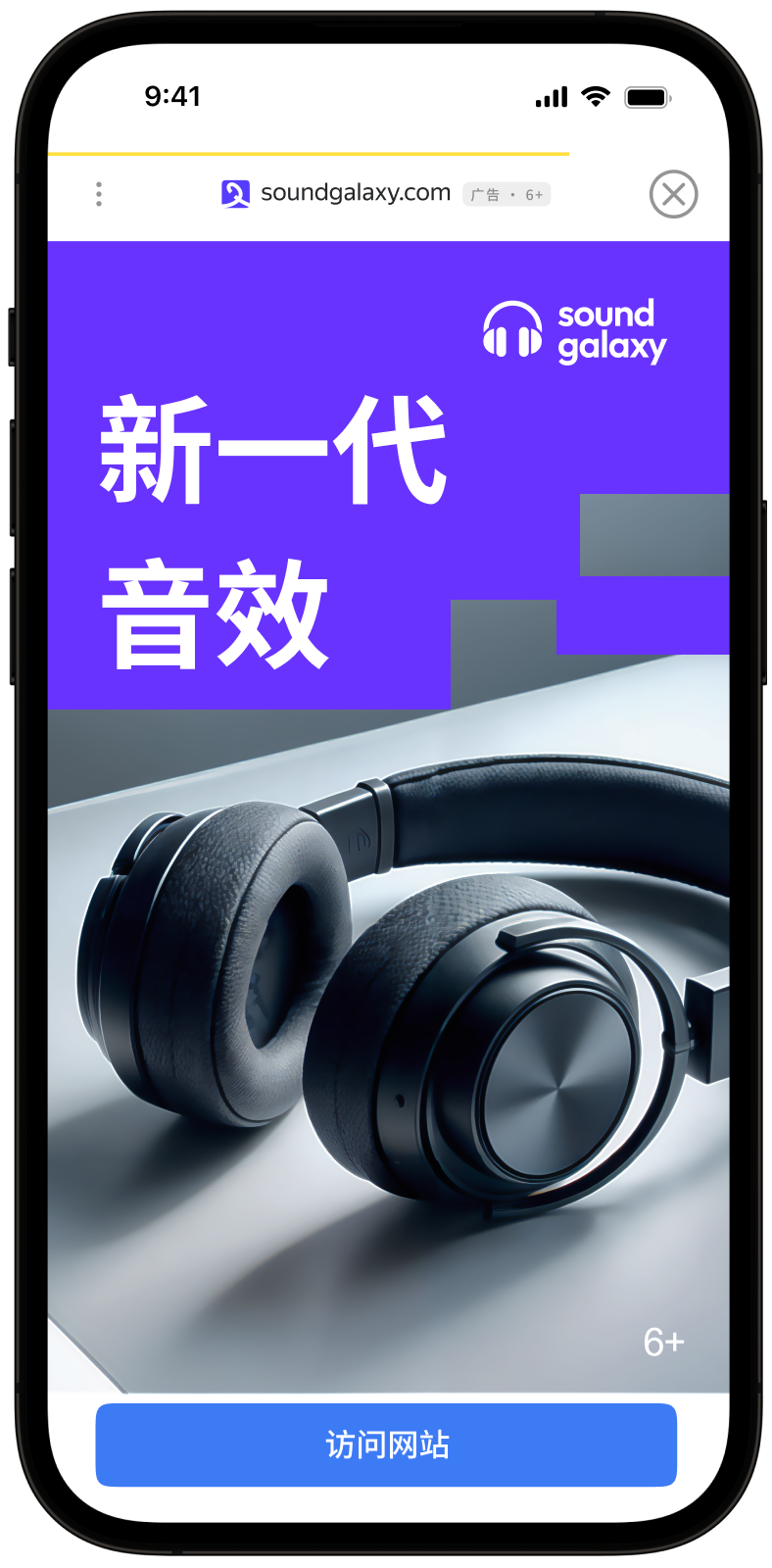
插屏广告是一种全屏广告格式,嵌入在应用内容中,在自然暂停时显示,例如在游戏关卡之间过渡或完成目标操作时。
当应用展示插屏广告时,用户可以选择:点击广告并前往广告主的网站,或关闭广告并返回应用。
插屏广告吸引了用户对广告的全部注意力,这便是其 CPM 更高的原因。
{% cut "外观" %}
 {% endcut %}
本指南展示了如何使用 Jetpack Compose 扩展将插屏广告集成到 Android 应用中。 除了代码示例和说明之外,它还提供使用此广告格式的建议和其他资源的链接。
## 前提条件 {#pre}
1. 按照[快速入门](https://ads.yandex.com/helpcenter/zh/dev/android/quick-start.md) 中描述的 SDK 集成步骤进行操作。
2. 首先,您需要[初始化](https://ads.yandex.com/helpcenter/zh/dev/android/quick-start.md#init) 广告 SDK。
3. 确保您使用的是[最新Yandex Mobile Ads SDK 版本](https://ads.yandex.com/helpcenter/zh/dev/android/changelog-android.md)。如果您使用的是广告中介服务,请更新至最新的[单一构建版本](https://ads.yandex.com/helpcenter/zh/dev/android/changelog-android.md)。
要使用 Compose 扩展,请在 `build.gradle.kts` 中添加依赖:
```kotlin
dependencies {
implementation("com.yandex.android:mobileads:8.2.0")
implementation("com.yandex.android:mobileads-compose:8.2.0")
// Compose BOM (最低版本 2024.01.00)
implementation(platform("androidx.compose:compose-bom:2025.03.00"))
}
```
## 实施 {#implement}
集成插屏广告的关键步骤:
1. 使用 `rememberInterstitialAdLoader()` 创建广告加载器。
1. 通过挂起函数 `loadAd()` 加载广告,并处理 `InterstitialAdLoadResult`。
1. 为广告事件回调 `InterstitialAdEventListener` 注册监听器。
1. 展示 `InterstitialAd`。
## 插屏广告集成说明 {#features}
1. 所有 Yandex Mobile Ads SDK 方法调用都必须在主线程中进行。
2. 如果您在 `InterstitialAdLoadResult.Failure` 中收到错误,请不要尝试立即加载新广告。 如果必须重试,请限制重新加载尝试次数,以避免在条件受限的情况下请求持续失败并出现连接问题。
3. 建议在发生广告交互的屏幕的整个生命周期内保持对广告的强引用,以防止收集垃圾。
4. 当可组合项从组合树中移除时,`cancelLoading()` 将自动调用 — 无需显式释放加载器资源。
## 加载广告 {#load}
要加载插屏广告,请使用 `rememberInterstitialAdLoader()`。 加载通过挂起函数 `loadAd()` 执行,该函数返回 `InterstitialAdLoadResult`。
要加载广告,您需要从 Yandex Advertising Network 界面获取广告单元 ID (adUnitId)。
您可以通过 `AdRequest.Builder()` 传递用户兴趣数据、页面上下文数据、位置或其他附加数据来扩展广告请求参数。 请求中的附加上下文数据可以显著提高广告质量。 有关更多信息,请参阅[广告定位](https://ads.yandex.com/helpcenter/zh/dev/android/target.md)。
### 插播广告加载示例
```kotlin
@Composable
fun MyScreen(activity: Activity) {
var interstitialAd by remember { mutableStateOf(null) }
val loader = rememberInterstitialAdLoader()
LaunchedEffect(Unit) {
val adRequest = AdRequest.Builder("your-ad-unit-id").build()
when (val result = loader.loadAd(adRequest)) {
is InterstitialAdLoadResult.Success -> interstitialAd = result.ad
is InterstitialAdLoadResult.Failure -> {
// Ad failed to load with AdRequestError.
// Attempting to load a new ad from here is strongly discouraged.
}
}
}
}
```
如果您通过 Adfox 投放广告,则在横幅广告响应后,可以使用 `AdAttributes` 类型的 `adAttributes` 属性从 `interstitialAdLoader` 对象访问 `campaignId`、`bannerId` 和 `placeId` 数据。
## 展示广告 {#ad-view}
插屏广告应在应用使用的自然暂停期间展示。 一个很好的例子是在游戏关卡间或完成目标操作后,例如在文件下载完成后。
在展示广告之前,设置广告事件监听器 `InterstitialAdEventListener`。
```kotlin
@Composable
fun MyScreen(activity: Activity) {
var interstitialAd by remember { mutableStateOf(null) }
val loader = rememberInterstitialAdLoader()
LaunchedEffect(Unit) {
val adRequest = AdRequest.Builder("your-ad-unit-id").build()
when (val result = loader.loadAd(adRequest)) {
is InterstitialAdLoadResult.Success -> interstitialAd = result.ad
is InterstitialAdLoadResult.Failure -> {
// Ad failed to load with AdRequestError.
}
}
}
LaunchedEffect(interstitialAd) {
interstitialAd?.apply {
setAdEventListener(object : InterstitialAdEventListener {
override fun onAdShown() {
// Called when ad is shown.
}
override fun onAdFailedToShow(adError: AdError) {
// Called when an InterstitialAd failed to show.
loadInterstitialAd()
}
override fun onAdDismissed() {
// Called when ad is dismissed.
// Now you can preload the next interstitial ad.
loadInterstitialAd()
}
override fun onAdClicked() {
// Called when a click is recorded for an ad.
}
override fun onAdImpression(impressionData: ImpressionData?) {
// Called when an impression is recorded for an ad.
}
})
show(activity)
}
}
}
```
## 测试插屏广告集成 {#test}
### 使用演示广告单元进行广告测试 {#demo-blocks}
使用测试广告来检查您的插播广告集成和应用本身。为了确保每次广告请求都能返回测试广告,您可以使用一个特殊的演示广告版位 ID。
演示广告单元 ID:`demo-interstitial-yandex`。
{% note warning %}
在应用商店发布应用前,请务必将演示广告版位 ID 替换为您在 Yandex Advertising Network 接口中获取的真实 ID。
{% endnote %}
有关所有可用演示广告版位 ID 的列表,请参阅[用于测试的演示广告单元](https://ads.yandex.com/helpcenter/zh/dev/android/demo-blocks.md)。
### 测试广告集成 {#test-int}
您可以使用 SDK 的内置分析工具检查插播广告是否已正确集成。日志中将显示包含测试结果的详细报告。
要查看报告,请在 Android 应用调试工具 [Logcat](https://developer.android.com/studio/command-line/logcat) 中搜索关键词“YandexAds”。
```bash
adb logcat -v brief '*:S YandexAds'
```
如果集成成功,将返回以下消息:
```bash
adb logcat -v brief '*:S YandexAds'
mobileads$ adb logcat -v brief '*:S YandexAds'
I/YandexAds(13719): [Integration] Ad type interstitial was integrated successfully
```
如果存在任何插播广告集成问题,您将收到详细的问题报告和故障排除建议。
## 其他资源 {#resources}
*
[GitHub](https://github.com/yandexmobile/yandex-ads-sdk-android) 链接。
{% endcut %}
本指南展示了如何使用 Jetpack Compose 扩展将插屏广告集成到 Android 应用中。 除了代码示例和说明之外,它还提供使用此广告格式的建议和其他资源的链接。
## 前提条件 {#pre}
1. 按照[快速入门](https://ads.yandex.com/helpcenter/zh/dev/android/quick-start.md) 中描述的 SDK 集成步骤进行操作。
2. 首先,您需要[初始化](https://ads.yandex.com/helpcenter/zh/dev/android/quick-start.md#init) 广告 SDK。
3. 确保您使用的是[最新Yandex Mobile Ads SDK 版本](https://ads.yandex.com/helpcenter/zh/dev/android/changelog-android.md)。如果您使用的是广告中介服务,请更新至最新的[单一构建版本](https://ads.yandex.com/helpcenter/zh/dev/android/changelog-android.md)。
要使用 Compose 扩展,请在 `build.gradle.kts` 中添加依赖:
```kotlin
dependencies {
implementation("com.yandex.android:mobileads:8.2.0")
implementation("com.yandex.android:mobileads-compose:8.2.0")
// Compose BOM (最低版本 2024.01.00)
implementation(platform("androidx.compose:compose-bom:2025.03.00"))
}
```
## 实施 {#implement}
集成插屏广告的关键步骤:
1. 使用 `rememberInterstitialAdLoader()` 创建广告加载器。
1. 通过挂起函数 `loadAd()` 加载广告,并处理 `InterstitialAdLoadResult`。
1. 为广告事件回调 `InterstitialAdEventListener` 注册监听器。
1. 展示 `InterstitialAd`。
## 插屏广告集成说明 {#features}
1. 所有 Yandex Mobile Ads SDK 方法调用都必须在主线程中进行。
2. 如果您在 `InterstitialAdLoadResult.Failure` 中收到错误,请不要尝试立即加载新广告。 如果必须重试,请限制重新加载尝试次数,以避免在条件受限的情况下请求持续失败并出现连接问题。
3. 建议在发生广告交互的屏幕的整个生命周期内保持对广告的强引用,以防止收集垃圾。
4. 当可组合项从组合树中移除时,`cancelLoading()` 将自动调用 — 无需显式释放加载器资源。
## 加载广告 {#load}
要加载插屏广告,请使用 `rememberInterstitialAdLoader()`。 加载通过挂起函数 `loadAd()` 执行,该函数返回 `InterstitialAdLoadResult`。
要加载广告,您需要从 Yandex Advertising Network 界面获取广告单元 ID (adUnitId)。
您可以通过 `AdRequest.Builder()` 传递用户兴趣数据、页面上下文数据、位置或其他附加数据来扩展广告请求参数。 请求中的附加上下文数据可以显著提高广告质量。 有关更多信息,请参阅[广告定位](https://ads.yandex.com/helpcenter/zh/dev/android/target.md)。
### 插播广告加载示例
```kotlin
@Composable
fun MyScreen(activity: Activity) {
var interstitialAd by remember { mutableStateOf(null) }
val loader = rememberInterstitialAdLoader()
LaunchedEffect(Unit) {
val adRequest = AdRequest.Builder("your-ad-unit-id").build()
when (val result = loader.loadAd(adRequest)) {
is InterstitialAdLoadResult.Success -> interstitialAd = result.ad
is InterstitialAdLoadResult.Failure -> {
// Ad failed to load with AdRequestError.
// Attempting to load a new ad from here is strongly discouraged.
}
}
}
}
```
如果您通过 Adfox 投放广告,则在横幅广告响应后,可以使用 `AdAttributes` 类型的 `adAttributes` 属性从 `interstitialAdLoader` 对象访问 `campaignId`、`bannerId` 和 `placeId` 数据。
## 展示广告 {#ad-view}
插屏广告应在应用使用的自然暂停期间展示。 一个很好的例子是在游戏关卡间或完成目标操作后,例如在文件下载完成后。
在展示广告之前,设置广告事件监听器 `InterstitialAdEventListener`。
```kotlin
@Composable
fun MyScreen(activity: Activity) {
var interstitialAd by remember { mutableStateOf(null) }
val loader = rememberInterstitialAdLoader()
LaunchedEffect(Unit) {
val adRequest = AdRequest.Builder("your-ad-unit-id").build()
when (val result = loader.loadAd(adRequest)) {
is InterstitialAdLoadResult.Success -> interstitialAd = result.ad
is InterstitialAdLoadResult.Failure -> {
// Ad failed to load with AdRequestError.
}
}
}
LaunchedEffect(interstitialAd) {
interstitialAd?.apply {
setAdEventListener(object : InterstitialAdEventListener {
override fun onAdShown() {
// Called when ad is shown.
}
override fun onAdFailedToShow(adError: AdError) {
// Called when an InterstitialAd failed to show.
loadInterstitialAd()
}
override fun onAdDismissed() {
// Called when ad is dismissed.
// Now you can preload the next interstitial ad.
loadInterstitialAd()
}
override fun onAdClicked() {
// Called when a click is recorded for an ad.
}
override fun onAdImpression(impressionData: ImpressionData?) {
// Called when an impression is recorded for an ad.
}
})
show(activity)
}
}
}
```
## 测试插屏广告集成 {#test}
### 使用演示广告单元进行广告测试 {#demo-blocks}
使用测试广告来检查您的插播广告集成和应用本身。为了确保每次广告请求都能返回测试广告,您可以使用一个特殊的演示广告版位 ID。
演示广告单元 ID:`demo-interstitial-yandex`。
{% note warning %}
在应用商店发布应用前,请务必将演示广告版位 ID 替换为您在 Yandex Advertising Network 接口中获取的真实 ID。
{% endnote %}
有关所有可用演示广告版位 ID 的列表,请参阅[用于测试的演示广告单元](https://ads.yandex.com/helpcenter/zh/dev/android/demo-blocks.md)。
### 测试广告集成 {#test-int}
您可以使用 SDK 的内置分析工具检查插播广告是否已正确集成。日志中将显示包含测试结果的详细报告。
要查看报告,请在 Android 应用调试工具 [Logcat](https://developer.android.com/studio/command-line/logcat) 中搜索关键词“YandexAds”。
```bash
adb logcat -v brief '*:S YandexAds'
```
如果集成成功,将返回以下消息:
```bash
adb logcat -v brief '*:S YandexAds'
mobileads$ adb logcat -v brief '*:S YandexAds'
I/YandexAds(13719): [Integration] Ad type interstitial was integrated successfully
```
如果存在任何插播广告集成问题,您将收到详细的问题报告和故障排除建议。
## 其他资源 {#resources}
*
[GitHub](https://github.com/yandexmobile/yandex-ads-sdk-android) 链接。