---
metadata:
- name: generator
content: Diplodoc Platform v5.52.0
alternate:
- https://ads.yandex.com/helpcenter/en/dev/ios/quick-start-mm.md
- https://ads.yandex.com/helpcenter/pt/dev/ios/quick-start-mm.md
- https://ads.yandex.com/helpcenter/ru/dev/ios/quick-start-mm.md
- https://ads.yandex.com/helpcenter/zh/dev/ios/quick-start-mm.md
- href: zh/dev/ios/quick-start-mm.md
type: text/markdown
title: Markdown version
- href: llms.txt
type: text/markdown
title: llms.txt
---
> **Documentation Index:** Fetch the complete configuration index at https://ads.yandex.com/helpcenter/zh/llms.txt
[//]: # (Эта страница переводится также на бразильский португальский — pt-BR)
# 集成 Yandex Mobile 聚合
{% note warning %}
请确保更新到最新的适配器版本([Yandex Mobile 聚合](https://ads.yandex.com/helpcenter/zh/dev/ios/list-network.md) 和适配器 [第三方聚合网络适配器](https://ads.yandex.com/helpcenter/zh/dev/ios/third-party-mediation.md))。否则可能会因适配器集成不当而出现错误,导致广告无法投放。
{% endnote %}
[Yandex Mobile 聚合](https://ads.yandex.com/helpcenter/zh/monetization/yandex-mediation/index.md) 是一个使用机器学习算法从各种网络自动选择广告的平台,可帮助您最大限度地提高收入。所有设置均已预配置,您可以立即开始使用,而无需单独设置每个网络。
如果您一直在使用单一 Yandex 网络的 Mobile Ads SDK,则迁移到 Yandex 聚合不需要更改代码。您只需预设第三方广告网络的网页界面的相关部分即可。
## 前提条件 {#prolog}
要准备您的应用,请按照接下来的章节中描述的步骤进行操作。
### 应用要求 {#requirements}
- 使用 iOS 13 或更高版本。
- 使用 Xcode 16.4 或更高版本。
### 在您的 Yandex Advertising Network 账户中设置应用 {#yan}
以下是在 Yandex Advertising Network 中注册您的应用的方法:
1. 在 Yandex Advertising Network 中 [登录](https://partner.yandex.ru/) 或 [登录](https://passport.yandex.com/auth/list?origin=rsy_ligth_out&retpath=https%3A%2F%2Fpartner.yandex.com%2Fform%2F?roles%5B%5D=27) 您的账户。
2. 在 Yandex Advertising Network 中 [注册](https://passport.yandex.com/auth/list?origin=rsy_ligth_out&retpath=https%3A%2F%2Fpartner.yandex.com%2Fform%2F?roles%5B%5D=27) 您的应用。
## 集成
集成方式有两种:
* **单一构建(推荐)**:所有可用的适配器都会自动连接。
* **连接单独的适配器**:安装 Yandex SDK 并使用适当的包单独连接特定适配器。
{% list tabs %}
- 单一构建
您可以使用 `YandexMobileAdsMediation` 共享聚合库自动连接所有可用适配器:该库已适配依赖项管理器:
{% list tabs radio %}
- CocoaPods
如果您需要静态链接:
1. 在 Yandex Advertising Network 界面中 [设置聚合](https://ads.yandex.com/helpcenter/zh/monetization/yandex-mediation/setup.md)。
2. 将 `YandexMobileAdsMediation` 库添加到 Podfile。
```
pod 'YandexMobileAdsMediation', '8.3.0'
```
每个适配器将自动选择最新的兼容版本。
3. 在您的应用的 Info.plist 文件中,添加 `GADApplicationIdentifier` 键,并将其值设置为您的 `AdMob ID`。详细了解在何处可以 [找到 AdMob ID](https://support.google.com/admob/answer/7356431)。
```xml
GADApplicationIdentifier
ca-app-pub-xxxxxxxxxxxxxxxx~yyyyyyyyyy
```
- Swift Package Manager
以下方法适用于外部广告交易平台 Mintegral、AppLovin、Google AdMob、VK Ads (ex. myTarget) 和 Liftoff (ex. Vungle):
1. 在 Yandex Advertising Network 界面中 [设置聚合](https://ads.yandex.com/helpcenter/zh/monetization/yandex-mediation/setup.md)。
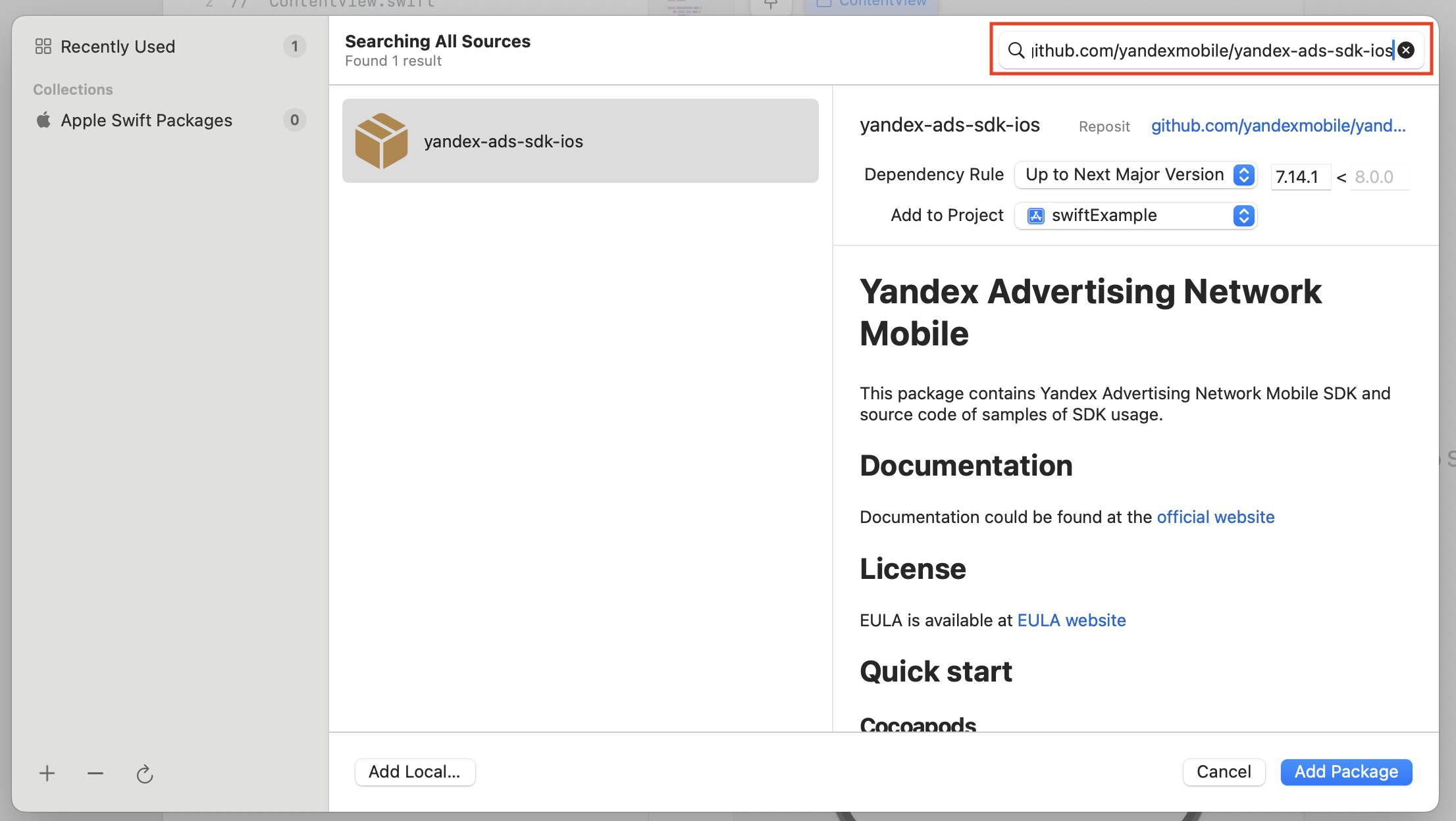
2. 在您的 Xcode 项目中,使用 **File** → **Add Packages dependencies** 添加依赖项。
3. 指定包含 Swift 包的存储库的网址:`https://github.com/yandexmobile/yandex-ads-sdk-ios`。
 4. 前往 **Build Settings**,并在 **Linking** 下添加参数值 `Other Linker Flags = -ObjC`。
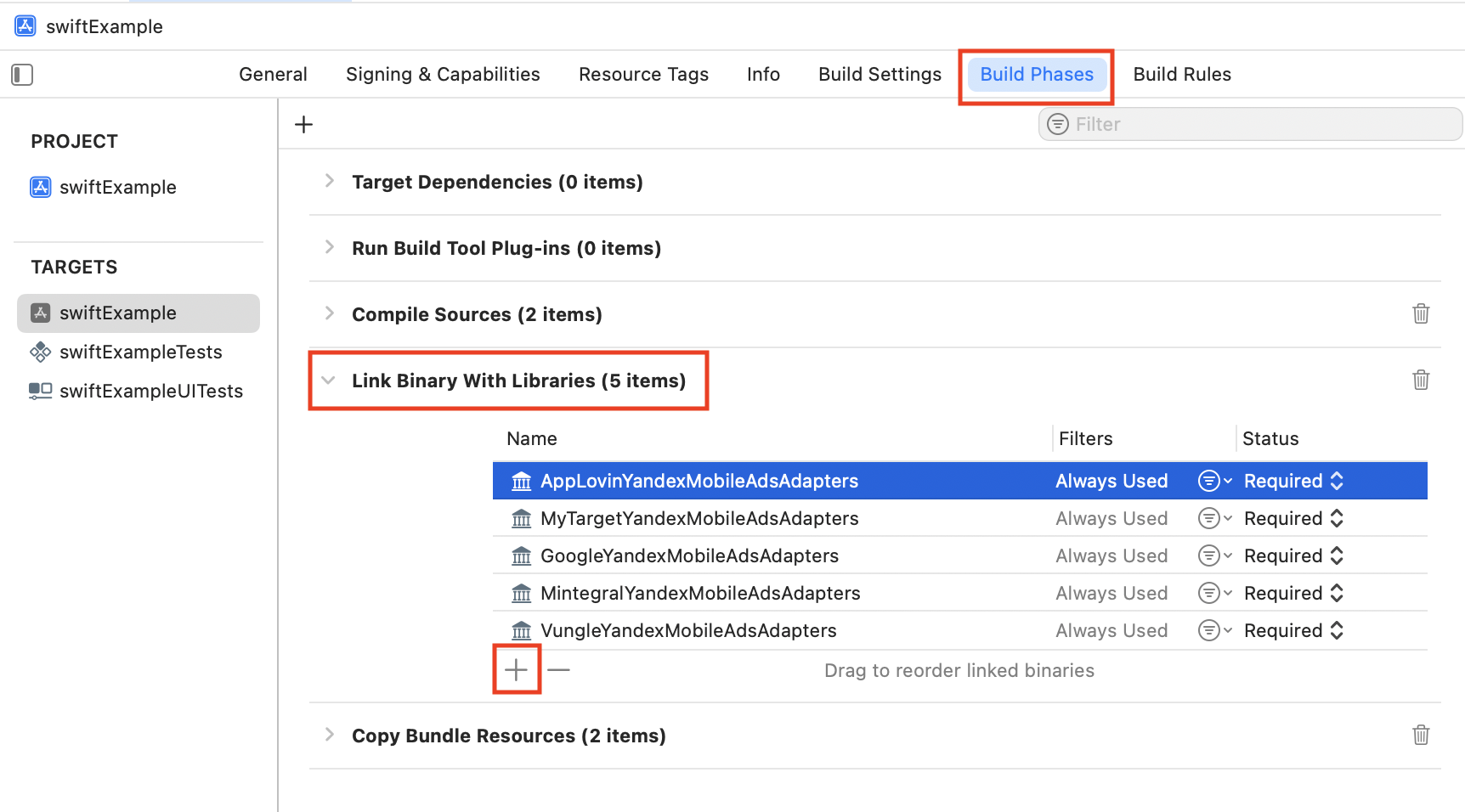
 5. 确保目标已链接到 YandexMobileAdsPackage。如果尚未链接,请前往 **Link Binary With Libraries**,然后点击 **+** 添加库链接。
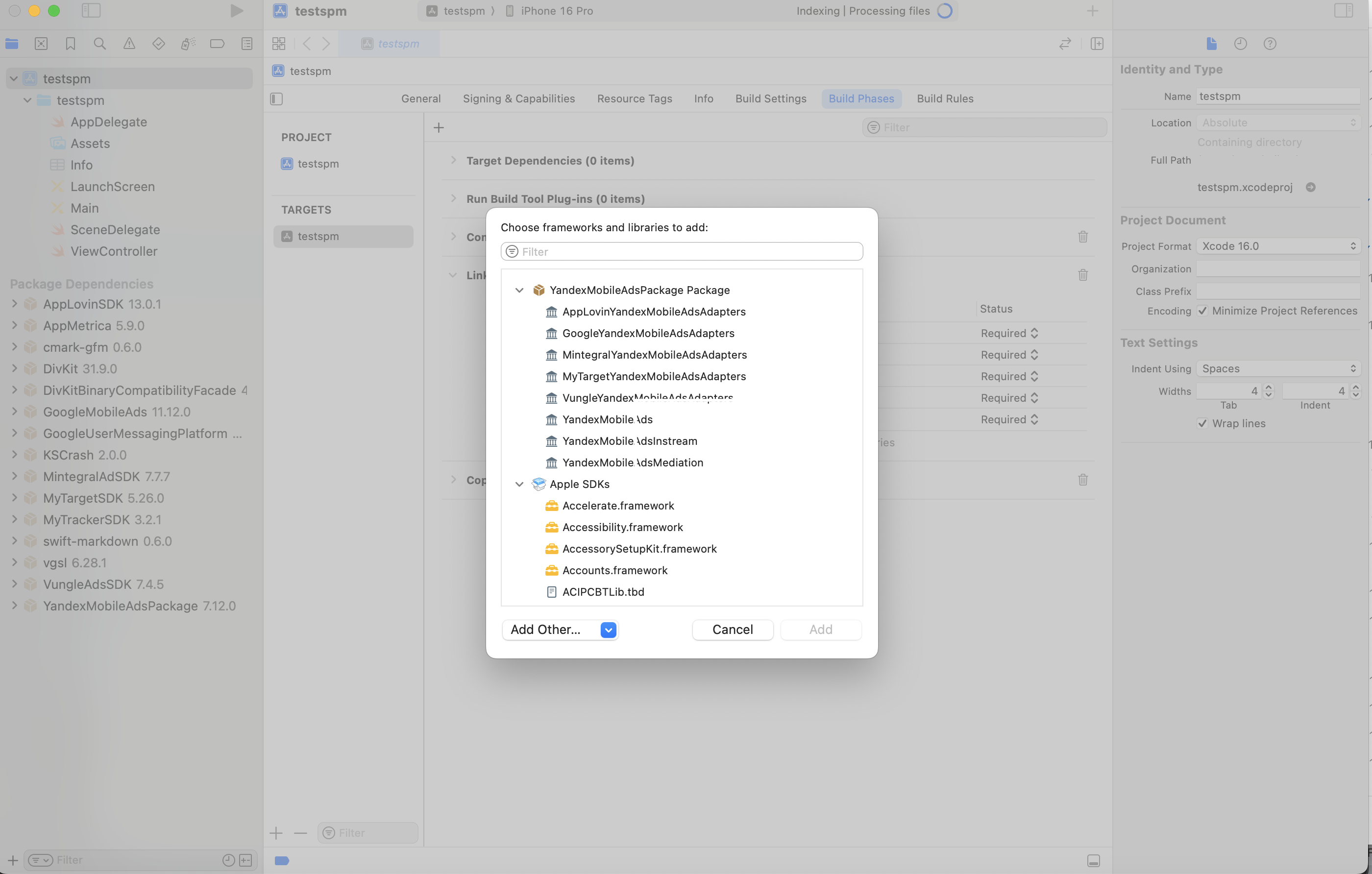
 6. 选择适配器或聚合版本。在 SPM 中,您只需启用适配器。
 {% endlist %}
- 连接单独的适配器
若要连接单个适配器,请启用 Yandex Ads SDK,然后按照每个适配器的具体说明进行操作:
1. 在 Yandex Advertising Network 界面中 [设置聚合](https://ads.yandex.com/helpcenter/zh/monetization/yandex-mediation/setup.md)。
2. 将 `YandexMobileAds` 库添加到 Podfile。
```
pod 'YandexMobileAds', 'x.x.x' // 添加支持的版本
```
3. 使用适当的库单独连接所需的 [适配器](https://ads.yandex.com/helpcenter/zh/dev/ios/list-network.md)。
{% note info %}
如果您需要移动聚合来追踪应用安装,请务必配置 Info.plist 文件。详情请参阅 [SKAdNetwork 支持](https://ads.yandex.com/helpcenter/zh/dev/ios/quick-start.md#skad)。
{% endnote %}
{% endlist %}
{% endlist %}
- 连接单独的适配器
若要连接单个适配器,请启用 Yandex Ads SDK,然后按照每个适配器的具体说明进行操作:
1. 在 Yandex Advertising Network 界面中 [设置聚合](https://ads.yandex.com/helpcenter/zh/monetization/yandex-mediation/setup.md)。
2. 将 `YandexMobileAds` 库添加到 Podfile。
```
pod 'YandexMobileAds', 'x.x.x' // 添加支持的版本
```
3. 使用适当的库单独连接所需的 [适配器](https://ads.yandex.com/helpcenter/zh/dev/ios/list-network.md)。
{% note info %}
如果您需要移动聚合来追踪应用安装,请务必配置 Info.plist 文件。详情请参阅 [SKAdNetwork 支持](https://ads.yandex.com/helpcenter/zh/dev/ios/quick-start.md#skad)。
{% endnote %}
{% endlist %}