---
metadata:
- name: generator
content: Diplodoc Platform v5.55.0
alternate:
- https://ads.yandex.com/helpcenter/en/dev/ios/swiftui/rewarded.md
- https://ads.yandex.com/helpcenter/ru/dev/ios/swiftui/rewarded.md
- https://ads.yandex.com/helpcenter/zh/dev/ios/swiftui/rewarded.md
- href: zh/dev/ios/swiftui/rewarded.md
type: text/markdown
title: Markdown version
- href: ../llms.txt
type: text/markdown
title: llms.txt
---
> **Documentation Index:** Fetch the complete configuration index at https://ads.yandex.com/helpcenter/zh/llms.txt
[//]: # (This page is also translated into Brazilian Portuguese — pt-BR)
# 激励广告 (SwiftUI)
激励广告是一种受欢迎的全屏广告格式,用户观看广告后会获得奖励。
广告展示采用主动选择机制:例如,用户可以主动触发广告以获取游戏奖励或额外生命值。
强烈的用户动机使这种广告格式成为免费应用中最受欢迎且盈利能力最强的广告格式。
{% cut "外观" %}
{% list tabs %}
- 文本和图形广告
- 视频广告
{% endlist %}
{% endcut %}
本指南展示了如何使用 **SwiftUI** 将激励广告集成到 iOS 应用中。 除了代码示例和说明之外,它还提供使用此广告格式的建议和其他资源的链接。
## 前提条件 {#pre}
1. 请按照 [快速入门](https://ads.yandex.com/helpcenter/zh/dev/ios/quick-start.md) 中描述的 SDK 集成步骤进行操作。
2. 提前 [初始化](https://ads.yandex.com/helpcenter/zh/dev/ios/quick-start.md#init) 您的广告 SDK。
3. 确保您运行的是最新的 [Yandex Mobile Ads SDK](https://ads.yandex.com/helpcenter/zh/dev/platforms.md) 版本。如果您使用聚合,请同时确保您运行的是最新版本的 [统一构建](https://ads.yandex.com/helpcenter/zh/dev/platforms.md)。
## 实施 {#implement}
在 SwiftUI 中集成激励广告的关键步骤:
* 附加 `.rewardedAd(isPresented:request:onEvent:)` 修饰符。
* 通过 `Binding` 控制加载,通过 `Binding` 控制展示。
* 在 `onEvent` 闭包中处理 `RewardedAdEvent` 事件。
* 在 `.didReward` 事件中为用户发放观看广告的奖励。
## 激励广告集成说明 {#features}
1. 强烈建议在 `.didFailToLoad` 事件回调中收到错误时不要尝试加载新广告。 如果需要从错误处理程序中重试加载,请限制重新加载尝试次数,以避免在网络连接受限的情况下广告请求连续失败。
2. 将修饰符保留在整个展示场景中一直存在的视图上。
## 加载广告 {#load}
要加载激励广告,请在传递到 `.rewardedAd` 的绑定中设置非 `nil` `AdRequest`。
要接收关于加载成功、失败以及其他阶段的通知,请将 `onEvent` 与 `RewardedAdEvent` 一起使用。
```swift
import SwiftUI
import YandexMobileAds
struct RewardedView: View {
@State private var adRequest: AdRequest?
@State private var isPresented = false
var body: some View {
VStack {
Button("Load and show") {
adRequest = AdRequest(adUnitID: "R-M-XXXXX-YY")
}
}
.rewardedAd(isPresented: $isPresented, request: $adRequest) { event in
switch event {
case .didLoad:
isPresented = true
case .didDismiss, .didFailToShow, .didFailToLoad:
adRequest = nil
default:
break
}
}
}
}
```
要加载广告,您需要从 Yandex Advertising Network 界面获取广告单元 ID (adUnitId)。
您可以通过 `AdRequest` 传递用户兴趣数据、页面上下文数据、位置或其他附加数据来扩展广告请求参数。 请求中的附加上下文数据可以显著提高广告质量。 有关更多信息,请参阅[广告定位](https://ads.yandex.com/helpcenter/zh/dev/ios/target.md)。
## 展示广告 {#ad-view}
激励广告是一种激励型广告格式,允许用户通过观看广告来获得奖励。这些奖励可能包括额外生命值或游戏中的晋级机会。具体奖励形式由应用自身决定。
加载成功后,将触发 `.didLoad` 事件 — 设置 `isPresented = true` 以展示广告(或提前设置展示标记;如果加载尚未完成,将延迟展示)。
```swift
struct RewardedView: View {
@State private var adRequest: AdRequest?
@State private var isPresented = false
var body: some View {
ContentView()
.rewardedAd(isPresented: $isPresented, request: $adRequest) { event in
switch event {
case .didLoad:
isPresented = true
case .didDismiss, .didFailToShow, .didFailToLoad:
adRequest = nil
default:
break
}
}
}
}
```
## 发放奖励 {#reward-send}
如果广告展示次数已成功统计,将在 `onEvent` 中触发 `.didReward(Reward)`。 使用它为应用用户发放奖励。 奖励应该在 `.didReward` 处理程序中发放,而不是仅依赖 `.didDismiss`。
```swift
struct RewardedView: View {
@State private var adRequest: AdRequest?
@State private var isPresented = false
var body: some View {
ContentView()
.rewardedAd(isPresented: $isPresented, request: $adRequest) { event in
switch event {
case .didReward(let reward):
sendReward(reward)
case .didDismiss, .didFailToShow, .didFailToLoad:
adRequest = nil
default:
break
}
}
}
private func sendReward(_ reward: Reward) {
// 发放奖励
}
}
```
## 测试激励广告集成 {#test}
### 使用演示版位进行广告测试
我们建议使用测试广告来测试您的广告集成和应用本身。
为了保证为每个广告请求返回测试广告,我们创建了一个特殊的演示广告版位 ID。用它来检查您的广告集成。
演示广告单元 ID:`demo-rewarded-yandex`。
{% note warning %}
在商店中发布您的应用程序之前,确保将演示版位 ID 替换为您在 Yandex Advertising Network 界面中获得的真实 ID。
{% endnote %}
您可以在 [用于测试的演示广告单元](https://ads.yandex.com/helpcenter/zh/dev/ios/demo-blocks.md) 版块找到可用的演示广告版位 ID 列表。
### 验证广告集成的正确性
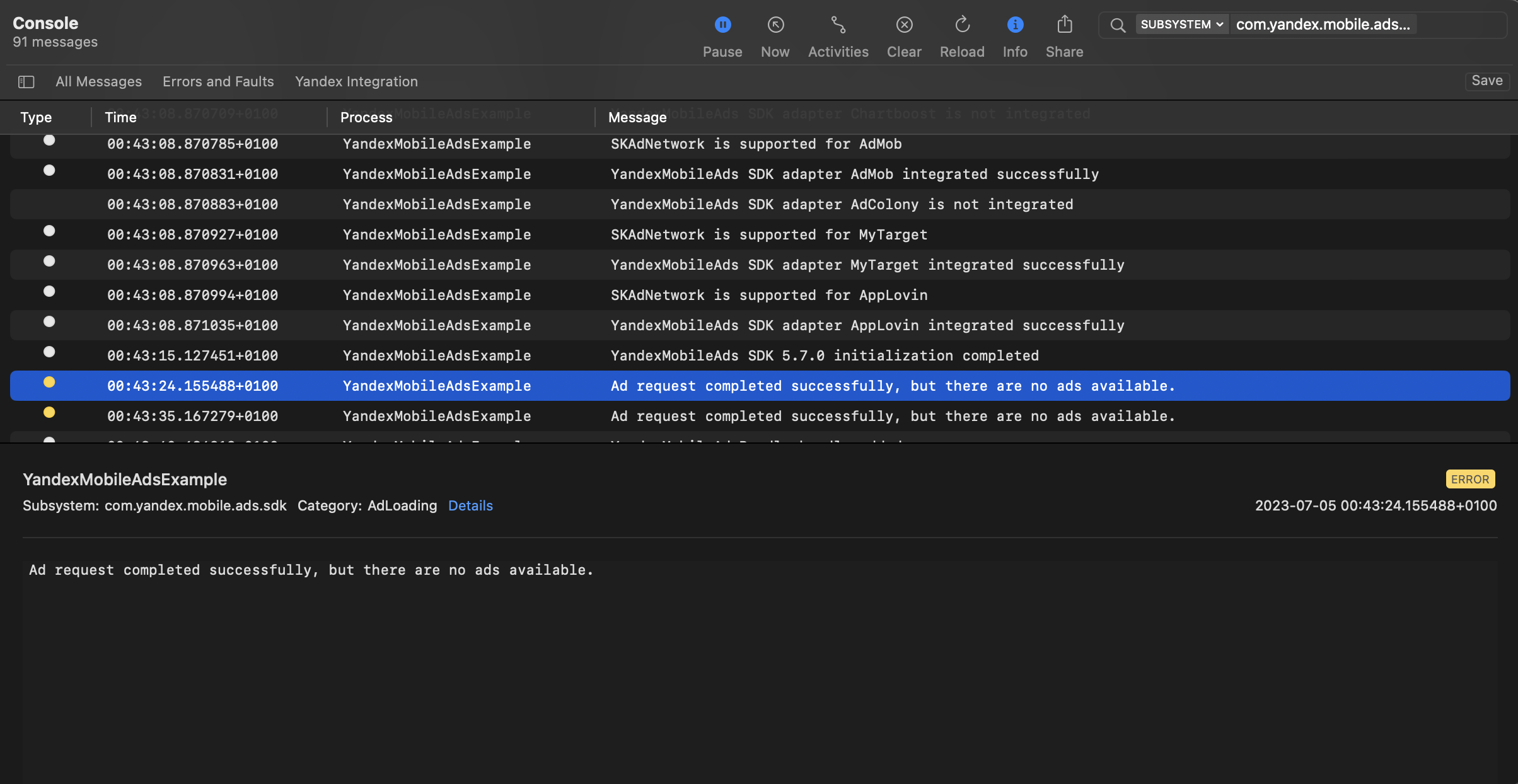
您可以使用本机控制台工具测试广告集成。
要查看详细日志,请调用 `YMAMobileAds` 类的 `enableLogging` 方法。
```swift
YMAMobileAds.enableLogging()
```
要查看 SDK 日志,请前往控制台工具并设置 `Subsystem = com.mobile.ads.ads.sdk`。您还可以按类别和错误级别过滤日志。
如果您在集成广告时遇到问题,您将获得有关问题的详细报告以及如何解决这些问题的建议。
 ## 其他资源 {#resources}
*
[GitHub](https://github.com/yandexmobile/yandex-ads-sdk-ios/blob/master/Examples/YandexMobileAdsExample/YandexMobileAdsExample/Yandex/Rewarded/RewardedAdViewController.swift) 链接。
## 其他资源 {#resources}
*
[GitHub](https://github.com/yandexmobile/yandex-ads-sdk-ios/blob/master/Examples/YandexMobileAdsExample/YandexMobileAdsExample/Yandex/Rewarded/RewardedAdViewController.swift) 链接。