---
metadata:
- name: generator
content: Diplodoc Platform v5.52.0
alternate:
- https://ads.yandex.com/helpcenter/en/dev/react-native/rewarded.md
- https://ads.yandex.com/helpcenter/ru/dev/react-native/rewarded.md
- https://ads.yandex.com/helpcenter/zh/dev/react-native/rewarded.md
- href: zh/dev/react-native/rewarded.md
type: text/markdown
title: Markdown version
- href: llms.txt
type: text/markdown
title: llms.txt
---
> **Documentation Index:** Fetch the complete configuration index at https://ads.yandex.com/helpcenter/zh/llms.txt
# 激励广告
激励广告是一种受欢迎的全屏广告格式,用户观看广告后会获得奖励。
广告展示采用主动选择机制:例如,用户可以主动触发广告以获取游戏奖励或额外生命值。
强烈的用户动机使这种广告格式成为免费应用中最受欢迎且盈利能力最强的广告格式。
{% cut "外观" %}
{% list tabs %}
- 文字和图片广告
- 视频广告
{% endlist %}
{% endcut %}
本指南介绍了将激励广告集成到 React Native 应用的过程。
除了代码示例和说明之外,它还包含特定格式的建议以及指向其他资源的链接。
## 前提条件 {#pre}
1. 按照 [快速入门](https://ads.yandex.com/helpcenter/zh/dev/react-native/quick-start.md) 中描述的 Yandex Mobile Ads React Native 插件集成步骤进行操作。
2. 确保您拥有 [最新版本的 Yandex Mobile Ads React Native 插件](https://ads.yandex.com/helpcenter/zh/dev/platforms.md)。如果您正在使用聚合,请更新到最新的 [单一构建版本](https://ads.yandex.com/helpcenter/zh/dev/platforms.md)。
## 实施 {#implement}
集成激励广告的关键步骤:
* 创建并配置 `RewardedAdLoader`。
* 使用 `AdRequestConfiguration` 对象设置加载广告的参数。
* 加载 `RewardedAd` 对象。
* 设置广告的回调函数。
* 展示 `RewardedAd` 对象。
* 奖励观看广告的用户。
## 激励广告集成的特点 {#features}
如果 `loadAd` 方法返回错误,请勿再次尝试加载新广告。如果没有其他选项,请限制广告加载重试次数。如果有限制,这将有助于避免频繁出现失败的请求和连接问题。
## 加载广告
要加载激励广告,请创建一个 `RewardedAdLoader` 对象。为此,请调用 `RewardedAdLoader.create()` 方法。
要创建 `AdRequestConfiguration` 类实例,您需要来自 Yandex Advertising Network 界面 (adUnitId) 的版位 ID。
您还可以在创建 `AdRequestConfiguration` 对象时,通过提供有关用户兴趣、页面上下文、位置和其他附加数据的信息来扩展广告请求参数。在广告请求中添加额外的上下文信息可以极大地提高广告质量。请参阅[广告定位](https://ads.yandex.com/helpcenter/zh/dev/react-native/target.md)版块了解更多信息。
要加载激励广告,请调用 `RewardedAdLoader` 类对象的 `loadAd` 方法。
以下示例展示了如何加载激励广告:
```ts
let loader = await RewardedAdLoader.create()
.catch((error) => {
// 妥善处理错误
return;
});
if (!loader) {
return;
}
let adRequestConfiguration = new AdRequestConfiguration({
adUnitId: 'R-M-XXXXXX-Y', // for debug you can use 'demo-rewarded-yandex'
age: '20',
contextQuery: 'context-query',
contextTags: ['context-tag'],
gender: Gender.Female,
location: new Location(55.734202, 37.588063),
});
let ad = await loader.loadAd(adRequestConfiguration)
.then((ad) => {
// 广告加载成功
return ad;
})
.catch((error) => {
// 妥善处理错误
return;
});
```
## 展示广告
激励广告是一种激励的广告格式,允许用户通过观看广告来获得奖励。这些奖励可能包括额外的生命值或在游戏中晋级到下一个关卡的能力。激励广告格式由应用本身决定。
要跟踪激励广告的生命周期和奖励事件,请为 `RewardedAd` 类对象设置回调函数。
要展示激励广告,请使用 `show()` 方法。
```ts
ad.onAdShown = () => {
console.log('Did show');
};
ad.onAdFailedToShow = (error) => {
console.log(`Did fail to show with error: ${JSON.stringify(error)}`);
};
ad.onAdClicked = () => {
console.log('Did click');
};
ad.onAdDismissed = () => {
console.log('Did dismiss');
};
ad.onAdImpression = (impressionData) => {
console.log(`Did track impression: ${JSON.stringify(impressionData)}`);
};
ad.onRewarded = (reward) => {
console.log(`Did reward: ${JSON.stringify(reward)}`);
}
ad.show();
```
## 测试激励广告集成 {#test}
{% list tabs %}
- Android
### 使用演示广告单元进行广告测试 {#demo-blocks}
使用测试广告来检查您的激励广告集成和应用本身。为了确保每次广告请求都能返回测试广告,您可以使用一个特殊的演示广告版位 ID。
演示广告单元 ID:`demo-rewarded-yandex`。
{% note warning %}
在应用商店发布应用前,请务必将演示广告版位 ID 替换为您在 Yandex Advertising Network 接口中获取的真实 ID。
{% endnote %}
有关所有可用演示广告版位 ID 的列表,请参阅[用于测试的演示广告单元](https://ads.yandex.com/helpcenter/zh/dev/android/demo-blocks.md)。
### 测试广告集成 {#test-int}
您可以使用 SDK 的内置分析工具检查激励广告是否已正确集成。日志中将显示包含测试结果的详细报告。
要查看报告,请在 Android 应用调试工具 [Logcat](https://developer.android.com/studio/command-line/logcat) 中搜索关键词“YandexAds”。
```bash
adb logcat -v brief '*:S YandexAds'
```
如果集成成功,将返回以下消息:
```bash
adb logcat -v brief '*:S YandexAds'
mobileads$ adb logcat -v brief '*:S YandexAds'
I/YandexAds(13719): [Integration] Ad type rewarded was integrated successfully
```
如果存在任何激励广告集成问题,您将收到详细的问题报告和故障排除建议。
- iOS
### 使用演示广告单元进行广告测试
我们建议使用测试广告来测试您的广告集成和应用本身。
为了保证为每个广告请求返回测试广告,我们创建了一个特殊的演示广告版位 ID。用它来检查您的广告集成。
演示广告单元 ID:`demo-rewarded-yandex`。
{% note warning %}
在商店中发布您的应用程序之前,确保将演示版位 ID 替换为您在 Yandex Advertising Network 界面中获得的真实 ID。
{% endnote %}
您可以在 [用于测试的演示广告单元](https://ads.yandex.com/helpcenter/zh/dev/ios/demo-blocks.md) 版块找到可用的演示广告版位 ID 列表。
### 测试广告集成
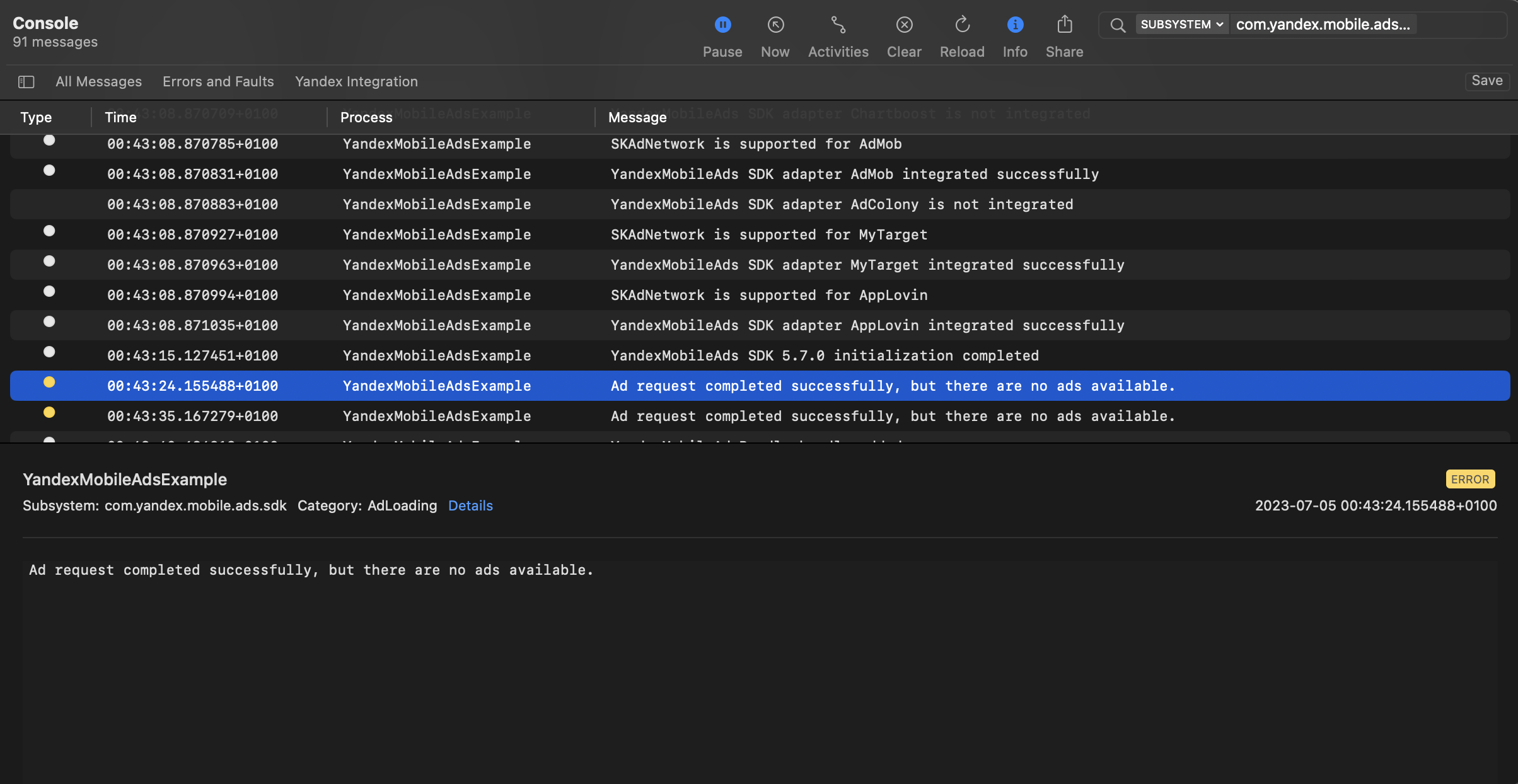
您可以使用本机控制台工具测试广告集成。
要查看详细日志,请调用 `YMAMobileAds` 类的 `enableLogging` 方法。
```swift
YMAMobileAds.enableLogging()
```
要查看 SDK 日志,请前往控制台工具并设置 `Subsystem = com.mobile.ads.ads.sdk`。您还可以按类别和错误级别过滤日志。
如果您在集成广告时遇到问题,您将获得有关问题的详细报告以及如何解决这些问题的建议。
 {% endlist %}
## 提示
### 广告预加载
加载广告可能需要几秒钟的时间,具体取决于移动聚合中对接的广告网络数量和用户的互联网速度。我们建议在展示广告之前预加载广告。
提前调用 `loadAd` 方法,以便在需要时立即显示广告。
要在当前广告服务结束后立即开始预加载下一个广告,您可以将此过程关联到 `onAdDismissed` 事件。
如果您在太多不太可能显示的屏幕上缓存广告,您的广告效果可能会下降。例如,如果用户每次会话完成 2-3 个游戏关卡,则您不应缓存 6-7 个屏幕的广告。否则,您的广告可见性可能会降低,并且广告系统可能会降低您的应用的优先级。
为确保您为应用程序找到良好的平衡,请在 Yandex Advertising Network 界面中跟踪“收视数比例”或“可见收视数比例”指标。如果它低于 20%,可能需要修改您的缓存算法。收视数比例越高越好。
## 其他资源 {#resources}
*
[GitHub](https://github.com/yandexmobile/yandex-ads-react-native-plugin) 链接。
{% endlist %}
## 提示
### 广告预加载
加载广告可能需要几秒钟的时间,具体取决于移动聚合中对接的广告网络数量和用户的互联网速度。我们建议在展示广告之前预加载广告。
提前调用 `loadAd` 方法,以便在需要时立即显示广告。
要在当前广告服务结束后立即开始预加载下一个广告,您可以将此过程关联到 `onAdDismissed` 事件。
如果您在太多不太可能显示的屏幕上缓存广告,您的广告效果可能会下降。例如,如果用户每次会话完成 2-3 个游戏关卡,则您不应缓存 6-7 个屏幕的广告。否则,您的广告可见性可能会降低,并且广告系统可能会降低您的应用的优先级。
为确保您为应用程序找到良好的平衡,请在 Yandex Advertising Network 界面中跟踪“收视数比例”或“可见收视数比例”指标。如果它低于 20%,可能需要修改您的缓存算法。收视数比例越高越好。
## 其他资源 {#resources}
*
[GitHub](https://github.com/yandexmobile/yandex-ads-react-native-plugin) 链接。