---
metadata:
- name: generator
content: Diplodoc Platform v5.52.0
alternate:
- https://ads.yandex.com/helpcenter/en/dev/unity/release/6-0-0-migration.md
- https://ads.yandex.com/helpcenter/ru/dev/unity/release/6-0-0-migration.md
- https://ads.yandex.com/helpcenter/zh/dev/unity/release/6-0-0-migration.md
- href: zh/dev/unity/release/6-0-0-migration.md
type: text/markdown
title: Markdown version
- href: ../llms.txt
type: text/markdown
title: llms.txt
---
> **Documentation Index:** Fetch the complete configuration index at https://ads.yandex.com/helpcenter/zh/llms.txt
# 版本 6 迁移指南
其他平台
{% note warning %}
请确保将您使用的 [Yandex 聚合](https://ads.yandex.com/helpcenter/zh/dev/unity/list-network.md) 适配器和 [第三方聚合网络适配器](https://ads.yandex.com/helpcenter/zh/dev/unity/third-party-mediation.md) 更新到最新版本。旧版本可能会导致适配器集成错误,从而导致您的广告无法投放。
{% endnote %}
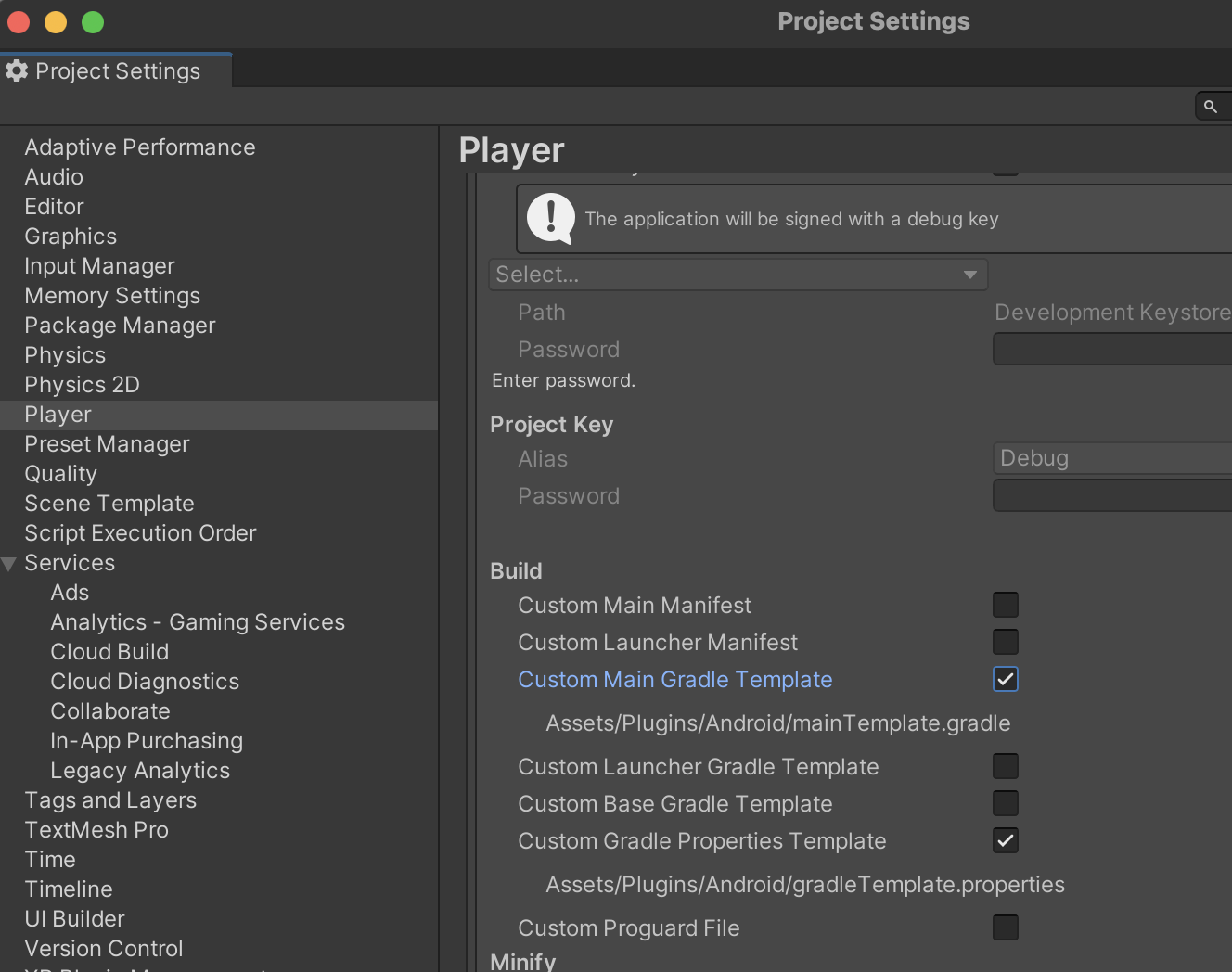
要解决此问题,请为您正在生成的项目启用自定义模板。转至 **Build Settings** → **Player Settings** → **Publishing Settings** → **Build** and enable **Custom Main Gradle Template**。
我们建议您在构建 Unity 应用时始终使用 **Custom Main Gradle Template** 和 **Custom Gradle Properties Template**,以避免其他潜在错误。
 ## 横幅
将 `AdSize` 类重命名为 `BannerAdSize`。移除了 `FlexibleSize(int width, int height)` 方法。
根据广告类型使用方法:
使用 `BannerAdSize.stickySize(int width)` 方法创建自适应粘性横幅。
> 这是一个自动更新的小广告,放置在应用屏幕的顶部或底部。
>
> 广告与主要应用内容不重叠,常用于游戏应用中。
>
> 粘性横幅的高度是自动确定的,可根据设备的屏幕尺寸调整,并且不占用超过屏幕高度的 15%。
{% note warning %}
版本 6.0.0 添加了对自适应粘性横幅的自动刷新支持。
如果您之前已为粘性横幅实施了自动刷新,请禁用它。
{% endnote %}
使用 `BannerAdSize.inlineSize(int width, int maxHeight) method` 创建自适应内联横幅。
> 自适应内联横幅是一种灵活的横幅广告格式,通过优化每个设备上的广告尺寸,实现最大效率。
>
> 横幅的高度会自动调整,可能会达到设备屏幕的高度。
>
> 通常,这种格式在基于内容来源的应用或允许主要关注广告的上下文环境中使用。
为了向后兼容,我们保留了 `fixedSize(int width, int height)` 方法,尽管我们不推荐该方法。请改用 `inlineSize(int width, int maxHeight)` 或 `stickySize(int width)`。在 SDK 6.1.0 中,横幅高度是自动计算的,并且在发送广告请求之前已知。您可以在屏幕布局中使用此高度。
## 激励广告
我们改变了创建和加载广告的方法。我们现在提供 `RewardedAdLoader` 加载器对象,用于加载广告,以及从 `OnAdLoaded` 广告加载事件检索的 `RewardedAd` 广告对象。
要了解有关新 API 的更多信息,请参阅 [SDK 参考](https://doc-static.yandex.net/src/support/RSYA-RMP/mobile-ads/ru/unity-docs/namespaces.html)。
#|
||
广告加载
| **SDK 5**
用于广告加载和呈现的单个对象:
```c#
private RewardedAd rewardedAd;
private void RequestRewardedAd()
{
string adUnitId = "demo-rewarded-yandex"; // 替换为 "R-M-XXXXXX-Y"
rewardedAd = new RewardedAd(adUnitId);
AdRequest request = new AdRequest.Builder().Build();
rewardedAd.LoadAd(request);
}
```
**SDK 6**
用于加载多个广告的 `RewardedAdLoader`:
```c#
private void SetupLoader()
{
rewardedAdLoader = new RewardedAdLoader();
rewardedAdLoader.OnAdLoaded += HandleRewardedAdLoaded;
rewardedAdLoader.OnAdFailedToLoad += HandleRewardedAdFailedToLoad;
}
private void RequestRewardedAd()
{
string adUnitId = "demo-rewarded-yandex"; // 替换为 "R-M-XXXXXX-Y"
AdRequestConfiguration adRequestConfiguration = new AdRequestConfiguration.Builder(adUnitId).Build();
rewardedAdLoader.LoadAd(adRequestConfiguration);
}
public void HandleAdLoaded(object sender, RewardedAdLoadedEventArgs args)
{
this.interstitial = args.RewardedAd;
}
public void HandleAdFailedToLoad(object sender, AdFailedToLoadEventArgs args)
{
Debug.Log($"HandleAdFailedToLoad event received with message: {args.Message}");
}
```
||
||
广告呈现
| **SDK 5**
在展示广告之前,请检查广告是否已加载。
```c#
private void ShowRewardedAd()
{
if (rewardedAd != null && rewardedAd.IsLoaded())
{
rewardedAd.Show();
}
}
```
**SDK 6**
You don't need to check to see if the ad is loaded.
```c#
private void ShowRewardedAd()
{
if (rewardedAd != null)
{
rewardedAd.Show();
}
}
```
||
||
订阅广告生命周期事件
| **SDK 5**
所有事件均到达单个 `RewardedAd` 对象。
```c#
rewardedAd.OnRewardedAdLoaded += HandleRewardedAdLoaded;
rewardedAd.OnRewardedAdFailedToLoad += HandleRewardedAdFailedToLoad;
rewardedAd.OnReturnedToApplication += HandleReturnedToApplication;
rewardedAd.OnLeftApplication += HandleLeftApplication;
rewardedAd.OnAdClicked += HandleAdClicked;
rewardedAd.OnRewardedAdShown += HandleRewardedAdShown;
rewardedAd.OnRewardedAdFailedToShow += HandleRewardedAdFailedToShow;
rewardedAd.OnRewardedAdDismissed += HandleRewardedAdDismissed;
rewardedAd.OnImpression += HandleImpression;
rewardedAd.OnRewarded += HandleRewarded;
```
**SDK 6**
广告加载事件到达 `RewardedAdLoader` 对象,而广告呈现事件到达 `RewardedAd` 对象。
统一的事件名称。移除了 `OnLeftApplication` 和 `OnReturnedToApplication` 事件。
```c#
rewardedAdLoader.OnAdLoaded += HandleRewardedAdLoaded;
rewardedAdLoader.OnAdFailedToLoad += HandleRewardedAdFailedToLoad;
// ...
rewardedAd.OnAdClicked += HandleAdClicked;
rewardedAd.OnAdShown += HandleRewardedAdShown;
rewardedAd.OnAdFailedToShow += HandleRewardedAdFailedToShow;
rewardedAd.OnAdDismissed += HandleRewardedAdDismissed;
rewardedAd.OnAdImpression += HandleImpression;
rewardedAd.OnRewarded += HandleRewarded;
```
||
|#
## 插屏广告
我们改变了创建和加载广告的方法。我们现在提供 `InterstitialAdLoader` 加载器对象,用于加载广告,以及从 `OnAdLoaded` 广告加载事件检索的 `Interstitial` 广告对象。
要了解有关新 API 的更多信息,请参阅 [SDK 参考](https://doc-static.yandex.net/src/support/RSYA-RMP/mobile-ads/ru/unity-docs/namespaces.html)。
#|
||
广告加载
| **SDK 5**
用于广告加载和呈现的单个对象:
```c#
private Interstitial interstitial;
private void RequestInterstitial()
{
string adUnitId = "demo-interstitial-yandex"; // 替换为 "R-M-XXXXXX-Y"
interstitial = new Interstitial(adUnitId);
AdRequest request = new AdRequest.Builder().Build();
interstitial.LoadAd(request);
}
```
**SDK 6**
用于加载多个广告的 `InterstitialAdLoader`。
```c#
private void SetupLoader()
{
interstitialAdLoader = new InterstitialAdLoader();
interstitialAdLoader.OnAdLoaded += HandleInterstitialLoaded;
interstitialAdLoader.OnAdFailedToLoad += HandleInterstitialFailedToLoad;
}
private void RequestInterstitial()
{
string adUnitId = "demo-interstitial-yandex"; // 替换为 "R-M-XXXXXX-Y"
AdRequestConfiguration adRequestConfiguration = new AdRequestConfiguration.Builder(adUnitId).Build();
interstitialAdLoader.LoadAd(adRequestConfiguration);
}
```
||
||
广告呈现
| **SDK 5**
在展示广告之前,请查看广告是否已加载。
```c#
private void ShowInterstitial()
{
if (interstitial != null && interstitial.IsLoaded())
{
interstitial.Show();
}
}
```
**SDK 6**
您无需检查广告是否已加载。
```c#
private void ShowInterstitial()
{
if (interstitial != null)
{
interstitial.Show();
}
}
```
||
||
订阅广告生命周期事件
| **SDK 5**
所有事件均到达单个 `Interstitial` 对象。
```c#
interstitial.OnInterstitialLoaded += HandleInterstitialLoaded;
interstitial.OnInterstitialFailedToLoad += HandleInterstitialFailedToLoad;
interstitial.OnReturnedToApplication += HandleReturnedToApplication;
interstitial.OnLeftApplication += HandleLeftApplication;
interstitial.OnAdClicked += HandleAdClicked;
interstitial.OnInterstitialShown += HandleInterstitialShown;
interstitial.OnInterstitialFailedToShow += HandleInterstitialFailedToShow;
interstitial.OnInterstitialDismissed += HandleInterstitialDismissed;
interstitial.OnImpression += HandleImpression;
```
**SDK 6**
广告加载事件到达 `InterstitialAdLoader` 对象,而广告呈现事件到达 `Interstitial` 对象。
统一的事件名称。移除了 `OnLeftApplication` 和 `OnReturnedToApplication` 事件。
```c#
interstitialAdLoader.OnAdLoaded += HandleInterstitialLoaded;
interstitialAdLoader.OnAdFailedToLoad += HandleInterstitialFailedToLoad;
// ...
interstitial.OnAdClicked += HandleAdClicked;
interstitial.OnAdShown += HandleInterstitialShown;
interstitial.OnAdFailedToShow += HandleInterstitialFailedToShow;
interstitial.OnAdDismissed += HandleInterstitialDismissed;
interstitial.OnAdImpression += HandleImpression;
```
||
|#
## 开屏广告
添加了新的广告格式:开屏广告。如需了解更多信息,请参阅 [开屏广告](https://ads.yandex.com/helpcenter/zh/dev/unity/app-open-ad.md)
## Yandex 聚合
{% note warning %}
请确保将您使用的 [Yandex 聚合](https://ads.yandex.com/helpcenter/zh/dev/unity/list-network.md) 适配器和 [第三方聚合网络适配器](https://ads.yandex.com/helpcenter/zh/dev/unity/third-party-mediation.md) 更新到最新版本。旧版本可能会导致适配器集成错误,从而导致您的广告无法投放。
{% endnote %}
我们将包 `mobileads-admob-mediation-2.9.0.unitypackage` 重命名为 `mobileads-google-mediation-6.0.0.unitypackage`。
如果您使用标准化聚合构建,则无需执行任何操作。如果您要手动添加适配器,请先删除旧包,然后再添加新包。
您可以在此处查找完整的集成示例:
*
[GitHub](https://github.com/yandexmobile/yandex-ads-unity-plugin) 链接。
## 横幅
将 `AdSize` 类重命名为 `BannerAdSize`。移除了 `FlexibleSize(int width, int height)` 方法。
根据广告类型使用方法:
使用 `BannerAdSize.stickySize(int width)` 方法创建自适应粘性横幅。
> 这是一个自动更新的小广告,放置在应用屏幕的顶部或底部。
>
> 广告与主要应用内容不重叠,常用于游戏应用中。
>
> 粘性横幅的高度是自动确定的,可根据设备的屏幕尺寸调整,并且不占用超过屏幕高度的 15%。
{% note warning %}
版本 6.0.0 添加了对自适应粘性横幅的自动刷新支持。
如果您之前已为粘性横幅实施了自动刷新,请禁用它。
{% endnote %}
使用 `BannerAdSize.inlineSize(int width, int maxHeight) method` 创建自适应内联横幅。
> 自适应内联横幅是一种灵活的横幅广告格式,通过优化每个设备上的广告尺寸,实现最大效率。
>
> 横幅的高度会自动调整,可能会达到设备屏幕的高度。
>
> 通常,这种格式在基于内容来源的应用或允许主要关注广告的上下文环境中使用。
为了向后兼容,我们保留了 `fixedSize(int width, int height)` 方法,尽管我们不推荐该方法。请改用 `inlineSize(int width, int maxHeight)` 或 `stickySize(int width)`。在 SDK 6.1.0 中,横幅高度是自动计算的,并且在发送广告请求之前已知。您可以在屏幕布局中使用此高度。
## 激励广告
我们改变了创建和加载广告的方法。我们现在提供 `RewardedAdLoader` 加载器对象,用于加载广告,以及从 `OnAdLoaded` 广告加载事件检索的 `RewardedAd` 广告对象。
要了解有关新 API 的更多信息,请参阅 [SDK 参考](https://doc-static.yandex.net/src/support/RSYA-RMP/mobile-ads/ru/unity-docs/namespaces.html)。
#|
||
广告加载
| **SDK 5**
用于广告加载和呈现的单个对象:
```c#
private RewardedAd rewardedAd;
private void RequestRewardedAd()
{
string adUnitId = "demo-rewarded-yandex"; // 替换为 "R-M-XXXXXX-Y"
rewardedAd = new RewardedAd(adUnitId);
AdRequest request = new AdRequest.Builder().Build();
rewardedAd.LoadAd(request);
}
```
**SDK 6**
用于加载多个广告的 `RewardedAdLoader`:
```c#
private void SetupLoader()
{
rewardedAdLoader = new RewardedAdLoader();
rewardedAdLoader.OnAdLoaded += HandleRewardedAdLoaded;
rewardedAdLoader.OnAdFailedToLoad += HandleRewardedAdFailedToLoad;
}
private void RequestRewardedAd()
{
string adUnitId = "demo-rewarded-yandex"; // 替换为 "R-M-XXXXXX-Y"
AdRequestConfiguration adRequestConfiguration = new AdRequestConfiguration.Builder(adUnitId).Build();
rewardedAdLoader.LoadAd(adRequestConfiguration);
}
public void HandleAdLoaded(object sender, RewardedAdLoadedEventArgs args)
{
this.interstitial = args.RewardedAd;
}
public void HandleAdFailedToLoad(object sender, AdFailedToLoadEventArgs args)
{
Debug.Log($"HandleAdFailedToLoad event received with message: {args.Message}");
}
```
||
||
广告呈现
| **SDK 5**
在展示广告之前,请检查广告是否已加载。
```c#
private void ShowRewardedAd()
{
if (rewardedAd != null && rewardedAd.IsLoaded())
{
rewardedAd.Show();
}
}
```
**SDK 6**
You don't need to check to see if the ad is loaded.
```c#
private void ShowRewardedAd()
{
if (rewardedAd != null)
{
rewardedAd.Show();
}
}
```
||
||
订阅广告生命周期事件
| **SDK 5**
所有事件均到达单个 `RewardedAd` 对象。
```c#
rewardedAd.OnRewardedAdLoaded += HandleRewardedAdLoaded;
rewardedAd.OnRewardedAdFailedToLoad += HandleRewardedAdFailedToLoad;
rewardedAd.OnReturnedToApplication += HandleReturnedToApplication;
rewardedAd.OnLeftApplication += HandleLeftApplication;
rewardedAd.OnAdClicked += HandleAdClicked;
rewardedAd.OnRewardedAdShown += HandleRewardedAdShown;
rewardedAd.OnRewardedAdFailedToShow += HandleRewardedAdFailedToShow;
rewardedAd.OnRewardedAdDismissed += HandleRewardedAdDismissed;
rewardedAd.OnImpression += HandleImpression;
rewardedAd.OnRewarded += HandleRewarded;
```
**SDK 6**
广告加载事件到达 `RewardedAdLoader` 对象,而广告呈现事件到达 `RewardedAd` 对象。
统一的事件名称。移除了 `OnLeftApplication` 和 `OnReturnedToApplication` 事件。
```c#
rewardedAdLoader.OnAdLoaded += HandleRewardedAdLoaded;
rewardedAdLoader.OnAdFailedToLoad += HandleRewardedAdFailedToLoad;
// ...
rewardedAd.OnAdClicked += HandleAdClicked;
rewardedAd.OnAdShown += HandleRewardedAdShown;
rewardedAd.OnAdFailedToShow += HandleRewardedAdFailedToShow;
rewardedAd.OnAdDismissed += HandleRewardedAdDismissed;
rewardedAd.OnAdImpression += HandleImpression;
rewardedAd.OnRewarded += HandleRewarded;
```
||
|#
## 插屏广告
我们改变了创建和加载广告的方法。我们现在提供 `InterstitialAdLoader` 加载器对象,用于加载广告,以及从 `OnAdLoaded` 广告加载事件检索的 `Interstitial` 广告对象。
要了解有关新 API 的更多信息,请参阅 [SDK 参考](https://doc-static.yandex.net/src/support/RSYA-RMP/mobile-ads/ru/unity-docs/namespaces.html)。
#|
||
广告加载
| **SDK 5**
用于广告加载和呈现的单个对象:
```c#
private Interstitial interstitial;
private void RequestInterstitial()
{
string adUnitId = "demo-interstitial-yandex"; // 替换为 "R-M-XXXXXX-Y"
interstitial = new Interstitial(adUnitId);
AdRequest request = new AdRequest.Builder().Build();
interstitial.LoadAd(request);
}
```
**SDK 6**
用于加载多个广告的 `InterstitialAdLoader`。
```c#
private void SetupLoader()
{
interstitialAdLoader = new InterstitialAdLoader();
interstitialAdLoader.OnAdLoaded += HandleInterstitialLoaded;
interstitialAdLoader.OnAdFailedToLoad += HandleInterstitialFailedToLoad;
}
private void RequestInterstitial()
{
string adUnitId = "demo-interstitial-yandex"; // 替换为 "R-M-XXXXXX-Y"
AdRequestConfiguration adRequestConfiguration = new AdRequestConfiguration.Builder(adUnitId).Build();
interstitialAdLoader.LoadAd(adRequestConfiguration);
}
```
||
||
广告呈现
| **SDK 5**
在展示广告之前,请查看广告是否已加载。
```c#
private void ShowInterstitial()
{
if (interstitial != null && interstitial.IsLoaded())
{
interstitial.Show();
}
}
```
**SDK 6**
您无需检查广告是否已加载。
```c#
private void ShowInterstitial()
{
if (interstitial != null)
{
interstitial.Show();
}
}
```
||
||
订阅广告生命周期事件
| **SDK 5**
所有事件均到达单个 `Interstitial` 对象。
```c#
interstitial.OnInterstitialLoaded += HandleInterstitialLoaded;
interstitial.OnInterstitialFailedToLoad += HandleInterstitialFailedToLoad;
interstitial.OnReturnedToApplication += HandleReturnedToApplication;
interstitial.OnLeftApplication += HandleLeftApplication;
interstitial.OnAdClicked += HandleAdClicked;
interstitial.OnInterstitialShown += HandleInterstitialShown;
interstitial.OnInterstitialFailedToShow += HandleInterstitialFailedToShow;
interstitial.OnInterstitialDismissed += HandleInterstitialDismissed;
interstitial.OnImpression += HandleImpression;
```
**SDK 6**
广告加载事件到达 `InterstitialAdLoader` 对象,而广告呈现事件到达 `Interstitial` 对象。
统一的事件名称。移除了 `OnLeftApplication` 和 `OnReturnedToApplication` 事件。
```c#
interstitialAdLoader.OnAdLoaded += HandleInterstitialLoaded;
interstitialAdLoader.OnAdFailedToLoad += HandleInterstitialFailedToLoad;
// ...
interstitial.OnAdClicked += HandleAdClicked;
interstitial.OnAdShown += HandleInterstitialShown;
interstitial.OnAdFailedToShow += HandleInterstitialFailedToShow;
interstitial.OnAdDismissed += HandleInterstitialDismissed;
interstitial.OnAdImpression += HandleImpression;
```
||
|#
## 开屏广告
添加了新的广告格式:开屏广告。如需了解更多信息,请参阅 [开屏广告](https://ads.yandex.com/helpcenter/zh/dev/unity/app-open-ad.md)
## Yandex 聚合
{% note warning %}
请确保将您使用的 [Yandex 聚合](https://ads.yandex.com/helpcenter/zh/dev/unity/list-network.md) 适配器和 [第三方聚合网络适配器](https://ads.yandex.com/helpcenter/zh/dev/unity/third-party-mediation.md) 更新到最新版本。旧版本可能会导致适配器集成错误,从而导致您的广告无法投放。
{% endnote %}
我们将包 `mobileads-admob-mediation-2.9.0.unitypackage` 重命名为 `mobileads-google-mediation-6.0.0.unitypackage`。
如果您使用标准化聚合构建,则无需执行任何操作。如果您要手动添加适配器,请先删除旧包,然后再添加新包。
您可以在此处查找完整的集成示例:
*
[GitHub](https://github.com/yandexmobile/yandex-ads-unity-plugin) 链接。